Tier lists are the most honest format on the internet. You can dance around “it depends” in a comparison table. You can hide behind methodology in a benchmark. You can’t dance in a tier list. Either it’s S, or it isn’t. Either you’d defend it to a friend who’s about to spend money, or you wouldn’t.
What follows is what I actually use, ranked without the diplomatic phrasing I’d use if my CFO were reading. I run Belkins, Folderly, the newsletter, plus a portfolio of side bets. The stack below is what survives that load. Some tools are on this list because they earn their keep daily. Some are here because I’m too lazy to migrate. I’ll tell you which is which.
One rule for reading this chapter: tiers are a snapshot. The tools move. The reasons to rank them don’t. So pay attention to the why under each placement, not just the letter. If you disagree with the letters, fine. If you disagree with the reasoning, write your own chapter.
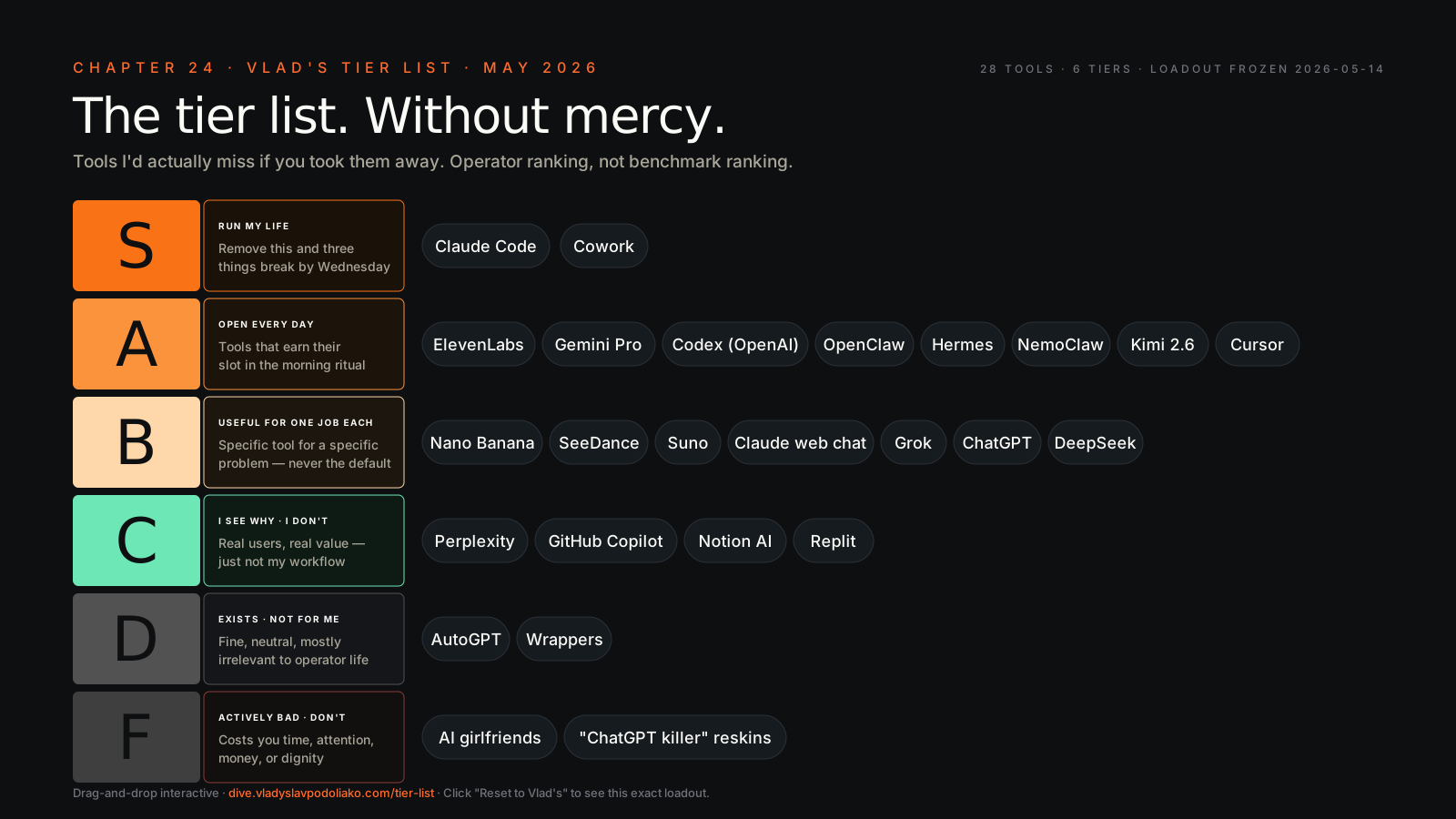
Tier list addendum — May 2026#
The lists below were ranked at first writing. Four changes since then are big enough that I’d rewrite the entries inline if I weren’t trying to preserve the receipt. Read these before the tables — they change how to read the placements.
- Operator (OpenAI) is out. OpenAI shut Operator down on 2025-08-31. Any S- or A-tier mention is dead weight. The replacement is Anthropic’s computer-use feature, which moved to production-tier availability on Pro and Max plans in 2026 — same job, different surface, doesn’t require a separate subscription. If you were paying for Operator, that line stops; if you were waiting for the Operator replacement, it shipped and you didn’t have to wait.
- Mythos was disclosed and then explicitly withheld. Anthropic disclosed an internal model called Mythos that beats Opus 4.7 across benchmarks — and then stated Mythos Preview will NOT be made generally available. Project Glasswing shipped instead. The S-tier line doesn’t need a Mythos placeholder — tier the models you can actually buy, not the ceilings the lab won’t ship. The real forcing function is the June 15 deprecation cliff for
claude-sonnet-4/claude-opus-4— sweep code samples to 4.6 / 4.7 now. Don’t pin model strings literally; make the id swappable so the next release (or non-release) is a one-line change. - AutoGen → Microsoft Agent Framework. AutoGen graduated to Microsoft Agent Framework 1.0 GA on 2026-04-03. AutoGen itself is now in maintenance mode. If you have AutoGen in a tier above F, you’re ranking a deprecated runtime. The framework chapter treats this fully; the tier list just needs to know that the AutoGen line moved.
- The model floor moved. Sonnet 4.6 ($3/$15 per million tokens) shipped 2026-02-17. Opus 4.7 ($5/$25) shipped 2026-04-16 with new
effortandtask budgetparameters — the actionable cost lever you didn’t have before. Haiku 4.5 ($1/$5) remains the workhorse for cheap-eval loops and is what powers/goal’s evaluator. The price-per-intelligence improved across the board; lower-tier wrappers are competing against a moving floor. - The Flash tier started clearing last-gen Pro. Google announced Gemini 3.5 Flash on 2026-05-19 — a Flash that beats Gemini 3.1 Pro on the agentic/coding boards Google showed, with token price tripled ($0.5/$3 → $1.5/$9 per million) and a Pro variant promised next month at an undisclosed price. Don’t re-letter anything on a launch deck: this is a signal, not a measured placement, and the cost question is per-task not per-token (Ch 29). The point for this chapter is the meta-point this chapter already makes — the tools move, the discipline doesn’t. Logged in /research-notes; the live widget is the receipt.
The tier-list widget at the bottom of this chapter (/tier-list) is the live version — it gets updated independently as the landscape shifts. Treat the tables below as the May 2026 snapshot; the widget is the receipt for whatever month you’re reading this in. The Mythos non-release is logged in /research-notes — read it for the capability-disclosed-but-withheld framing.
Tier List 1 — AI Tools and Surfaces#
This is the core. The models, the chat surfaces, the coding agents, the creative gen tools. Where I spend the bulk of my AI hours.
S — these run my life#
— the daily driver. Where the happens. Where my OS-level work lives. Skills, subagents, the whole orchestration layer. Without it, three of my companies would be running half-speed. The closest thing to “having an actual ops team in a terminal” that exists today. — for ops, docs, scheduled tasks, talking-to-my-tools. Roughly half of my Claude time happens here. Most operators sleep on this because it doesn’t market itself like a chat product. It’s where Claude meets your real work surfaces, and once you wire it in you stop tab-hopping. The contrarian take: if you’re paying for Notion AI and a separate meeting transcriber and a separate task agent, Cowork already replaced two of them and you didn’t notice.
A — I open these every day#
- ChatGPT (mobile) — voice mode on walks. Not for serious work; for thinking out loud. The single best “talk through a problem while pacing” tool, full stop.
- Gemini AI Studio — when context length is the bottleneck. The million-token window beats every alternative for “ingest this 800-page PDF and tell me what’s in chapter 14.” I don’t write in it. I extract from it.
- ElevenLabs — best voice in the game. Not close. Newsletter audio, voice clones for my own narration, character voices for video projects. Everyone else is competing for second.
- Codex (OpenAI) — runs 24/7 against my Sentry and GitHub. Night-shift junior engineer. Picks up bugs while I sleep, drafts PRs, leaves the hard calls to me. Pulls its weight at the price.
- Cursor — when I want a richer editor over Claude Code for very long sessions. It’s the IDE-shaped sibling. Less common in my flow because I prefer the CLI, but worth respecting and worth keeping installed.
B — useful for one job each#
- Suno — best in class for music. I don’t use it daily because I’m not a daily musician. When I need a track for a video drop or a newsletter intro, nothing beats it.
- Nano Banana — best price-per-image right now. Bulk gen for newsletter visuals, social variants, scratch-pad creative. Punches well above its sticker price.
- SeeDance — best video gen for character consistency across shots. Side-project work, not core ops.
- Claude.ai web Chat — fine for casual conversations on a phone or a friend’s laptop. Loses to Cowork for anything real because it can’t reach my files, my calendar, or my data.
- Whisper — voice-to-text. Solid. Mostly invisible to me — it just works in the background. The plumbing under several tools above.
C — I see why people use these but I don’t#
- Perplexity — fine search product. Loses to Claude with WebFetch plus a research
, because I want the summary written in my style, in my doc, with my citations. Perplexity gives you Perplexity’s voice. I have my own. - GitHub Copilot — was great in 2023. Now eclipsed by Claude Code for any real repo work. If you only have ten minutes a week to code, sure. If you ship, switch.
- Replit Ghostwriter / Replit Agents — fine for browser-only coding and for getting a non-engineer to “ship something.” Not where I live. My work goes through real repos and real deploys.
- Notion AI — bolts AI on top of Notion. Cowork does it better, your data isn’t trapped in Notion’s format, and you don’t pay twice for the same workflow.
D — exists, fine, not for me#
- Generic “ChatGPT for X” wrapper SaaS — most are a prompt and an OAuth flow with a logo. You can build the same thing as a Claude skill in 30 minutes and own it forever. Stop renting prompts.
- AutoGPT-style “do everything” agents — gold for demos, mediocre for real work. The Anthropic-and-Cowork approach to
— sharp scope, real tools, controlled context — is the version that survives contact with reality.
E — I’m actively skeptical#
- AI girlfriend / companion apps — not a tool, a slot machine. Built to maximize session length, not to make your life better. Hard pass.
- AI “feature” inside legacy SaaS that’s three months behind the frontier — paying twice for a worse version of what your stack already does. Audit your bills.
F — actively bad for the field#
- Anything claiming “ChatGPT killer” that’s actually a reskin of the OpenAI API with worse UX and a markup — the marketing tells you everything.
- Vibe-marketing AI products that put “AGI” in their landing page — track record speaks for itself, every single time.
- Tools that lock your prompts and conversations behind a proprietary format with no export — the AI equivalent of vendor lock-in. Twice as bad because your prompts ARE your IP.
Tier List 2 — Connectors and MCP Servers#
This is what determines whether your AI is a smart toy or a smart coworker. The
S — wire these on day one#
- Filesystem — your AI agent’s hands. Without it, none of the rest matters. If your agent can’t read and write your files, you’re just chatting.
- GitHub — every operator should have this on every repo. Free. Essential. The single highest-leverage connector after filesystem.
- Slack — message volume is signal volume. Read it programmatically; don’t read it manually. Threading, search, channel summaries — your AI should be reading Slack so you can stop.
A — wire these in week one#
- HubSpot (or your CRM equivalent — Salesforce, Close, Pipedrive — same role) — your pipeline is your reality. Pull it into the model.
- Stripe — your money is signal. Charges, refunds, MRR motion, dispute trends. Connect it.
- Notion — for teams that live in Notion docs. Read access at minimum.
- Google Calendar — meeting context for everything. Half the questions you ask your AI need calendar context to answer.
- Gmail / MS 365 — your inbox is everyone else’s outbox. Read-only access is the highest-ROI connector after filesystem.
B — wire these when the use case appears#
- Linear / Jira / Atlassian — for shipping. Connect when you have an ops-on-engineering use case.
- Sentry — for production reality. Errors, stack traces, regression context.
- Vercel — for deploys, build logs, and runtime errors.
- Customer.io / Klaviyo — for marketing automation. Pulling segments and campaign analytics through Claude saves hours weekly.
- Ahrefs — for SEO operators. Keyword data on demand inside your normal workflow.
- Fireflies / Granola / Gong — meeting transcripts. Pick one, not three. Three transcribers is one of the most common AI-bill bloats I see.
C — useful but more friction than reward in 2026#
- Salesforce direct
— most operators are better off using HubSpot if they have a choice. Salesforce’s MCP surface is heavier and the auth dance is painful. - Intercom MCP — read-only is fine, write is risky in customer-facing contexts. Don’t let your agent reply to customers without a human in the loop.
- PostHog / Amplitude / Mixpanel — pick one, the others are noise. Three analytics tools means three sources of truth, which means none.
D — fine if your team already lives there#
- Box, Dropbox, OneDrive — Google Drive eats their lunch in 2026. If you’re already on them, fine. Don’t migrate to them.
- Discord MCP — read-only is fine; write violates community ToS in most cases. Be careful what you wire up to write.
E — too much risk for the value#
- Any community-built MCP server with no maintainer — supply-chain risk; audit before installing. Read the source. Don’t install MCP servers like you install Chrome extensions.
- MCP servers that demand admin-scope OAuth for what should be read-only access — if a “read calendar” connector wants write-and-delete scopes, walk away.
F — don’t#
- Self-built MCP servers your intern wrote unsupervised — same energy as a SQL injection vector. Get a senior to review.
- Anything that asks for production credentials in plain text in
.mcp.json— use env vars. Use a secrets manager. Plain-text creds in a config file checked into git is a 2019 mistake.
Tier List 3 — Build, Deploy, and Adjacent#
The infrastructure stack around the AI tools. The boring layer that decides whether you ship.
S — these are the floor#
- GitHub — already in tier-1 connectors. The floor of every workflow. Repos, actions, the whole thing.
- Vercel — deploys in four minutes. The default for me. Push to main, it’s live, it’s globally cached, the preview URLs work.
- Obsidian — my second brain. Without it, my AI is a goldfish — it has no memory between sessions and no shared substrate to write into. The
is half the leverage.
A — strong defaults#
- Cloudflare Workers / Pages — for edge compute that’s not Vercel-shaped. Cheap, fast, generous free tier.
- Supabase — Postgres + auth + storage in thirty seconds. The “I just need a backend” answer.
- Neon — same role, different niche, slightly better DX for branching. If your workflow is “spin up a database per PR,” Neon is the call.
- Resend — transactional email that doesn’t suck. The first email API I haven’t grumbled at in years.
- shadcn/ui + Tailwind — UI in an afternoon. Stop debating CSS frameworks; this combination won.
- Inngest — durable background jobs for AI workflows. When you need retries, scheduling, and observability, this beats hand-rolling
.
B — useful for specific jobs#
- Netlify — Vercel competitor; pick whichever your team’s already on, don’t fight about it.
- Railway / Render / Fly.io — for things that don’t fit Vercel functions. Long-running processes, sockets, custom runtimes.
- Modal / Replicate / Together / RunPod — for GPU work. Pick by use case: Modal for Python-native workflows, Replicate for hosted models, Together for inference at scale, RunPod for raw GPU.
- Stripe Checkout — for taking money. Hosted, PCI-compliant, working in twenty minutes.
C — fine but I rarely reach for them#
- AWS Lambda — for production scale; overkill for personal projects and most early-stage SaaS.
- Heroku — for nostalgia; Render replaces it for new builds.
- Firebase — pick Supabase if you’re starting fresh. Firebase locks you in harder.
D — legacy infra that creeps in#
- Google Cloud Run — fine, but if you’re already on Vercel, why add a second deploy target?
- DigitalOcean Droplets — fine for one-off VMs. Don’t build your business on them.
E — don’t choose this in 2026#
- Bare-metal hosting for a side project — your time costs more than the savings. Always.
- Self-hosted WordPress for a blog — Substack costs zero attention. Beehiiv too. Your blog isn’t your moat; your writing is.
F — actively hostile#
- SaaS tools whose only differentiator is “we have AI” — and the AI is a thin layer on top of GPT-4 with a markup. You’re paying retail for wholesale.
- Closed-source “AI platforms” that lock your prompts, your conversations, and your training data behind their walls with no export — if you can’t take your work with you, it isn’t your work.
Stop Paying For This — A Sidebar#
Quick audit. Subscriptions I’ve cut, and you should consider cutting:
- Notion AI add-on — when Cowork covers the same job and your data isn’t sandboxed inside someone else’s database.
- Standalone meeting transcribers — when one MCP connector pipes the same data into your normal AI surface.
- Multiple AI-image services — pick one. Two is a tax. Three is a habit.
- Multiple voice services — pick one. ElevenLabs for output, Whisper for input, done.
- Any “AI agent” SaaS at more than $30/month that’s a wrapper over the OpenAI API — you’re paying twice for someone else’s prompt.
If you cut even half of these, you’ll fund the better tools above and have margin left over.
Closing — The Only Thing That’s Actually S-Tier#
Honestly? The stack changes every six months. Half the tools in the A row above will move by the time you read this. Two of the F-tier picks will be acquired and rebranded. Some tool I’ve never heard of will be S-tier by next quarter, and I’ll write the next chapter eating my words.
The thing that’s actually S-tier is your discipline. Your CLAUDE.md. Your vault. Your habit of running /clear before a fresh task instead of fighting context bleed. Your refusal to install the 47th MCP server because it sounded cool on a podcast. Your willingness to cut a subscription, not just add one.
Pick a stack you can defend to your future self in October. By April, half of it will have moved a tier. Keep moving with it. Keep the discipline. The list will rewrite itself. The discipline won’t.