I was on a Zoom last month with an operator who runs a sharp little agency. Smart guy. Books are clean, team is lean, he’s read all the right essays. He shares his screen and I see one Claude tab open in his browser. Just one. That’s where he lives. He’s been pasting his CRM exports into it, re-explaining his company every morning, uploading the same PDFs across sessions, and yelling at it for not remembering. He looks at me like I’m about to sell him a faster horse. I tell him: you’re driving a sedan to a job site. There’s a pickup truck in your garage you’ve never started.
Most people have one Claude tab open and they think Claude is one thing. It isn’t. Same model, three surfaces. Same engine, three vehicles. Sedan, SUV, pickup. Knowing which one to drive when is half the unlock. Anthropic ships the firepower; the operator ships the choice of vehicle. Get the choice wrong and you’ll spend an hour on what should take ten minutes. Get it right and the work doubles overnight.
The three surfaces#
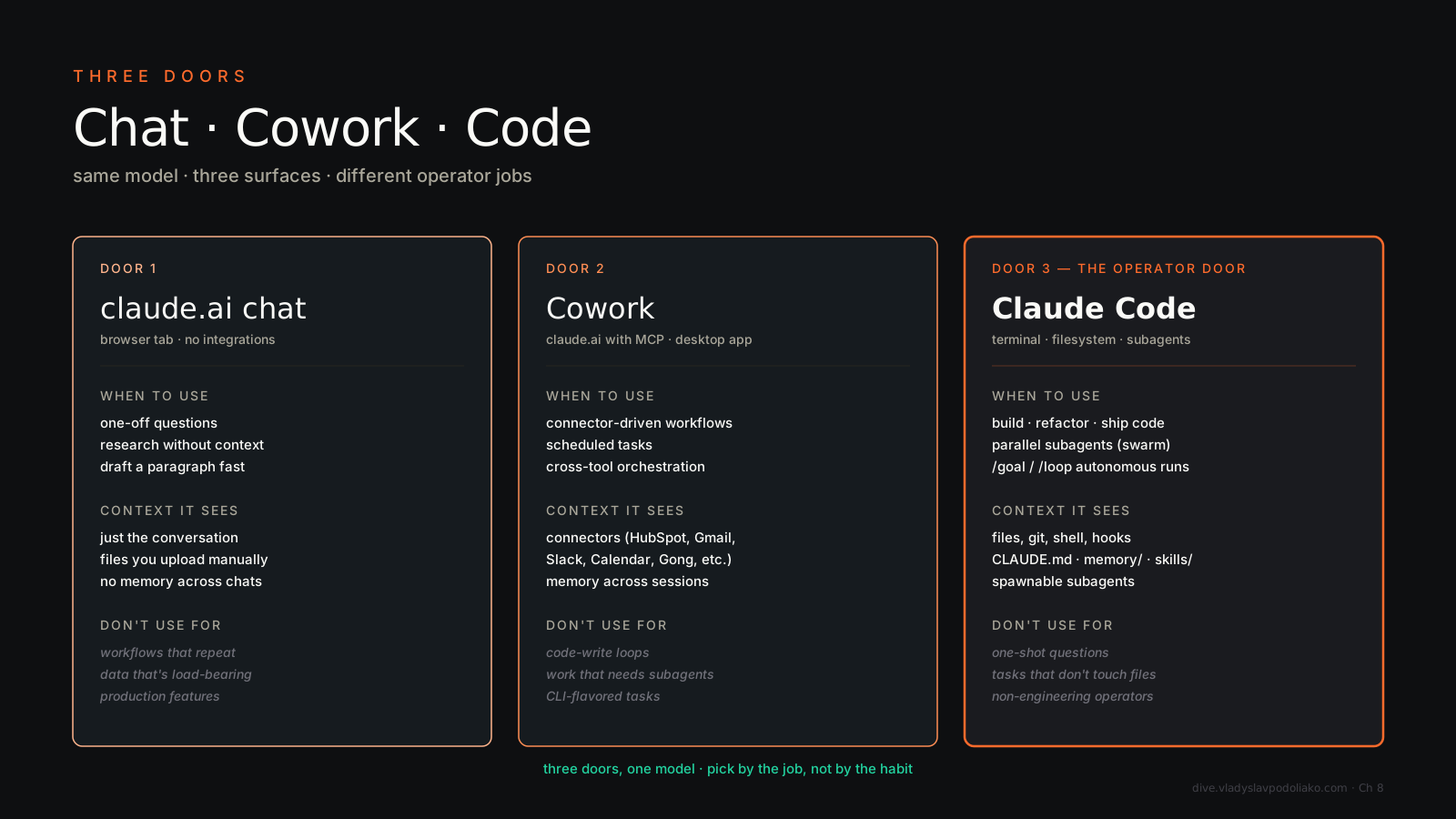
Chat — claude.ai on web, iOS, Android, and desktop. This is what most people meet first. Pure conversational interface. You get artifacts, file uploads, web search, and projects with custom instructions that act like a lightweight memory. What you do not get:
claude command in your terminal. It reads and writes your repo, runs shell commands, spawns
My actual split#
I don’t trust people who give you architecture advice without telling you what they actually run. Here’s mine.
Cowork — about 50%. Morning briefing, mentoring prep for a paid mentee, weekly wrap-up, sales intel pulls, newsletter drafting, document generation, scheduled tasks I never look at because they just run.
Claude Code — about 40%. Agent
Chat (mostly mobile) — about 10%. Quick questions, reading articles on the train, casual brainstorming when I don’t want a full session.
If your split is 90% Chat, you’re leaving an hour a day on the table. Probably more.
Decision tree, read this in 30 seconds#
- Are you in a code repo or running shell commands? → Claude Code.
- Are you pulling data from your enterprise tools and writing a report? → Cowork.
- Are you on your phone? → Chat.
- Are you spawning
that talk to each other? → Claude Code. - Are you scheduling something to run nightly? → Cowork.
That’s it. Five questions. If you can answer them, you’ve already beaten 80% of users.
Where each surface wins#
For pure conversation — quick questions, mobile use, casual brainstorming on a train — Chat is the right answer and you should not overthink it. Don’t take a pickup to grab milk.
For reading your repo, writing code, and running tests — Claude Code, no contest. Nothing else in the family touches a codebase the same way. Cowork can read a file, but it doesn’t think in repos.
For daily ops — talking to enterprise tools, pulling Slack threads, summarizing HubSpot deals, scheduling recurring work — Cowork wins decisively. The connector layer is the differentiator. You can fake half of this in Chat with manual copy-paste, but you’ll burn the day doing it.
For long-running agent loops, swarms, complex multi-file refactors — Claude Code. The orchestration UX is meaningfully better than anywhere else. Spawn ten agents, watch them work, merge results.
For documents — docx, xlsx, pptx, PDF — Cowork’s skills make this trivial.
For privacy-sensitive personal vaults — Cowork or CC. Both run on your machine and read local files. Chat sends everything server-side. If your data shouldn’t leave your laptop, Chat is the wrong door.
For “what does this code even do” — Chat on your phone is fine. Don’t overbuild it.
The trick most people miss#
Your
Underrated bits per surface#
Chat. Projects with custom instructions are a lightweight CLAUDE.md and almost nobody uses them properly. Artifacts — HTML, React, code, SVG — are remarkably underused; most people use Chat as a text box and never let it draw, simulate, or build a tiny tool right there in the conversation.
Cowork. The mounted folder model is the magic. Anything in your selected folder, Claude can read and write. Scheduled tasks deliver to Slack DMs or canvases while you’re asleep. The plugin system lets you install whole skill packs in seconds — sales, marketing, finance, ops — and stand up a role-shaped Claude in an afternoon.
Claude Code. Subagent swarms — parallel Agent calls in one tool batch — change what’s possible. Hooks let you run things on tool calls. Custom slash commands are just markdown files in ~/.claude/commands/. And .mcp.json checked into the repo means the whole team shares the same connectors. That’s how you turn a personal tool into team infra.
Two common mistakes#
Using Chat as if it were Cowork. Re-explaining context every session, re-pasting data, re-uploading the same PDF. This is the operator I opened with. Switch to Cowork for daily ops and you’ll save an hour a day. Maybe more.
Treating Claude Code as “for engineers only.” I run non-code workflows in CC because the swarm UX beats everything else. Research, content production, lead enrichment — anywhere I want N agents in parallel goes to CC, even when there’s no code in sight. The name fools people. Don’t be one of them.
Watch this#
If you take one homework assignment from this chapter: Boris Cherny on Claude Code. The head of Claude Code product walks through the philosophy. Watch it before you start building, not after. It will save you weeks of misuse.
Closing mental model#
Chat is Slack. Cowork is your operating system. Claude Code is your IDE.
Use the right tool for the job. The mistake is using one for all three.