Saturday, 8 AM#
I wake up Saturday at 8 AM. I open Slack. There’s a 700-word canvas titled “Friday Wrap — May 1.” I didn’t write it. I didn’t ask anyone to write it.
It contains: pipeline movement at Belkins, Folderly’s deliverability incident from Wednesday, an activation-rate readout from one of the portfolio companies, two open mentoring threads I owe replies on, three Monday priorities ranked by which one will hurt most if it slips.
I read it in five minutes. I drink my coffee. The week is closed.
That canvas didn’t exist at 3 PM Friday. It was generated at 4 PM by a scheduled task that fired without me being on my laptop, pulled data from six systems, synthesized it into something I could actually act on, and dropped it where I’d see it first thing Saturday morning. The system worked while I was at dinner. It worked while I was sleeping. By the time I picked up my phone, the week had already been thought about.
That’s the chapter. That’s the unlock.
The pull-vs-push reframe#
Synchronous AI is a vending machine. You walk up, you push a button, you get a snack. Useful — but only when you remember you’re hungry, only when you’re standing in front of the machine, only when you already know what you want.
Asynchronous AI is a chef. They prep your meals before you walk into the kitchen. By the time you sit down, the briefing is on the table.
The shift from “I’ll ask Claude when I think to” to “Claude tells me when there’s something to know” is the biggest unlock most operators miss. It’s not a bigger model. It’s not a fancier prompt. It’s a scheduling decision. The instances that change your life are the ones that fire when you’re not looking.
What a scheduled task actually is#
Three things glued together: a saved instruction, a trigger (time, event, or
There are three flavors. Cron-style — fires on a clock. Event-triggered — fires when something happens (a deal moves to Closed Won, a Sentry alert spikes). Long-running — keeps a context warm for hours or days. The most useful by an order of magnitude is cron-style, and that’s where we’ll spend this chapter.
My scheduled stack#
Here’s what runs without me thinking about it.
- Mon 9 AM — process-mining scan. Looks across last week’s Slack, calendar, and HubSpot for repeating workflows that should become
. The system gets better every week without me sitting down to “improve the system.” - Daily 7:30 AM — morning briefing. Calendar, overnight email, portfolio metrics. Lands as a Slack DM by the time I’m pouring coffee.
- Daily 9 AM — Belkins sales pipeline ticker. HubSpot motion overnight, Gong calls from yesterday, anything moving in the funnel.
- Daily 5 PM ET — deal-advancement alerts. Which deals moved, which stalled, which went dark. One paragraph each.
- Daily 7 PM — end-of-day vault sync. Reads what shipped, writes back to the second brain so tomorrow’s instance starts smarter.
- Fri 4 PM — friday-wrapup. The cross-system synthesis that produces the Saturday canvas. Sets Monday priorities.
- Hourly — Codex Sentry watcher. It opens auto-PRs for non-trivial bugs. I review them like a manager reviewing junior engineer work.
- 30 min before each meeting — meeting prep auto-generated. Attendees, last interaction, open threads, suggested agenda.
I don’t run any of those. They run.
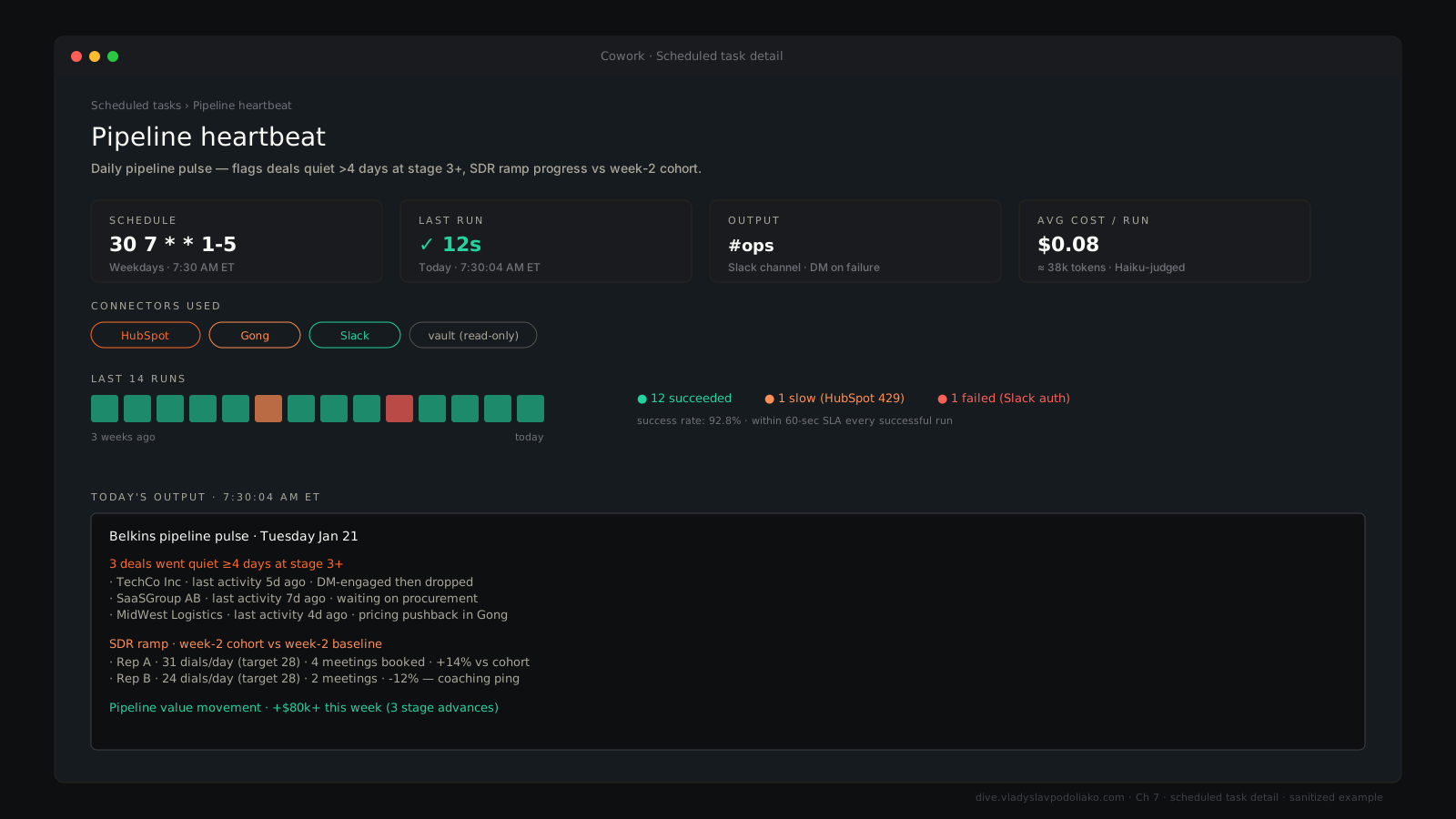
Designing one — the four-question checklist#
When I build a new scheduled task, I make sure I can answer four questions in one breath.
Trigger. Time, event, or both? Most start as time-based. Some upgrade to event-driven later. Some need both — event as the real signal, time as a backstop in case the event misfires.
Inputs. What does this instance need to read to do its job? Be specific. “HubSpot deals” is not specific. “HubSpot deals where stage changed in the last 24 hours and amount > $10K” is specific.
Output. Where does the result land? Slack DM, Slack canvas, email, vault file, dashboard. Match the channel to the urgency and the audience.
Failure mode. What happens when the data isn’t there or the API is down or there’s nothing useful to say? The default should always be “silent skip,” never “alert spam.” Train your scheduler to shut up when it has nothing useful to report. Silence is a feature.
The five high-leverage patterns#
Morning briefing. Pulls calendar, overnight Slack, open deals, lands a Slack DM with “today’s focus” by 7:30 AM. This single task replaces the first 20 minutes of email triage. Worth the entire chapter on its own.
End-of-day sync. 7 PM. Reads what shipped, writes back to the
Weekly wrap-up. Friday 4 PM. Cross-system synthesis. Replaces the “weekly review” meeting with yourself. The instance does the data pull. You do the thinking on Saturday morning over coffee.
Process-mining scan. Monday 9 AM. The meta-pattern — AI looking at your week to find what should become a skill. The system improves itself.
Anomaly alerts. Careful with this one. Don’t run it until your thresholds are calibrated. False positives kill the habit. The day you mute the channel is the day the alert system died.
Cron syntax — the 30-second primer#
Five fields, separated by spaces: minute, hour, day-of-month, month, day-of-week.
0 7 * * 1-5      # 7:00 AM every weekday
*/15 * * * *     # every 15 minutes
0 16 * * 5       # 4:00 PM every Friday
https://crontab.guru is your friend. Paste an expression, it tells you in plain English when it’ll fire. Bookmark it.
Most modern AI surfaces hide cron behind a UI — type “every weekday at 7 AM” in natural language and it generates the cron for you. Knowing the underlying syntax just helps when you outgrow the UI.
30 7 * * 1-5- Mon, Jun 29, 07:30 AM
- Tue, Jun 30, 07:30 AM
- Wed, Jul 1, 07:30 AM
- Thu, Jul 2, 07:30 AM
- Fri, Jul 3, 07:30 AM
- Mon, Jul 6, 07:30 AM
- Tue, Jul 7, 07:30 AM
A worked example — my deal-advancement alerts#
Five lines of design.
Trigger: 5 PM ET, weekdays.
Inputs: HubSpot stage changes in the last 24 hours, Gong transcripts of new calls, Slack #sales activity.
Logic: identify deals that moved, deals that stalled, deals that went dark. For each, pull a one-paragraph “why” from transcripts where available.
Output: Slack DM to me with the daily ticker. Slack canvas shared with leadership for the deep-dive.
Failure: if HubSpot is down, skip silently. Tomorrow’s run catches yesterday’s motion.
That’s it. Five lines. It replaces a 30-minute pipeline review every day and a leadership update meeting every week.
Idempotency — the trap#
A scheduled task that runs twice should produce the same output, not two copies. Otherwise some Friday night yours will misfire and your Slack will light up with three identical wrap-ups, and the next week you’ll mute the channel, and a month later you’ll forget the system existed.
Build dedup checks. Use unique keys. Add “have I already run for this window?” guards. Boring infrastructure work, but it’s the difference between a scheduler that runs for years and one that runs for two weeks.
Output channels matter more than the work#
The best report ever written is worthless if it lands in a channel you don’t read. I deliver to Slack DMs for high-attention urgent stuff. Slack canvases for shareable, persistent weekly artifacts. Email for things I’ll read in the gym. Vault files for things future-me or future-instances will reference.
Pick the channel for the reader, not the writer.
The compounding payoff#
When you have five to ten scheduled tasks running, your job changes shape. You spend less time PULLING data and more time RESPONDING to surfaced signal. The morning briefing tells you what matters. The deal ticker tells you what moved. The Friday wrap-up tells you what to do next week.
That’s the actual transformation AI promised — and almost no one builds it, because they keep treating AI as a chatbox.
Start small#
Don’t schedule ten tasks tomorrow. Pick ONE pull-to-push conversion — probably your morning briefing. Run it for two weeks. Tune the inputs, tune the channel, tune the format until you actually open it without thinking. Then add the next one.
One task. Two weeks. Then the next. The system compounds when each task earns its slot. It collapses when you bolt on five at once and stop reading any of them.
The Saturday canvas didn’t show up overnight. It started as a single morning briefing two years ago. Everything else got added one task at a time, only after the previous one had earned its place.
That’s how you make AI work while you sleep. One scheduled task at a time.