You’re reading a 25,000-word book that was written by 15 AI agents in parallel in about 6 minutes wall-clock. I dispatched them in one message from my main session. Each one wrote a chapter to a markdown file. When they returned, the orchestrator compiled the file you’re holding.
Total cost: under $40. Total time: less than the average meeting.
That’s the
Sit with that. Not because the number is impressive — it isn’t, by 2026 standards — but because of what it implies. No outline-then-draft-then-edit slog. No staring at Chapter 4 while Chapter 11 sits untouched. I typed one paragraph, hit return, made coffee, and came back to a book.
The model didn’t get smarter that morning. The architecture got smarter.
The mental model: an orchestra, not an assembly line#
Stop thinking of an AI
The conductor doesn’t play the instruments. The conductor reads the score, decides which sections start when, and signals the bar lines. The strings, brass, and percussion don’t need to listen to each other — they need to listen to the conductor and know their own sheet music.
A swarm of
That distinction is the whole game. Most people who try parallel agents and bounce off have built a group chat. You want a chain of command.
What Claude Code actually is, in plain English#
claude in your terminal and you’re inside an agent session that lives in your repo. It reads and edits files. It runs commands. It talks to
That last sentence is what throws people. They want panels and buttons and a sidebar showing what the agent is thinking. Resist. Claude Code’s power comes from being a Unix citizen — pipe-friendly, scriptable, cron-able. You can’t claude --print "review yesterday's PRs and post a Slack summary".
Install — five minutes, do it now if you haven’t#
npm install -g @anthropic-ai/claude-code
claude --version
cd your-repo
claude
First run authenticates against your Pro or Max plan. Then inside the session, /init generates a starter
The first thing to do that nobody does#
Write a real CLAUDE.md. Not the auto-generated one. Yours.
Stack. Conventions. Priorities. Folders you don’t touch. Libraries you use, and the cursed ones you’ve replaced. The “we run lint before commits” rule. The “never modify migrations once they ship” rule. Anything you’d tell a new senior engineer in their first hour.
Keep it under 100 lines. Every line gets re-read on every turn — it’s not free. Treat it like a README, not a wiki. Link out to deeper docs by path; don’t inline them.
The investment pays back inside a week. By day five you’ll catch the agent skipping wrong turns it would have taken on Monday, because you finally wrote down the convention. That’s leverage compounding in real time.
Spawning a subagent — concrete example#
Here’s the moment brains click. You’re in a Claude Code session. You type:
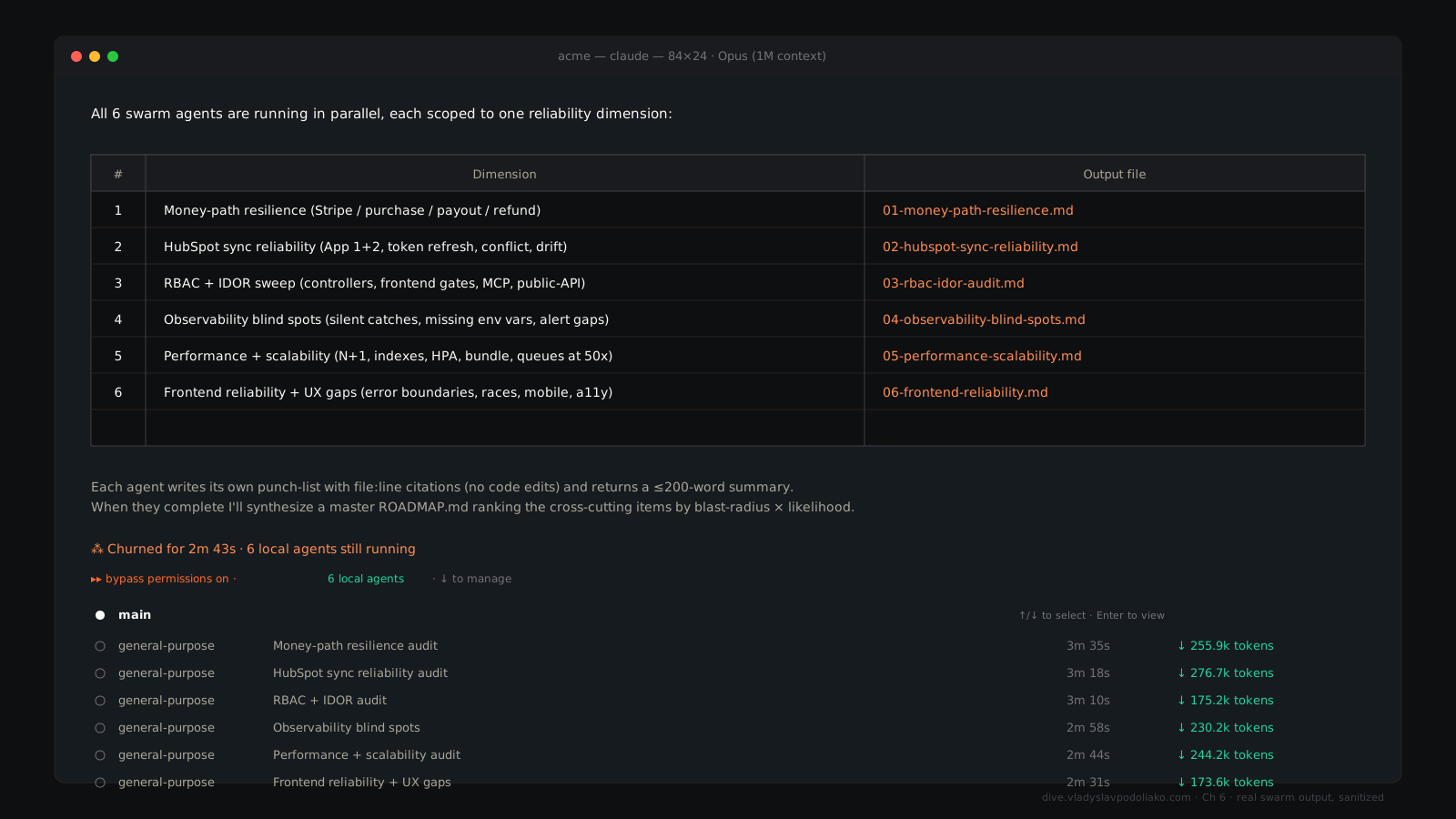
Spawn three Explore subagents in parallel. One finds every use of the deprecated getUser(). One maps where the old auth flow is still wired. One audits all env vars we read.
Hit return. All three run concurrently, each in its own context. Ninety seconds later, three summaries land in your main session. You merge them.
You just compressed an afternoon of grep-and-clicking into 90 seconds. That’s a single fan-out. Once you’ve done it, single-threaded work feels broken.
The four swarm patterns#
Almost every real workflow you’ll build is one of these four. Naming them helps.
Fan-out / fan-in. The orchestrator splits a task into N independent subtasks, dispatches them in parallel, collects the results, and compiles. This book is a fan-out: 15 chapters, 15 subagents, one compiler. Use it when the pieces don’t depend on each other.
Pipeline. Agent A produces. Agent B reviews. Agent C revises. Sequential by design, but each stage runs in a clean context with a tight role. A typical content pipeline: draft → critique → revise → publish. Each handoff is a file. Use it when quality compounds through stages of review.
Map-reduce. N parallel workers each chew a chunk of input. A reducer merges the outputs. Classic example: 5,000 support emails classified by intent. Don’t run that as one agent reading 5,000 emails — spawn 50 Haiku workers doing 100 each, then a Sonnet reducer counts buckets and summarizes. Use it whenever the input is too big for one window but the per-item work is shallow.
Adversarial. A proposer drafts. A critic attacks. An arbiter judges. Three agents, two views, a verdict. Gold for stress-testing strategy docs, plans, or any output where you’ve marked your own homework. Make the critic mean. Make the arbiter cold. The output gets sharper than anything one agent produces alone.
If you remember nothing else: fan-out for breadth, pipeline for depth, map-reduce for scale, adversarial for truth.
Anti-patterns — the ones that bite#
Spawning agents for trivial work. If a task takes 30 seconds in your own terminal, a subagent costs more in overhead and tokens than it saves. The swarm is for jobs that don’t fit one window or one thread.
Spawning agents that need each other’s outputs without explicit handoffs. Most common failure. People say “fan-out” and design a hidden pipeline. If section 7 depends on section 3’s conclusions, you’ve built a sequential chain pretending to be parallel — and the agents will hallucinate the missing dependencies rather than block. Run them in true sequence, or design file-based handoffs where the parent collects and re-dispatches.
Forgetting to give each agent a focused brief. “Write section X” is a bad prompt. “Write section X with these subsections, this tone, this word count, save to this exact path, return a one-line status” is a good prompt. Vague briefs produce 15 different shapes instead of 15 sections of the same shape. Treat every subagent like a contractor with a one-page SOW.
Hooks — the underrated feature#
You configure them in .claude/settings.json — committed to git, shared with the team.
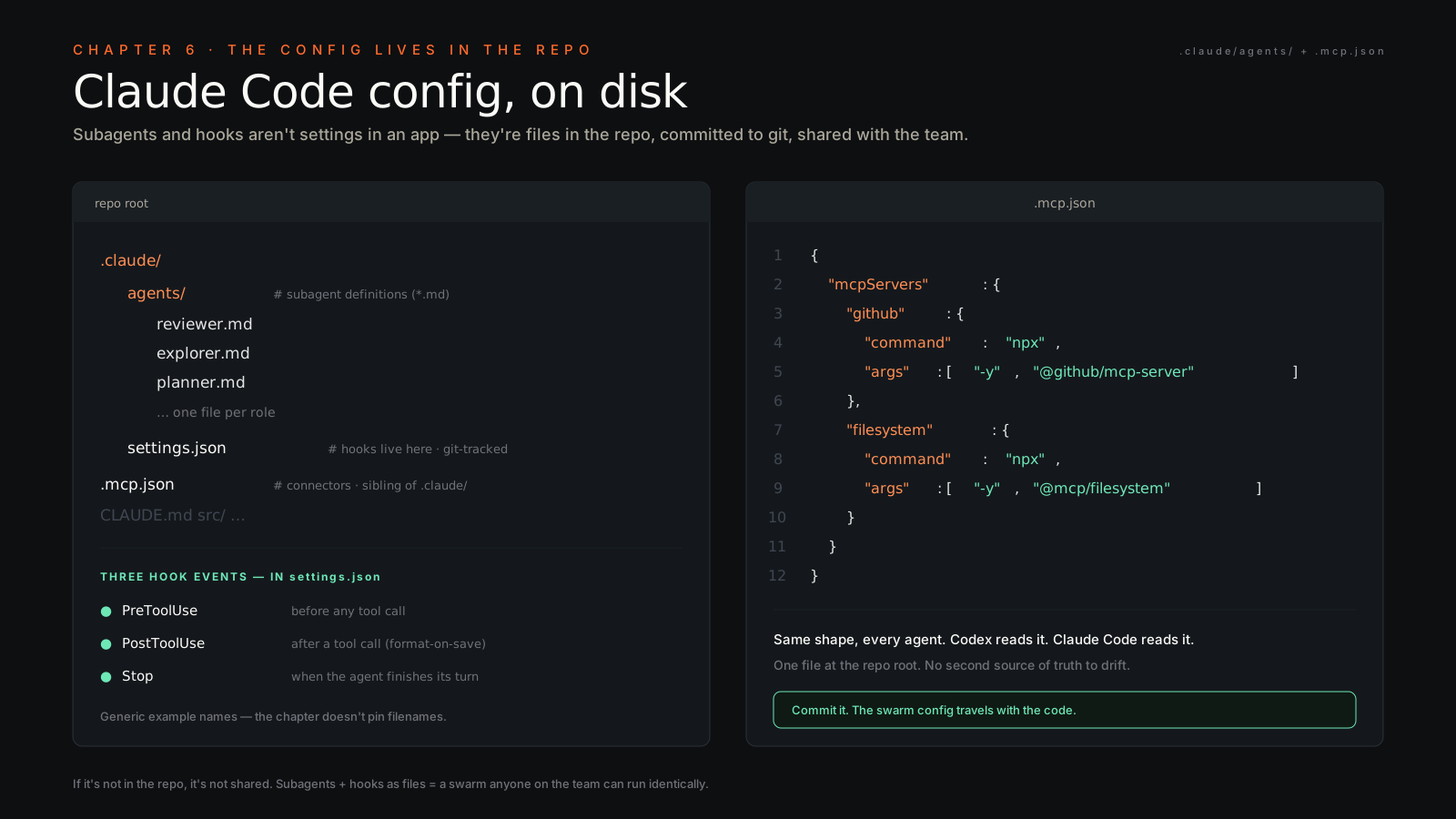
Use cases write themselves: prettier or ruff format-on-save in PostToolUse. Run-tests-on-write under src/. Block-pushes-to-main in PreToolUse. Slack-notify in Stop. A PostToolUse hook running prettier --write saves you from explaining formatting in 50 future prompts.
Once you set hooks, Claude Code stops behaving like an eager intern and starts behaving like an opinionated coworker. The agent has policy now, not just intent. That’s the upgrade most teams skip and regret.
Headless mode — the hidden production muscle#
claude --print "your prompt"That flag runs Claude Code without the interactive UI. The agent does the work, prints to stdout, exits. You can pipe it. You can cron it. You can drop it into a GitHub Action.
# .github/workflows/pr-review.yml
- name: Claude review
  run: claude --print "Review this PR for security and tests" >> $GITHUB_STEP_SUMMARY
Most Claude Code users never run --print. The ones who do have CI pipelines that get smarter every week — for cents per run. PR descriptions auto-written from the diff. Linters that explain bugs instead of just flagging them. Daily standups composed from the GitHub event stream while you sleep. Cheap, durable, and almost nobody is doing it yet.
Watch this before your second session#
Boris Cherny runs Claude Code at Anthropic. Twenty minutes of him walking through philosophy and demos will save you ten hours of trial-and-error: https://www.youtube.com/watch?v=fl1DSmwQKKY.
Watch it before your second session. Not your first — your first session should be confused. The talk lands harder once you’ve felt the friction.
The disposition shift#
Most people use Claude Code as fancy autocomplete. One session, one question, wait, next question, wait. They’ve upgraded their cursor and called it a workflow.
The unlock is the swarm. The moment you start a task with “spawn 8 parallel agents” instead of “let me do this step by step,” throughput jumps 5–10×. Not because the model got smarter. Your architecture got smarter.
This book exists because I stopped writing books the old way. The next thing you ship can exist the same way. You don’t need a bigger model. You need a conductor’s mindset.
Pick up the baton.