Picture a working kitchen at 7:42 on a Friday night. The pass is loud, the tickets are stacking, the expediter is calling out times in a voice that has been calibrated by ten years of service to cut through clatter. The chef on the pasta station does not pause to ask what carbonara is. He glances at a card pinned above the burner — eggs at room temperature, pecorino three to one against parmesan, guanciale rendered slow until the fat goes glassy, finish off the heat, always off the heat — and then he cooks. Twelve seconds of orientation, two minutes of execution, plate up, next ticket.
Now imagine the alternative. Every order, the chef has to be re-told what carbonara is. Re-told to use room-temperature eggs. Re-told that you finish off the heat or you’ll scramble the yolk and ruin the dish. By the third ticket the chef is exhausted from re-onboarding. By the tenth, the dining room has noticed.
That second kitchen is most people using AI today. They re-explain the workflow at every session — what files to load, what tone to write in, what order to run things, what the output should look like. They are paying full cognitive cost on every order.
What a skill actually is#
Mechanically, a skill is unglamorous. It is a folder. Inside the folder is a single file called SKILL.md with a frontmatter block — name and description — and a markdown body underneath. Optional extras: scripts the skill can call, templates it can fill in, reference docs it can pull from, sub-skills nested below.
That’s the whole shape. A folder with a recipe card on top. You can drop it in ~/.claude/skills/, commit it to a
When a session starts, every installed SKILL.md description gets read into the model’s working set. Just the description, not the body. Those descriptions become triggers. When you say something that matches one — by phrasing, by topic, by the shape of the request — the AI loads that skill’s full body and follows the instructions inside. The full payload only enters the
Skills beat long system prompts#
A 5,000-word
Anatomy of a great SKILL.md#
---
name: friday-wrapup
description: Friday evening weekly reflection — reviews the week
  across HubSpot, Slack, Calendar, Ahrefs, Stripe. Surfaces wins/misses,
  sets Monday priorities. Use when user says 'how did the week go',
  'weekly wrapup', 'Friday memo', or scheduled task fires.
---

# Friday Wrap-Up

## When to use
[trigger phrases, not just keywords]

## What to do (sequence)

## Output format (exact deliverable shape)

## Anti-patterns (what NOT to do)
That looks tidy on the page, but the load-bearing line is the description. The description does eighty percent of the work. It is the search query the AI runs against your intent. Get it right and the skill fires when you want it. Get it wrong and the skill either ghosts you when you summon it or barges in when you didn’t ask. The two failure modes are equally annoying.
The trick is being specific about what triggers it and what doesn’t. Positive triggers are obvious — list the phrases people actually use. Negative triggers are the ones beginners forget. “Do NOT use for X.” That single line keeps the skill from contaminating adjacent workflows. Without it, your weekly-review skill starts firing every time someone mentions the word “review” and the output gets weird.
The body underneath is for the AI, not for you. No marketing prose. No “this skill helps you reflect on your week” preamble. Decision trees. Required steps. Output format. Edge cases. Things to avoid. The AI is reading the body to execute, not to admire the craftsmanship.
Three patterns of skills#
The first is the lifecycle skill — one skill that manages a recurring workflow with multiple internal modes. Example: mentoring-lifecycle — pre-session prep / live capture / post-session fan-out across vault files for a paid mentee. One skill, four modes. Pre-session prep that pulls last session’s notes, action tracker, patterns file, and generates an agenda. Live capture that takes structured notes during the call. Post-session fan-out that writes the summary, updates the action tracker, refreshes patterns, and schedules the next one. Weekly review that rolls up across all mentees. One description. Four modes selected by context. Don’t fragment a coherent workflow into five tiny skills when one lifecycle skill with mode logic is cleaner.
The second is the aggregator skill — a skill that pulls data from many sources and stitches it into one report. My belkins-sales-intelligence skill ties HubSpot deal data, Gong call transcripts, calendar events, and Slack signals into a unified weekly read. The value is the join logic — knowing which fields from which source map to which section. That’s the integration work nobody wants to redo at 4 PM on a Friday.
The third is the voice/style skill — a skill that encodes a tone, an argument architecture, a structural convention. My vlads-newsletter skill is what makes my Substack drafts come out sounding like me instead of like a generic LinkedIn thinkfluencer. Opening hook, frame-shift in paragraph two, three-act argument, anti-takeaway closer. The skill doesn’t write the newsletter — it makes sure the draft has the right shape and the right voice when I sit down to edit.
A short tour of my current shelf#
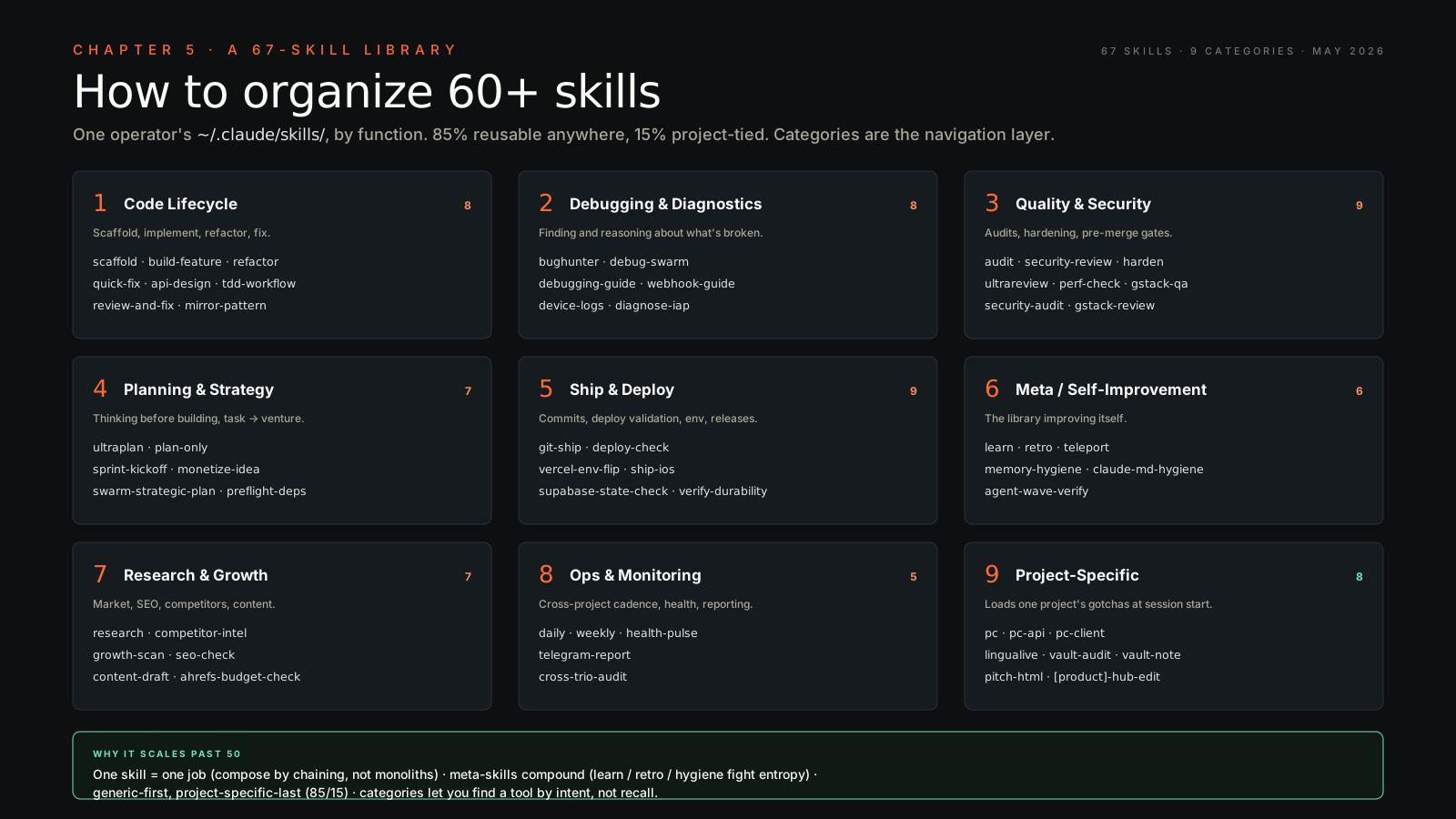
My active stack runs about twenty skills. belkins-sales-intelligence for the agency pipeline. growth-engine for the SaaS growth read across Company A. friday-wrapup for the weekly memo. mentoring-lifecycle for the paid coaching cadence. vlads-newsletter for the Substack. voice-calibration for everything else I write — LinkedIn, investor emails, decks. deep-research for thesis-driven research with editorial judgment. financial-modeling for valuations and deal intelligence. market-sensing for trading signals. adversarial-planning for negotiations and high-stakes calls. portfolio-radar for cross-company pattern recognition across the portfolio. And the two meta-skills that quietly hold the rest of the system together: process-mining, which scans my activity weekly and suggests new candidate skills, and self-improvement, which detects failure patterns and proposes fixes. The meta-skills are the ones that make the library a living thing instead of a static archive.
The build threshold#
The rule I use: if I’ve explained the same workflow to Claude three times, it’s a skill. The third repeat is the signal. You’ve stopped exploring and started executing.
If the workflow still changes week to week, don’t write the skill yet. Let the pattern stabilize. A premature skill encodes a wrong pattern and you’ll fight it for months. If the workflow is a one-off, just do it inline — the overhead of naming, describing, and testing isn’t worth it for one use. The threshold is repetition, stability, and non-triviality, all three.
How to write your first skill in five minutes#
- Do the workflow manually three times. Note what’s invariant across the runs and what changed.
- Open Claude Code. Invoke skill-creator. Describe the workflow in plain language.
- Iterate the SKILL.md — especially the description and the trigger phrases. This is where most skills succeed or fail.
- Test by spawning a fresh
and using a natural-language phrase that should trigger the skill. If it doesn’t fire, the description is wrong, not the body. - Add to your skills folder. Commit to git.
- Use it. Refine after the next five invocations.
Plugins are bundles of skills#
When a set of skills clusters around a domain — a brand-voice
The compounding effect#
Every skill you write reduces the cognitive overhead of starting that workflow to zero. The first one feels like overhead. The fifth one starts to pay you back. By the twentieth, something interesting happens — you stop “prompting” the AI and start “calling functions” against it. The interface stops feeling like a chatbot. It starts feeling like a custom operating system shaped to the exact contour of your work, a portfolio of reliable behaviors you can fire on demand.
That is the real unlock. Not better prompts. A library.
If you want the practical walk-through of building a skill end-to-end, jump to Chapter 11.