The morning I got tired of typing the same thing#
It’s 7:14 AM. Coffee’s hot, kid’s still asleep, I open
“Pull my calendar for today, scan overnight Slack DMs and channel mentions, check HubSpot for any deal stage changes since 5 PM yesterday, then write me a Slack canvas with the four things that matter.”
Claude does it. Beautifully. It does it every time. And every morning I rewrite the same paragraph because I haven’t bothered to codify it. That’s the threshold. That’s where a skill needs to be born.
In Chapter 5 I covered the why — the recipe-card analogy, why ~/.claude/skills/morning-briefing/, and I’ll never type that paragraph again.
The build threshold#
One rule: if you’ve explained the same workflow to Claude three or more times and the output was good each time, codify it. Don’t over-design. Don’t try to anticipate every edge case. Skills are runbooks, not software — you write the version that worked yesterday and tighten it as it breaks.
Anatomy of a skill#
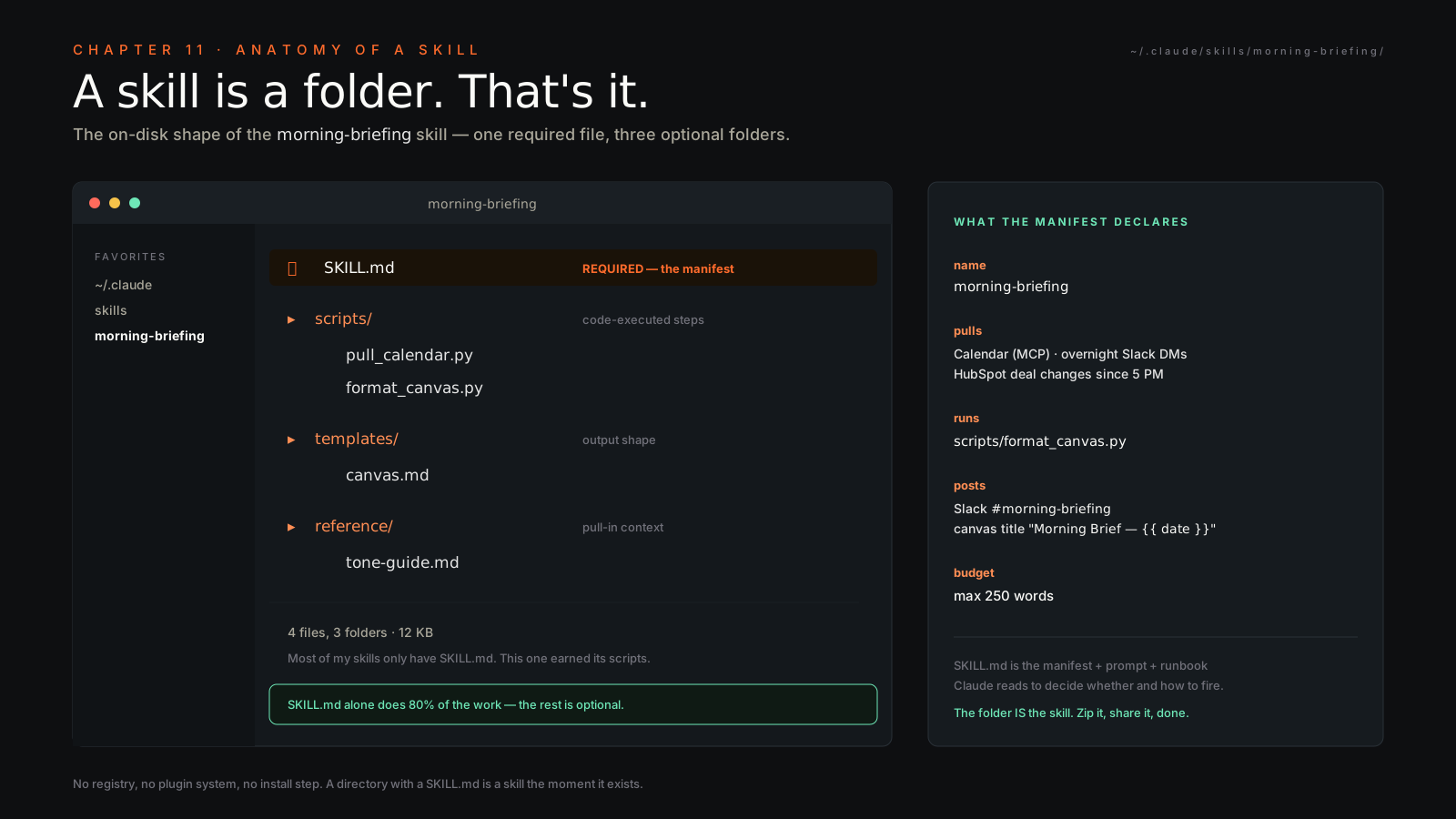
A skill is a folder. That’s it. Here’s the morning briefing one we’re building:
~/.claude/skills/morning-briefing/
├── SKILL.md                    # required — the manifest
├── scripts/
│   ├── pull_calendar.py        # optional — supporting scripts
│   └── format_canvas.py
├── templates/
│   └── canvas.md               # output template
└── reference/
    └── tone-guide.md           # voice / formatting reference
SKILL.md is the only required file. It’s the manifest, the prompt, the runbook — Claude reads this when it decides whether to use the skill and how. scripts/ holds anything you want executed as code rather than prose (deterministic transforms, API calls with fiddly auth, anything with a loop). templates/ is for output shapes the model should match. reference/ is for things the model can pull into context when it needs them — voice guides, examples, anti-patterns that are too long for the manifest.
Most of my skills only have SKILL.md. The others get added when prose stops being enough.
SKILL.md — the file that does 80% of the work#
Here’s the real, paste-ready manifest:
---
name: morning-briefing
description: Generate Vlad's daily morning briefing — pulls calendar,
  overnight Slack signals, HubSpot deal motion, then writes a Slack
  canvas. Use when user says "morning briefing", "daily brief", "what's
  on my plate today", or when the scheduled task fires at 7:30 AM ET.
  Do NOT use for end-of-day sync (use end-of-day-sync skill) or for
  weekly wrap-up (use friday-wrapup).
---

# Morning Briefing

## When to use
- User says "morning briefing", "daily brief", "what's on my plate today"
- Scheduled task fires at 7:30 AM ET
- Surface: Cowork or Claude Code; cadence: daily

## What to do
1. Pull calendar events for today via the calendar MCP
2. Read overnight Slack DMs and channel mentions (Slack MCP)
3. Pull HubSpot deal stage changes since 5 PM yesterday (HubSpot MCP)
4. Run scripts/format_canvas.py with the gathered data
5. Post the rendered canvas to #morning-briefing in Slack

## Output format
- Slack canvas with sections: Today's calendar, Overnight signals,
  Pipeline motion, #1 priority for today
- Canvas title: "Morning Brief — {{ date }}"
- Max 250 words across the whole canvas

## Anti-patterns
- Don't post if there's nothing useful to say (silent skip)
- Don't include LinkedIn notifications (noise)
- Don't speculate on deal status — only confirmed stage changes
- Don't summarize meetings I haven't attended yet---
name: morning-briefing
description: Generate Vlad's daily morning briefing — pulls calendar, overnight Slack signals, HubSpot deal motion, then writes a Slack canvas. Use when user says "morning briefing", "daily brief", "what's on my plate today", or when the scheduled task fires at 7:30 AM ET. Do NOT use for end-of-day sync (use end-of-day-sync skill) or weekly wrap-up (use friday-wrapup).
---
# Morning Briefing
## What to do
1. Pull calendar events for today via the calendar MCP
2. Read overnight Slack DMs and channel mentions (Slack MCP)
3. Pull HubSpot deal stage changes since 5 PM yesterday (HubSpot MCP)
4. Run scripts/format_canvas.py with the gathered data
5. Post the rendered canvas to #morning-briefing in Slack
## Output format
- Slack canvas with sections: Today's calendar, Overnight signals, Pipeline motion, #1 priority for today
- Canvas title: "Morning Brief — {{ date }}"
- Max 250 words across the whole canvas
## Anti-patterns
- Don't post if there's nothing useful to say (silent skip)
- Don't include LinkedIn notifications (noise)
- Don't speculate on deal status — only confirmed stage changes
- Don't summarize meetings I haven't attended yet
Three things in that file are doing the heavy lifting. Get them right and the rest is editing.
The description. This is what triggers the skill. Claude scans descriptions across all installed skills and picks the best match. Vague descriptions don’t trigger; greedy descriptions trigger when you don’t want them. The description above names the literal phrases I actually use (“morning briefing”, “daily brief”, “what’s on my plate today”), names the scheduled trigger, and explicitly excludes the two adjacent skills that would otherwise compete (end-of-day-sync, friday-wrapup). That last part — the negative space — is what most people miss.
The “what to do” sequence. Five short steps. Each step names the
The output format. This is where you tell the model what shape the deliverable takes. “A canvas” is not enough. “A Slack canvas with these four sections, titled like this, max 250 words” — that’s enough. Without it, you’ll get a different artifact every run, which is exactly what you were trying to escape by codifying.
Writing the description — the part that fails most skills#
If your skill never triggers, the description is wrong. If it triggers on unrelated requests, the description is wrong. Most failures are here. My checklist:
- Use three or more literal trigger phrases. Not synonyms — the actual words you say. I say “morning briefing.” I don’t say “diurnal status report.”
- Specify what the skill is NOT for. Name the adjacent skills it could be confused with and explicitly exclude them.
- Name the surface. Cowork?
? Both? It matters because some MCPs only exist in one. - Name the cadence. Manual invocation? Scheduled? Triggered by a
? - Cold-read test. Read the description as if you’ve never met yourself. Would a smart colleague decide this is the right tool from this paragraph alone? If they’d hesitate, rewrite.
Adding scripts — when prose isn’t enough#
Sometimes you want determinism. The model is great at gathering and writing; it’s mediocre at consistent formatting under varying input. So I push formatting into a script:
# ~/.claude/skills/morning-briefing/scripts/format_canvas.py
import json, sys
from datetime import date

data = json.loads(sys.stdin.read())
print(f"# Morning Brief — {date.today().isoformat()}\n")
print("## Today's calendar")
for ev in data["calendar"]:
    print(f"- {ev['time']} {ev['title']}")
print("\n## Overnight signals")
for s in data["slack"][:5]:
    print(f"- {s}")
print("\n## Pipeline motion")
for d in data["hubspot"]:
    print(f"- {d['name']}: {d['from']} → {d['to']}")
print(f"\n## #1 priority\n{data['priority']}")
In SKILL.md I just say: Run scripts/format_canvas.py with the gathered data piped in as JSON. The model executes it via shell, gets back deterministic markdown, posts it. The boring part stays boring. The smart part stays smart.
Where to put the skill#
Three locations, in order of how I actually use them:
~/.claude/skills/<name>/— personal global skills, available everywhere I’m logged in.<repo>/.claude/skills/<name>/— repo-scoped skills, committed to git, shared with anyone who clones.bundle — for distribution to a team or to the world.
For the morning briefing, global. For something Belkins-specific that touches our HubSpot pipeline, repo. For something I want the whole leadership team running, plugin.
Testing your skill — the loop#
- Open a fresh Cowork or Claude Code session (fresh, not your existing one — caching will lie to you).
- Type a natural phrase that should trigger it. For ours: “Give me my morning briefing.”
- Confirm the model invokes the skill — it usually announces it (“I’ll use the morning-briefing skill…”) and the UI shows a skill indicator.
- Read the output. If it’s wrong, the body is wrong. If it didn’t trigger, the description is wrong.
- Edit
SKILL.md, start a new session, repeat.
That loop should take you 60 seconds per iteration. Most skills are ready in five iterations.
Iterating on a live skill#
After the first week of running it, you’ll see it drift. It included a LinkedIn notification you didn’t want. It speculated on a deal stage. It posted on a Saturday when nothing happened. Open SKILL.md, add a line under Anti-patterns, save. Done. That file is a living runbook — every time the skill misbehaves, the misbehavior earns one bullet point. After a month you’ll have a tight, opinionated artifact that runs your morning better than you would.
Distributing skills — the social layer#
A plugin is a bundle: skills + slash commands + MCP servers + hooks, packaged together. One install command and your team is operating with the same playbook you are.
A marketplace is where plugins live. Browse with /plugins inside Claude Code. Public marketplaces exist; private team marketplaces exist; you can run your own.
The lowest-friction distribution is a git repo. Clone it into ~/.claude/skills/ and you’re done. For Belkins-internal stuff, that’s how we ship — private repo, one-line install, everyone on the same skill set inside a day.
For an internal team that’s going to live with this, the cleanest path is a private plugin marketplace. You version it, you can revoke it, new hires onboard by installing one plugin and inheriting fifty workflows.
The shortlist — three skills you should build this week#
- Morning briefing. The worked example above. Most leverage per line of code I’ve ever written.
- Weekly wrap-up. Fires Friday at 4 PM. Pulls the week’s wins, deal motion, anything that slipped, drops it into a canvas. Closes your week without you doing it.
- Pre-meeting prep. Fires 30 minutes before each calendar event. Pulls the attendee’s last interactions, the deal context, any open threads. You walk into every call already loaded.
Three skills. Maybe four hours total to write. They’ll save you an hour a day for the rest of the year.
How skills fail — and how to fix#
- Description too vague. Skill won’t trigger when you want. Fix: literal trigger phrases.
- Description too greedy. Triggers on unrelated requests. Fix: add explicit exclusions (“Do NOT use for X”).
- Body too long. Model loses focus, skips steps. Fix: cut to under 40 lines; push detail into
reference/. - No anti-patterns. Model wanders into adjacent jobs. Fix: write five anti-patterns minimum.
- No output format. You get a different shape every run. Fix: specify sections, length, title, tone.
Closing#
After 20 skills, you stop prompting and start calling functions. That’s the moment you stop using AI and start operating it.