Last Tuesday I asked my
That is the gap. An AI agent without
This chapter goes to the metal. What MCP actually is, what categories of connectors exist, how to install them in
MCP in one paragraph#
The
Connector vs MCP server#
This trips up everyone. “Connector” is the friendly UI label for an MCP server inside consumer products like Cowork or Claude.ai. When you click “Install Slack connector” in Cowork, you are authenticating against an MCP server that someone — Anthropic, the vendor, or a third party — hosts for you. Underneath, it is the same protocol. When you write a custom MCP server, you are building the thing that, in another product’s UI, would be labeled a connector. The two words point at the same object from different sides.
The three transport types#
stdio. The server runs as a local subprocess. The client pipes JSON-RPC over stdin and stdout. Best for filesystem access, local databases, anything that runs on your machine. Zero network exposure.
HTTP / streamable-http. The server is an HTTP endpoint. The client makes long-poll or streaming requests. Best for hosted SaaS connectors — Slack, HubSpot, Stripe, the public registry stuff. This is the modern transport for anything not on your laptop.
SSE (legacy). Older streaming variant from the early MCP days. Being phased out in favor of streamable-http. If you see it in old docs, mentally replace it. New servers should not ship SSE.
The connector taxonomy#
Here is the map I keep in my head, organized by category. For each, a one-line role and a handful of specific connectors I have either run myself or seen run reliably.
Productivity and storage. Files, docs, the substrate of work. Filesystem, Google Drive, Box, Dropbox, OneDrive, Notion, Obsidian (community-built). For the Newsletter I run Notion as the canonical store; everything else is a mirror.
Communication. Where humans actually live. Slack, Gmail, Microsoft 365 / Outlook, Discord (read-only is the safer default). Belkins runs Slack and Gmail; reading is fine, writing requires a confirmation step or it gets weird fast.
Sales and CRM. The pipeline source of truth. HubSpot, Salesforce, Close, Pipedrive. Belkins runs HubSpot — the agent reads deals, contacts, companies, and writes notes back. No autoclose without human-in-the-loop.
Billing and finance. Stripe, QuickBooks, Ramp, Brex. Folderly runs Stripe directly so I can ask “what was MRR last week” and get a real number, not a vibe.
Engineering. GitHub, GitLab, Linear, Jira / Atlassian, Sentry, Vercel, Cloudflare. I run GitHub, Vercel, and Sentry across every codebase. The full registry of reference servers is at github.com/modelcontextprotocol/servers.
Data and analytics. BigQuery, Snowflake, Postgres, Hex, Amplitude, Mixpanel, PostHog, Google Search Console, Ahrefs, Windsor.ai. The agent that can write SQL against your warehouse is a different animal from the one that cannot.
Marketing. Customer.io, Klaviyo, Canva, Similarweb, Ahrefs. For the Newsletter I lean on Ahrefs and Customer.io; for Folderly the marketing stack lives mostly inside HubSpot plus the warehouse.
Voice and AV. ElevenLabs, Whisper, Cartesia. ElevenLabs runs anywhere I need synthesized voice — newsletter audio, internal walkthroughs.
Browser and web. Puppeteer, Playwright, Claude in Chrome. The “let the agent click buttons on a webpage” layer. Useful, slightly scary, lock it down.
Calendar and scheduling. Google Calendar, Outlook, Calendly. Belkins runs Google Calendar — the agent can answer “when am I free Thursday” without me opening a tab.
Meeting transcripts. Fireflies, Granola, Gong (read-only by default). Belkins runs Gong and Fireflies; the agent reads call transcripts to build deal summaries and follow-up drafts. See “Your tools are now interactive in Claude” for the demo of this style of workflow.
That is roughly the universe. New ones ship every week. Treat the registry as a living document, not a finished list.
npx -y @modelcontextprotocol/server-filesystem /pathHow to install a connector — Cowork path#
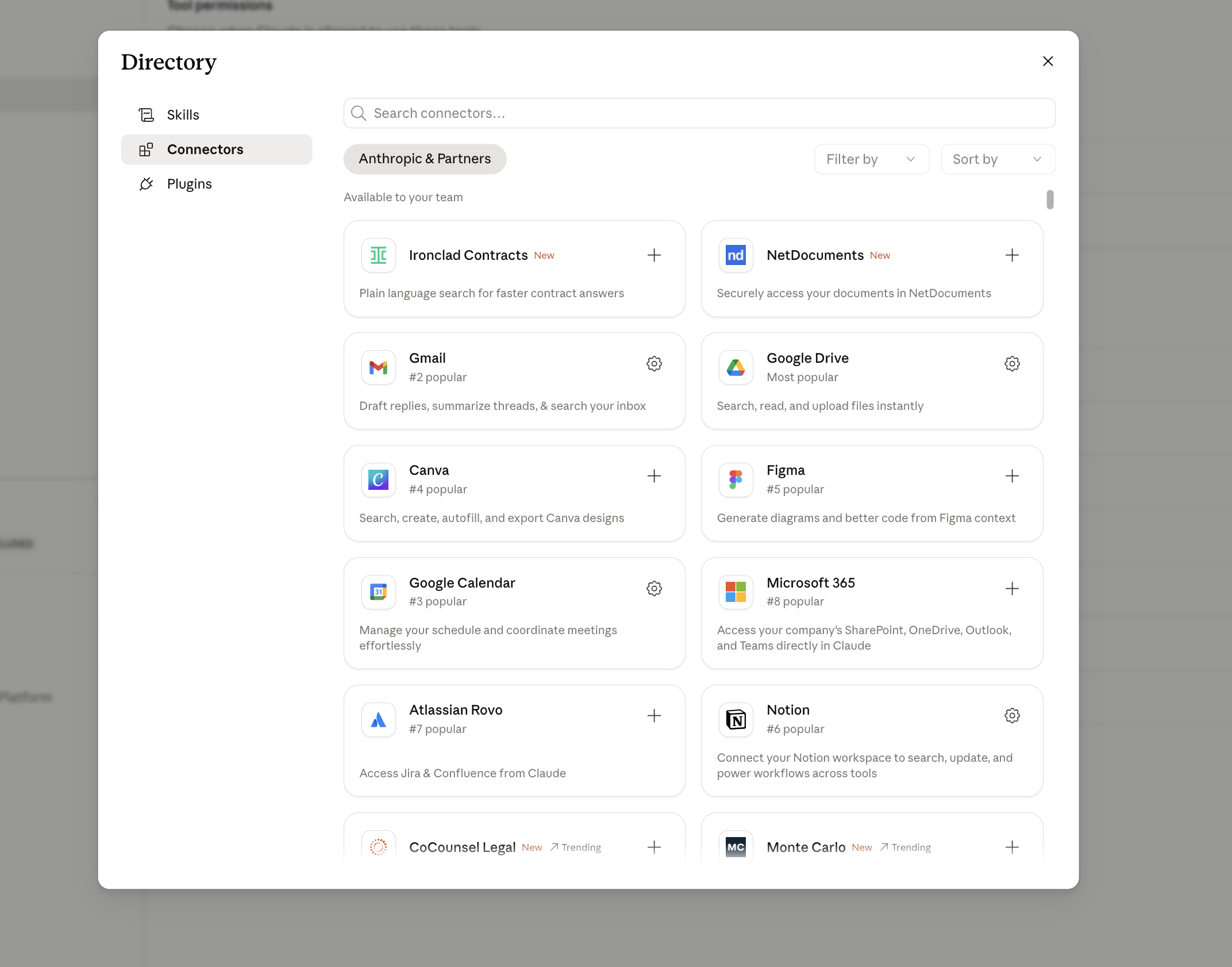
This is the no-code path. Five steps.
- Open Cowork and go to Settings → Connectors.
- Browse the registry. Click the connector you want.
- Walk through the OAuth flow. Read-only scopes first, always. Expand later when you actually need write.
- Test in chat with a low-stakes question: “list my last 5 emails” or “what deals are in Stage 4?”
- If it works, you are done. Cowork stores the auth in the OS keychain integration.
How to install a connector — Claude Code path#
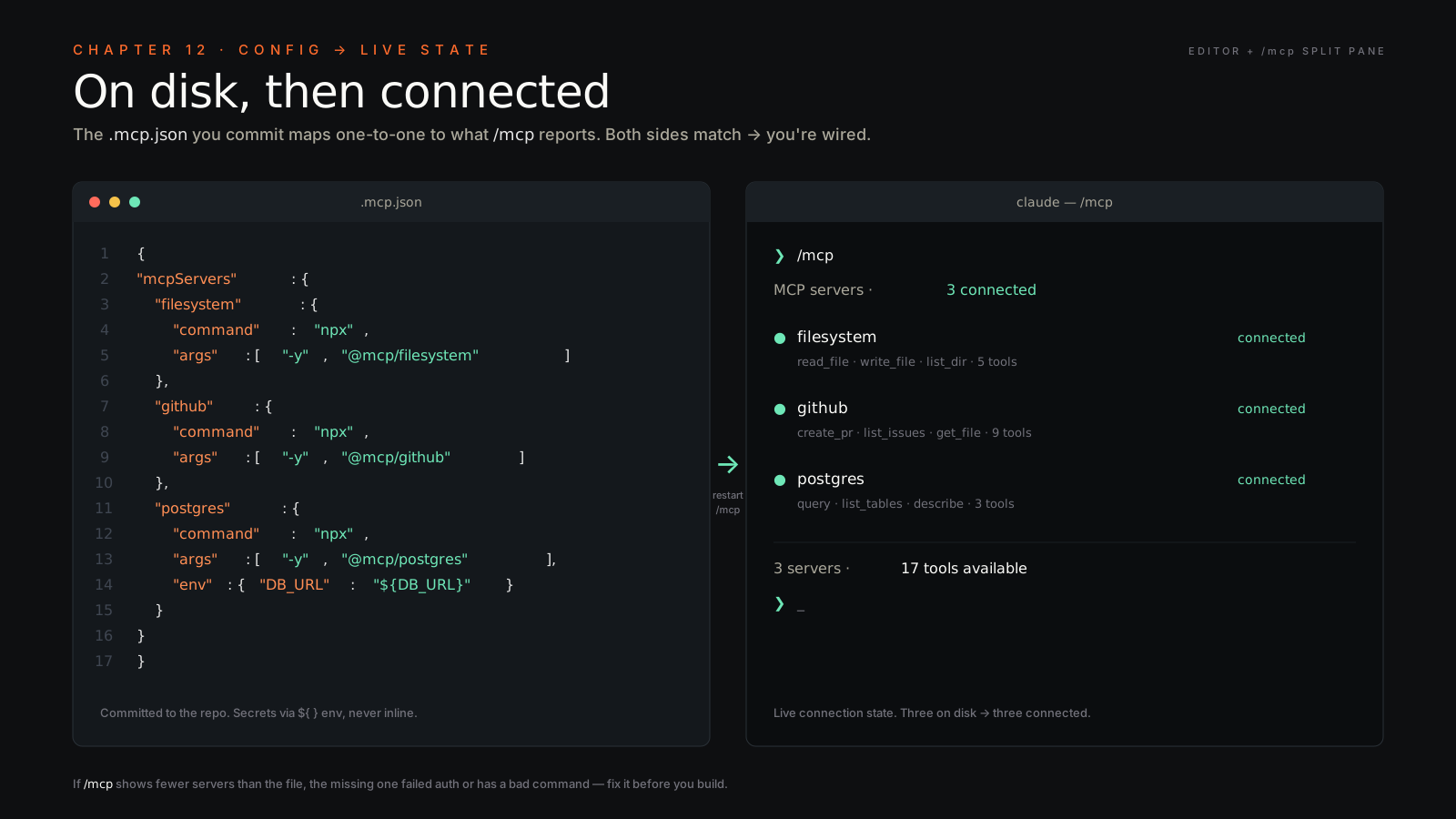
This is the developer path. Configuration lives in a file you commit to the repo, so the whole team gets the same connector set.
- Edit
<repo>/.mcp.jsonat the root of your project. Commit it. - Add server entries. Real example with two servers — local filesystem and GitHub:
{
  "mcpServers": {
    "filesystem": {
      "command": "npx",
      "args": ["-y", "@modelcontextprotocol/server-filesystem",
               "/Users/vlad/Vlad-Brain"]
    },
    "github": {
      "command": "npx",
      "args": ["-y", "@modelcontextprotocol/server-github"],
      "env": { "GITHUB_TOKEN": "ghp_***" }
    }
  }
}- Restart
claudein your repo. Run/mcpto list active servers and confirm they connected. - Test in session. Ask the agent to list files in your vault, or open issue #42 in your repo. If both return real data, you are wired.
Auth patterns — what to expect#
OAuth. Most hosted SaaS connectors — Slack, HubSpot, Google Calendar, Stripe. You click through a consent screen, the connector receives a token, tokens auto-refresh. This is the cleanest pattern. If a vendor offers OAuth, take it.
API key in env var. Common for self-hosted servers and developer-tool connectors — GitHub, OpenAI, ElevenLabs, Stripe in dev mode. Put the key in a local .env file or in the env block of .mcp.json for that server only. Never commit raw keys. If you absolutely must reference them in .mcp.json, use environment variable interpolation and keep the actual values in .env.
No auth. Local servers like filesystem, sqlite, or anything that runs entirely on your machine. Just declare the path or DB file. The trust boundary is your laptop.
Build your own MCP server — the 50-line version#
When no public connector exists for the system you need, write one. It is genuinely an evening project. Here is a working server that exposes a single tool, get_weather(city), in TypeScript.
// server.ts
import { McpServer } from "@modelcontextprotocol/sdk/server/mcp.js";
import { StdioServerTransport } from "@modelcontextprotocol/sdk/server/stdio.js";
import { z } from "zod";

const server = new McpServer({
  name: "weather-demo",
  version: "1.0.0",
});

server.tool(
  "get_weather",
  "Get current weather for a city",
  { city: z.string().describe("City name, e.g. London") },
  async ({ city }) => {
    const r = await fetch(`https://wttr.in/${encodeURIComponent(city)}?format=j1`);
    const data = await r.json();
    const c = data.current_condition[0];
    return {
      content: [{
        type: "text",
        text: `${city}: ${c.temp_C}°C, ${c.weatherDesc[0].value}`,
      }],
    };
  }
);

const transport = new StdioServerTransport();
await server.connect(transport);
Setup and run:
npm init -y
npm i @modelcontextprotocol/sdk zod
npm i -D typescript tsx
npx tsx server.ts   # run it
Then register the server in .mcp.json so Claude Code or Cowork will spawn it:
{
  "mcpServers": {
    "weather": {
      "command": "npx",
      "args": ["tsx", "/path/to/server.ts"]
    }
  }
}
Restart your client, run /mcp, and ask the agent: “what is the weather in London?” The agent will call get_weather, your server will hit wttr.in, and you will get a real answer. That is the whole loop. Now imagine the same skeleton pointed at your internal API instead of a weather endpoint, and you understand why custom servers are not exotic. They are the standard pattern.
Build your own MCP server — Python version#
If your team lives in Python, the FastMCP wrapper makes the same server even shorter:
from mcp.server.fastmcp import FastMCP

mcp = FastMCP("weather-demo")

@mcp.tool()
def get_weather(city: str) -> str:
    """Get current weather for a city"""
    import httpx
    r = httpx.get(f"https://wttr.in/{city}?format=j1").json()
    c = r["current_condition"][0]
    return f"{city}: {c['temp_C']}°C, {c['weatherDesc'][0]['value']}"

if __name__ == "__main__":
    mcp.run()
Install with pip install mcp and register in .mcp.json with "command": "python", "args": ["server.py"]. Same protocol on the wire, just a different host language.
When to write your own server#
You write your own when:
- An internal tool has no public connector and never will.
- A legacy system (mainframe, ancient ERP, in-house CRM from 2009) is in your stack and the vendor is not shipping MCP anytime this decade.
- Your data warehouse has custom auth — SSO with a quirky IdP, mTLS, signed JWTs — that the off-the-shelf connector cannot speak.
- You need to bridge two systems where the existing connectors do not compose well, and a thin wrapper server gives you a cleaner tool surface.
Most operators overestimate the difficulty. After your first server, every subsequent one is twenty minutes of boilerplate plus whatever the underlying API actually requires.
Best practices at production scale#
- Read-only first. Always. Expand permissions only when an actual workflow needs write.
- Scope tightly. Single repo, single workspace, single resource. Do not hand the agent the keys to the kingdom because it was easier than scoping.
- Audit logs on. Every tool call gets logged. Anomaly = breach until proven otherwise.
- Rotate creds on a schedule. OAuth refresh handles itself; API keys do not. Ninety-day rotation, written down somewhere.
- Pin SDK versions in
package.jsonandrequirements.txt. MCP is moving fast and a breaking change in a minor release will ruin your Tuesday.
What the stack actually produces — four workflows#
Everything above is plumbing. Here’s what the plumbing pumps. These four are from Anthropic’s small-business solutions — the owner with no finance team, no ops hire, no analyst, and the connector stack standing in for all three. I’m including them because the pattern is identical at portfolio scale; the only thing that changes is how many zeros are on the gap.
The thread through all four: the agent does the clerical work, you own the decision. Every one ends at a review gate, not a send button. That’s not a limitation — it’s the design. Anthropic’s framing is “delegate the work, own the decisions,” which is the same approval discipline as Chapter 34.
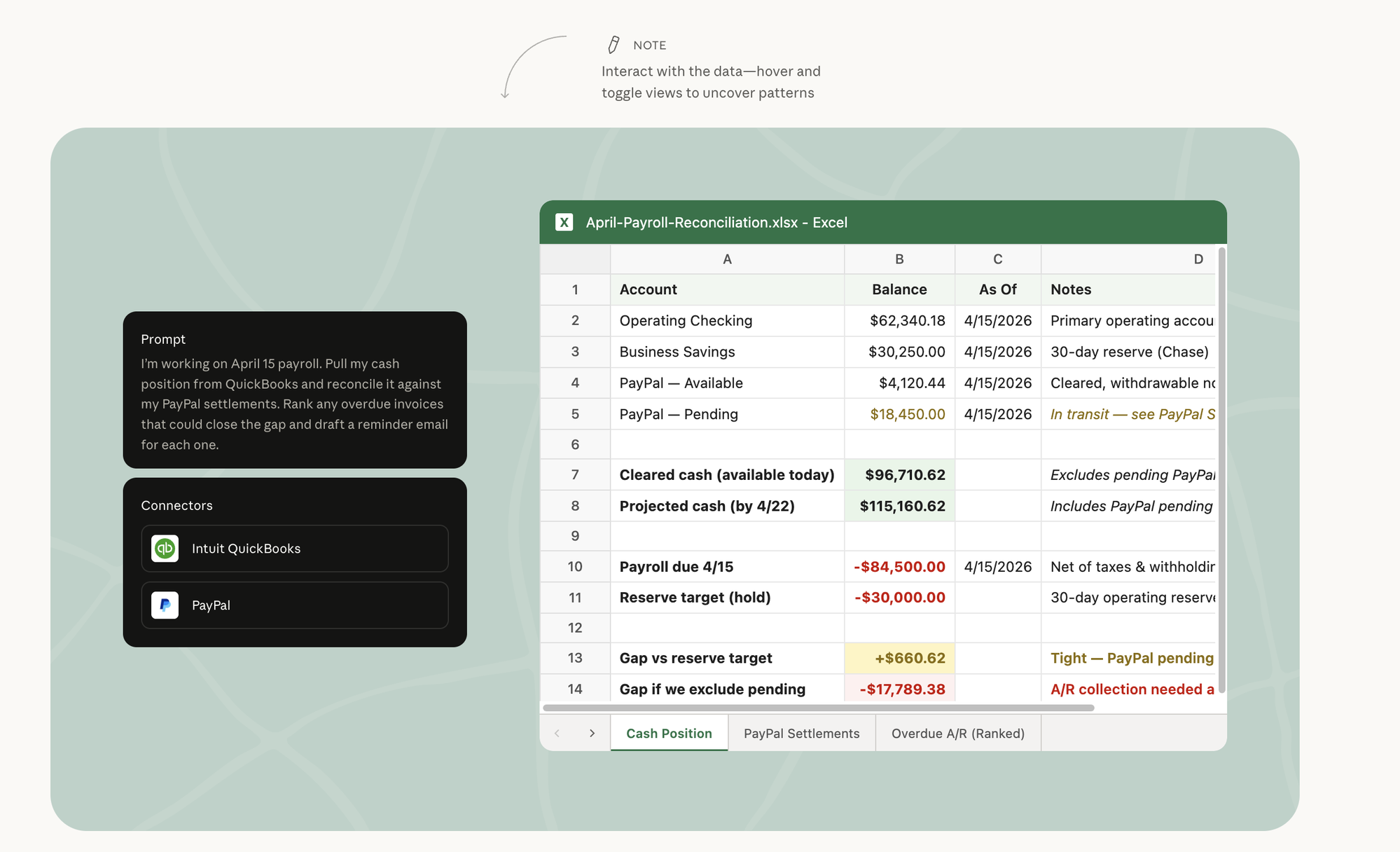
1. Cash reconciliation under payroll pressure. QuickBooks + PayPal.
“I’m working on April 15 payroll. Pull my cash position from QuickBooks and reconcile it against my PayPal settlements. Rank any overdue invoices that could close the gap and draft a reminder email for each one.”
What comes back isn’t a chat answer — it’s a workbook with three tabs (Cash Position, PayPal Settlements, Overdue A/R ranked). It separates cleared cash ($96,710) from projected cash including PayPal-pending ($115,160), nets out the $84,500 payroll and the $30k reserve hold, and lands on the number that matters: a +$660 cushion if PayPal clears, a −$17,789 hole if it doesn’t. Plus a drafted reminder email per overdue invoice. The owner reads three tabs and makes one call. The reconciliation that used to eat a Saturday is the part the agent already did.
2. Month-end close as an accountant-ready narrative. QuickBooks + PayPal + Google Drive.
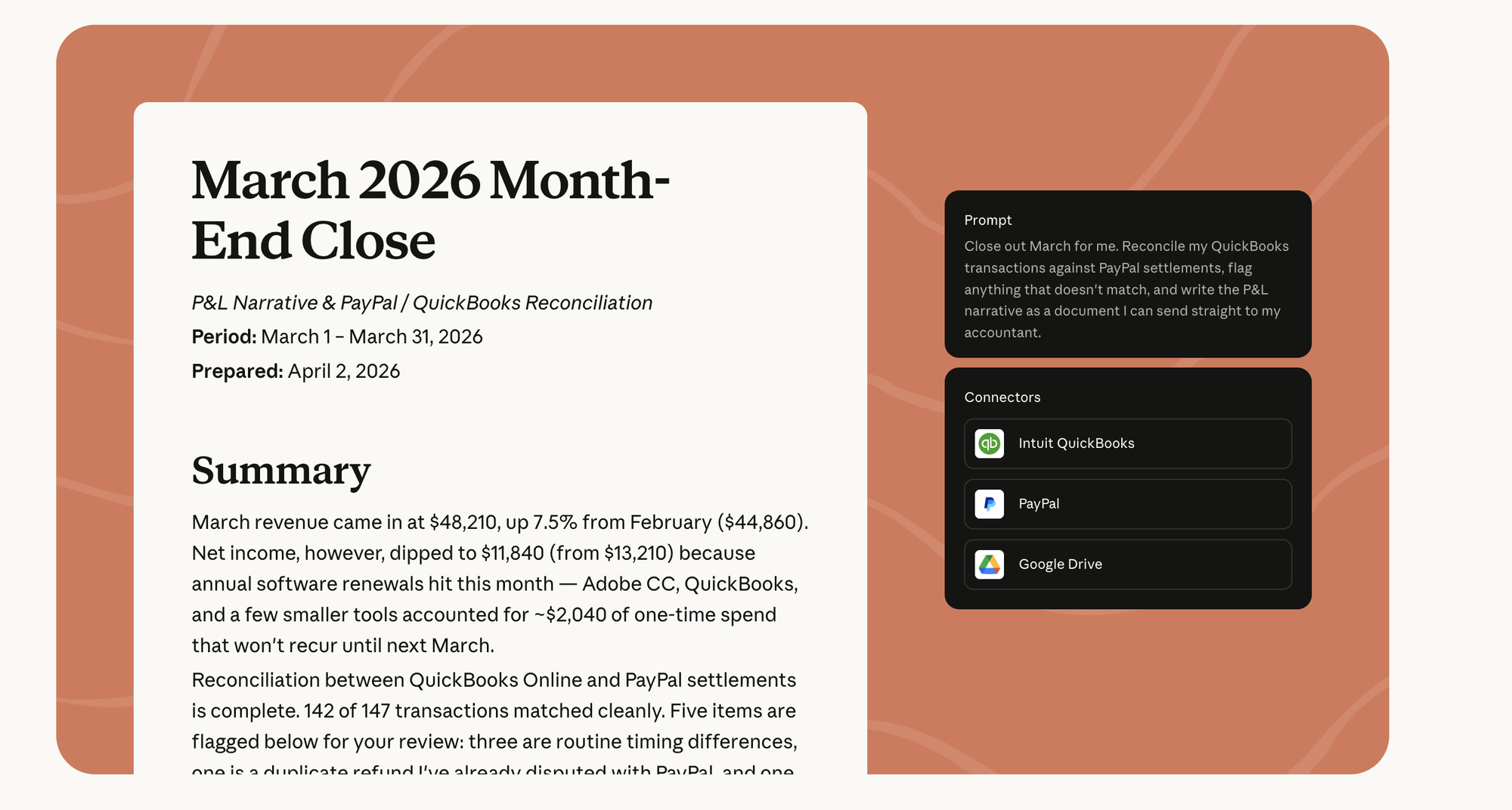
“Close out March for me. Reconcile my QuickBooks transactions against PayPal settlements, flag anything that doesn’t match, and write the P&L narrative as a document I can send straight to my accountant.”
The output is prose, not a spreadsheet — a written month-end close. Revenue $48,210, up 7.5%; net income down to $11,840 because annual software renewals landed this month as ~$2,040 of one-time spend. 142 of 147 transactions matched cleanly; five flagged — three timing differences, one disputed duplicate refund, one real mismatch. It reads like something a controller wrote, because the controller’s job here was done by the connector stack reading both ledgers at once.
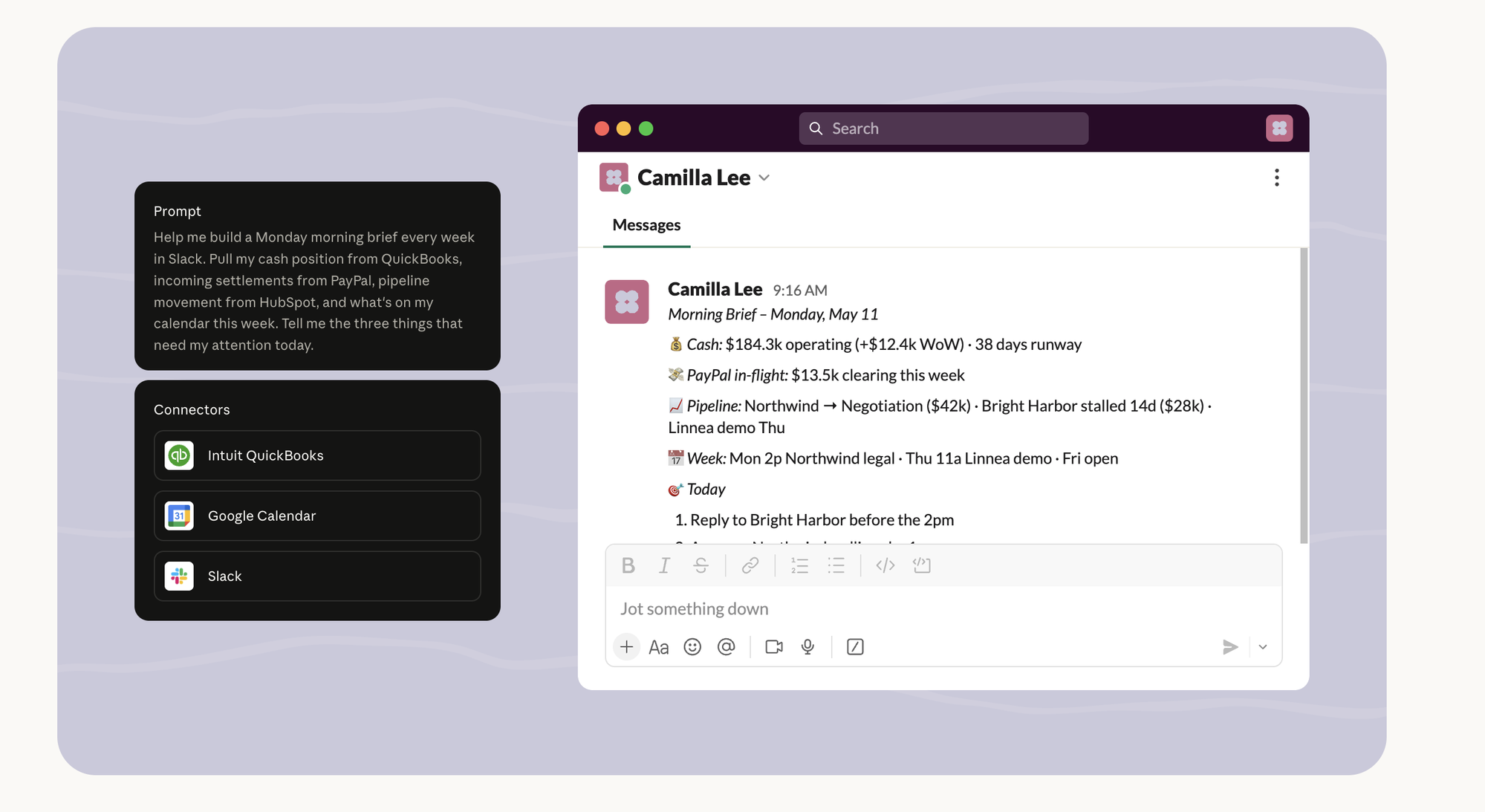
3. The Monday brief, recurring, in Slack. QuickBooks + Google Calendar + Slack.
“Help me build a Monday morning brief every week in Slack. Pull my cash position from QuickBooks, incoming settlements from PayPal, pipeline movement from HubSpot, and what’s on my calendar this week. Tell me the three things that need my attention today.”
A standing order, not a one-shot — see Chapter 7 for the scheduling layer underneath. 9:16 AM Monday, a Slack DM: cash $184.3k operating (+$12.4k WoW), 38 days runway; $13.5k PayPal in-flight; pipeline moves; the week’s calendar; and the three things to do today, ranked. Four connectors collapsed into the one message you read with coffee. This is Chapter 1 at the company level — the brief killed the tabs.
4. A campaign from the weakest month, staged not sent. QuickBooks + Canva + HubSpot.
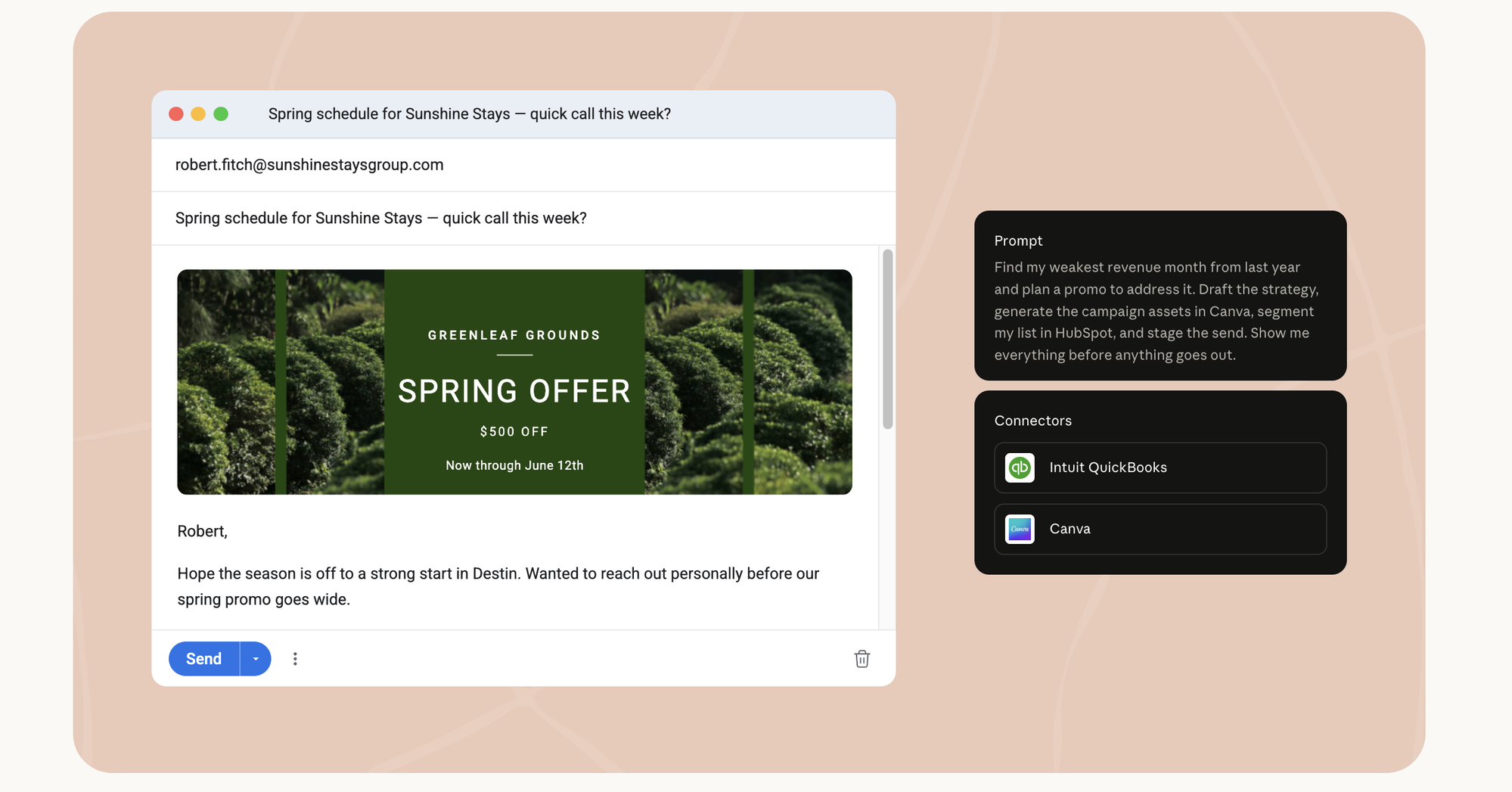
“Find my weakest revenue month from last year and plan a promo to address it. Draft the strategy, generate the campaign assets in Canva, segment my list in HubSpot, and stage the send. Show me everything before anything goes out.”
The one that crosses from finance into growth, and the clearest illustration of the review gate. The agent reads QuickBooks to find the soft month, builds the offer, generates the actual creative in Canva (a designed “$500 off” graphic, not a description of one), segments the HubSpot list, drafts the email — and stops. Staged, not sent. “Show me everything before anything goes out” is the whole relationship in one clause. The agent did the campaign. You decide if it ships.
The reason these belong in the connectors chapter and not a use-case appendix: none of them are possible without the plumbing. Pull QuickBooks out of #1 and it’s a guess. Pull Canva out of #4 and it’s a brief nobody designed. The workflow is what impresses; the connector is what makes it real. Wire the stack, and the demo becomes Tuesday.
My active connector set#
For Belkins I run HubSpot, Slack, Google Calendar, Gmail, Gong, and Fireflies. For Folderly I run Stripe and our deliverability data warehouse. For the Newsletter I run Notion and the Substack feed via RSS. Across everything I run Filesystem, GitHub, Vercel, Sentry, ElevenLabs, and Ahrefs.
The pattern: one CRM, one inbox, one calendar, one knowledge store, one analytics suite per company. No duplicates. The minute you have two CRMs wired in, the agent gets confused about which is canonical, and so do you. Pick one source of truth per category, wire it tight, expand only when a real workflow demands it.