It’s Tuesday, 12:47 PM. I’m three hours into a refactor on the Folderly inbox-rotation logic, the kind of work where the plan only lives in the conversation: four-step decomposition, two abandoned approaches, a half-finished test harness, and the exact reason we ruled out a queue-based design ninety minutes ago. I reach for my coffee, fumble the keyboard, and hit Cmd-Q on the wrong window.
Old me, two years ago, would have lost the thread. The plan, the context, the half-finished decomposition — all of it. I’d spend twenty minutes re-explaining myself to a fresh session, and the second pass would be worse than the first because I’d already used up the good thinking.
New me types one command:
claude --continueAnd I’m back in. Not back in roughly. Back in. The full transcript, the abandoned approaches, the test harness. Claude picks up mid-sentence, asks if I want to keep going, and we keep going. The session was never gone. It was waiting on disk.
This is the move. Sessions in Claude Code are a filesystem, not a memory. They’re not a feature you enable. They’re not something that lives in the model’s head. They are files on your machine, indexed by directory, persistent across crashes, accidental quits, and laptop reboots. This chapter is the filesystem operator’s manual.
The session model#
Every interactive Claude Code session is saved automatically. You don’t opt in. You don’t check a box. The moment you run claude in a directory, the conversation is being written to disk in real time. When you exit — clean or otherwise — the file is already there.
Sessions are scoped by working directory. Run claude in ~/projects/folderly and you get one session bucket. Run it in ~/projects/belkins-pipeline and you get a different one. This is the right default: most of your work is repo-local, and the session picker should only show you what’s relevant to where you are right now.
The files themselves live under ~/.claude/projects/<project-hash>/ (or a similar path depending on platform). Don’t edit them by hand. They are append-only logs of the conversation, and CC’s parser is the only thing that should be writing them. If you want to “do something” with a session, do it through the CLI, not through the filesystem.
One important caveat as of writing: cross-device sync isn’t there yet. If you start a session on your laptop, you can’t --continue it on your desktop unless you’re syncing ~/.claude yourself (which I do, via a private repo, but most people shouldn’t bother). Sessions live where they were born.
The four commands you’ll actually use#
claude --continue is the “I just closed the lid” command. It picks up the most recent session in the current directory and drops you back in with full context. No picker, no choice, just resume. This is what you use 80% of the time. Aliased to cc in my zsh config and burned into muscle memory.
claude --resume is the “what was I working on yesterday?” command. It opens an interactive picker showing past sessions in the current directory: timestamp, message count, a preview of the first prompt. Arrow keys, enter, you’re in. Use this when --continue would land you in the wrong session because you’ve worked on three things in this directory today.
/clear lives inside an active session. It wipes the current context — the conversation history the model can see — but keeps the session open. Use it when you’re switching tasks mid-session and don’t want yesterday’s debugging trail bleeding into today’s planning.
/compact also lives inside an active session. Instead of nuking history, it asks Claude to summarize the conversation so far and replace the long transcript with the short summary. You free up
The shape of —resume#
When you run claude --resume, you get a terminal picker. Not a fancy GUI — a list. Each entry shows a timestamp (“2 hours ago,” “yesterday at 3pm”), a count of messages, and a preview of your first prompt in that session. You scroll, you pick, you press enter, and the full history loads.
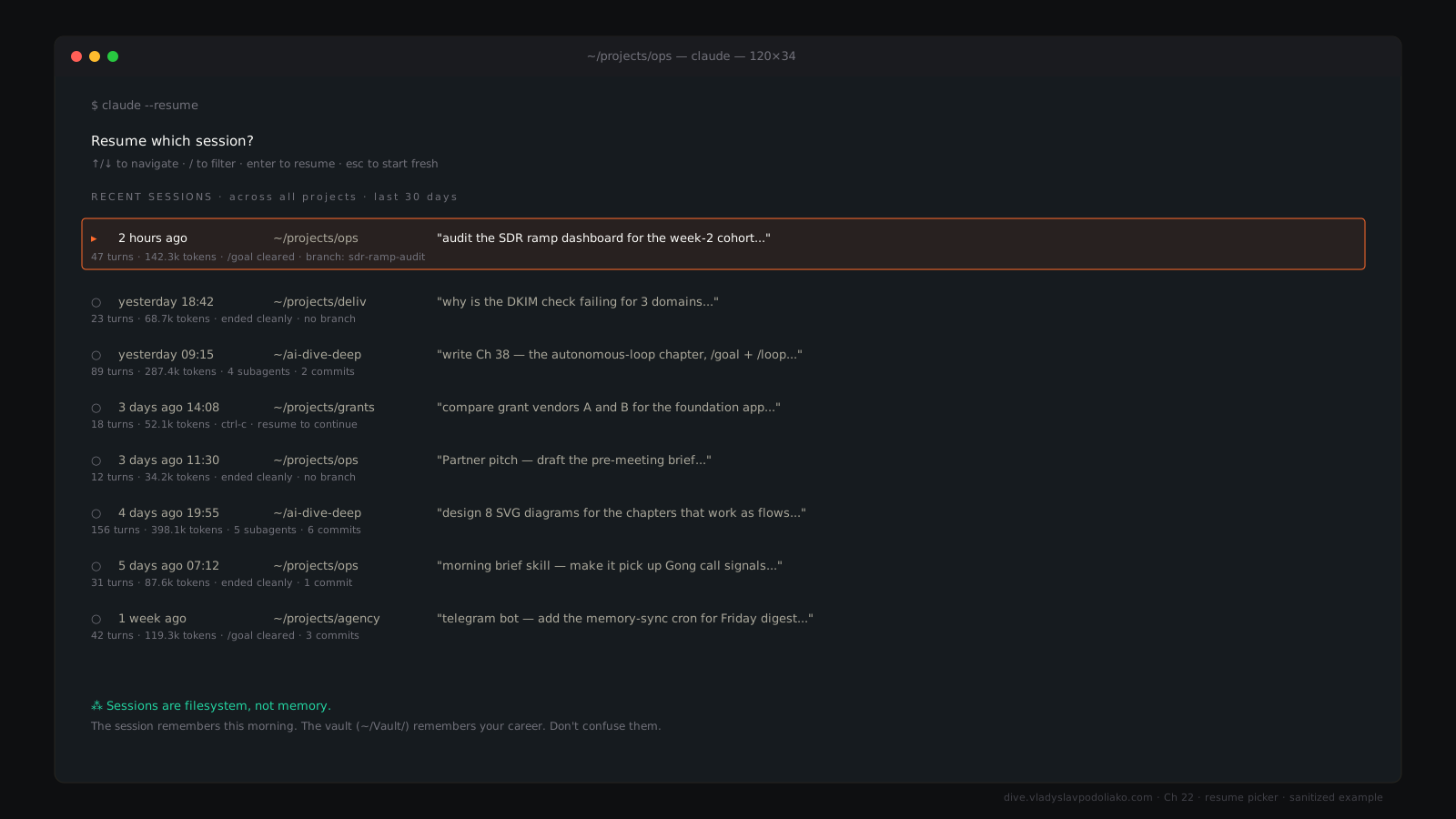
The picker is the part of CC most people under-use. It’s a bookmark system you didn’t know you had. Every meaningful conversation you’ve ever started in a given repo is one keypress away. The hard part is making the first prompts informative enough to be findable later — which brings us to forking and naming.
Forking — the underrated move#
Here’s the thing nobody tells you on day one: when you --resume an old session and submit a new prompt, you’ve created a fork. The original session, with its original ending, still exists on disk. The new branch — your new prompt and everything after — goes its own way. You have not overwritten yesterday. You have grown a second timeline.
Three patterns I use forking for, weekly:
The counterfactual fork. Yesterday I argued myself out of the second approach. Today I want to know if I was right. I --resume, scroll back to the decision point, and submit a new prompt: “Actually, let’s try the second approach.” The original analysis is preserved; the new branch explores the road not taken. Both are searchable later.
The style fork. I drafted a Belkins one-pager and shipped it. A week later, the prospect asked for “something punchier.” I --resume to the prompt right before the draft, fork with “Same content, but rewrite in a tighter, more aggressive tone — cut every other sentence.” Original draft preserved. New draft from the same context.
The swarm-rerun fork. I dispatched three --resume the dispatch session, fork at the dispatch turn, change the brief slightly, re-dispatch. The original swarm output is still there for comparison.
Forking is free. The cost of preserving a session is a few kilobytes. There is no version of “I should have forked instead of overwriting” because you can’t overwrite — every new prompt on an old session is a new branch by construction.
Naming sessions for sanity#
Claude Code doesn’t yet expose a clean “rename session” command. The picker shows your first prompt as the label. So your first prompt is your filename.
The hack: when a session matters, the very first thing you type is a memory note for future-you. Something like:
# this session is the Folderly inbox-rotation refactor — keep it.
tagged: refactor, inbox, prod
It’s a comment to yourself. Claude will respond, sure, but the value is that six weeks later, when you’re scrolling through fifty sessions in this repo, the one you actually need has a billboard on it. Five seconds of intention up front saves five minutes of “which one was that?” later.
Session history vs vault history#
These get conflated all the time, and it costs people. They’re different things.
Session history is the full prompt-and-tool-call log of every CC turn, stored on disk under ~/.claude/. It’s the conversation. It’s ephemeral by design — not in the sense that it gets deleted, but in the sense that it’s a thread, not a record. Work-in-flight. Scratch paper.
The rule I live by: for anything you want to remember six months from now, the vault is the answer. The session is the work-in-flight. If a decision matters, write it down outside the session. If a fact matters, drop it into CLAUDE.md. The session remembers this morning. The vault remembers your career.
Replay — when and why#
Sometimes you don’t want to continue, you want to re-run. Same prompt, different model. Same context, fresh session. Replay patterns:
# Re-run a prompt against a different model
claude --model opus
# paste the original prompt

# Programmatic replay across multiple repos
for repo in repo-a repo-b repo-c; do
  cd ~/projects/$repo && claude --print "Audit the test coverage."
done
For most operators, replay means “copy the original prompt, start a new session, paste.” That’s enough. The API gives you full conversation export if you need to do this programmatically, but most workflows don’t.
/clear vs /compact — when to use which#
/clear destroys context. Use it when you’re switching to an unrelated task in the same session (“now let me also look at the Belkins pricing page bug”). Cheaper than starting a new session because you don’t have to re-cd or re-set anything, but you lose the thread completely.
/compact summarizes context. Use it when the session has gotten long but the thread is still relevant (“we’ve been at this for ninety minutes, free up some space without losing the plot”). Claude rewrites the conversation as a brief, the brief becomes the new context, and you keep going.
A new claude invocation in the same directory is the third option: clean slate, but discoverable later via --resume. Pick based on whether you’ll want this thread back. Compact preserves it. Clear annihilates it. New invocation starts a sibling.
Long-running sessions — the trap#
A session that’s been open for six hours has accumulated context the model isn’t always smart enough to ignore. It starts referencing things from earlier in the day that don’t apply anymore. It hallucinates continuity. It “remembers” a file you renamed two hours ago.
The fix is mechanical: /compact aggressively, every 60–90 minutes on long sessions, or /clear if you’ve shifted tasks. Treat long sessions like air filters — they need swapping before they choke. The model gets dumber, not smarter, the longer you let context drift.
Sharing a session#
As of 2026, CC doesn’t have native session sharing. You can’t send a teammate a link to your conversation. The workaround is, again, the vault: write what matters to disk, and the next session — yours, or theirs — reads it from there. The chat is a workspace; the vault is what ships.
The right rhythm for daily work#
Morning: cd into the repo, claude --continue if you’re picking up yesterday’s thread, claude for a fresh start. Mid-day task switch: /clear and pivot, or open a second tmux pane with a separate session for the new task. Long task drag: /compact every 60–90 minutes without thinking. End of day: commit, write a one-line note in CLAUDE.md or your daily vault file about what’s left. Tomorrow’s --continue finds you exactly where you stopped.