Three days last month. Three modes. Same tool. Three completely different relationships with the agent.
Monday, 9:14 AM. I’m refactoring a payment-handling function — the kind where a wrong character means a real customer gets double-billed.
Tuesday, 2:47 PM. I want CC to migrate 14 files from a deprecated internal API to its replacement. I don’t want to babysit 14 prompts. I also don’t want to come back and find that CC made up a hook that doesn’t exist. So I run it in Plan mode. CC describes what it would do — every file, every line, every import — without writing a byte to disk. I read the plan in 90 seconds, push back on two of its decisions, then exit plan mode and let it run.
Wednesday, 3:11 AM. A Codex-style agent on my private box is auto-fixing Sentry errors that came in overnight. Auto mode, sandboxed, no prompts, no human. I’m asleep. In the morning I read the PR it opened, approve the ones I like, close the rest.
Three modes. Knowing which one you’re in is half the discipline. Most people running CC in 2026 still operate exclusively in one mode — usually Interactive, sometimes the wrong one — and lose either time or money because of it.
Mode 1 — Interactive (the default)#
Every Edit, Write, Bash, and WebFetch
- Yes, once — approve this single call.
- Yes, always for this pattern this session — auto-approve
Bash(npm test*)for the rest of this run, then revert. - Yes, always permanently — write that pattern into your settings. Future sessions auto-approve.
- No — reject and explain why. CC will course-correct.
Why this is the default: most of the time, you’re driving on real code, and the cost of a wrong write is real. Interactive is slow on purpose. The slowness is the safety margin.
When Interactive shines:
- Production code on your main machine.
- Anything touching
.env, auth, payment routing, migrations, or schema. - Pair-programming flow where you want to think between steps.
- Learning CC for the first time — every prompt is a teachable moment.
The mistake here is graduating out of Interactive too fast. The first week you run CC, you should reject things. Not because CC is wrong — but because rejecting forces you to articulate why, and that’s how you build the mental model for what to trust later.
Mode 2 — Plan mode#
Plan mode is the agent describing what it WOULD do without doing it. No edits hit disk. No bash runs. No network calls. The output is a step-by-step plan you can read, critique, and approve as a single unit.
claude --plan
# Then in-session:
> Migrate every call site of getUser() to the new useUser() hook.

# CC produces a plan:
# "I'll edit src/auth/login.tsx (line 42), src/auth/profile.tsx (line 19),
#  src/dashboard/header.tsx (line 88), [...11 more files...].
#  I'll add `import { useUser } from '@/hooks/useUser'` to each.
#  Tests in __tests__/auth.test.ts should still pass.
#  I will NOT touch src/legacy/ — those still need getUser().
#  Estimated 14 file edits, 0 deletions, 0 commands."
You read it. You push back on the legacy carve-out, or the test assumption, or the import path. CC adjusts. You exit plan mode and run for real — usually with the plan now serving as the ledger of what to expect.
When Plan mode shines:
- Any change touching 5+ files.
- Refactors where you don’t fully trust the agent’s instinct yet.
- Migrations across deprecated → new APIs.
- Anything where “let me see what you’d do” is cheaper than “let me undo what you did.”
- Communicating to a teammate or stakeholder what the agent is about to change.
Plan mode is the most underused feature in CC. Most engineers go straight from Interactive to “fuck it, —dangerously-skip-permissions” without ever stopping at Plan. That’s the wrong jump. Plan is the safety stop between caution and recklessness — the one that costs you 30 seconds and saves you 30 minutes of git reset.
Mode 3 — Auto mode#
No prompts. No approvals. The agent runs every tool call without asking. There are three flavors, and the difference between them is the difference between a controlled workshop and a kitchen fire.
--dangerously-skip-permissions— the nuclear option. Skips ALL gating across all tools. Reserved for sandboxed environments where the worst case is “rebuild the container.”--allowed-toolsallow-list — narrower. You specify exact tool patterns that auto-approve (Bash(pytest*),Edit(src/**)), and anything outside the list still gates. This is the version most pros actually use.- Settings-level always-allow patterns — quietly auto-approves specific patterns you’ve graduated to trust over time, written into
~/.claude/settings.jsonor per-repo equivalents. Same effect as the allow-list, but persistent.
When Auto mode shines:
- Sandboxed CI runs (Docker, Codespace, e2b, ephemeral VMs).
- Long-running monitoring agents — the Sentry-watcher pattern, where the agent reads errors and opens PRs.
- Headless cron jobs that run while you sleep.
- Repetitive batch work — classify 5,000 emails, normalize 200 markdown files, regenerate fixtures.
When Auto mode KILLS you:
- On your main laptop with prod credentials sitting in
.env. - In any repo where you haven’t audited what secrets the agent could read.
- Any environment where “agent did something stupid” costs more than “rebuild the container.”
The flag works exactly as advertised. The flag is not the problem. The environment is the problem.
The mode picker (mental model)#
Three questions, in order:
- What’s the cost of a wrong action? High → Interactive. Medium → Plan first. Low (
) → Auto. - How many steps? 1 → Interactive. 5+ → Plan first, then Interactive. 100+ batch → Auto in a sandbox.
- Am I awake? Yes → Interactive or Plan. No → Auto-only-if-sandboxed.
That’s it. There’s no fourth question. Most “should I use auto?” debates collapse the moment you ask question one honestly.
claudeCombining modes — the actual pro pattern#
You don’t pick one mode forever. You shift modes mid-session, sometimes within a single feature. The real workflow looks like this:
- Start in Interactive to scope the problem. Read files, ask CC questions, sketch the change in conversation.
- Flip to Plan when you’ve decomposed the change and want a preview of execution.
- Run Interactive for the actual execution if it’s under ~20 tool calls.
- Drop to Auto with a tight allow-list (
Bash(pytest*),Bash(prettier*)) for the long tail — tests, format, lint, the boring closeout.
The shift is the skill. Anyone can pick a mode; pros switch modes the way a driver switches gears, and the session feels different because of it.
Plan mode artifacts deserve more love#
A good Plan mode output is itself a deliverable. Copy it into the PR description. Paste it into the Linear ticket. Hand it to a teammate as the brief. Drop it into the next session as the starting context. Plans are reviewable; raw diffs are not. Treating Plan output as throwaway is leaving the second-best feature of CC on the table.
The auto-mode trap most people fall into#
They run claude --dangerously-skip-permissions on their main machine “because the prompts were annoying.” Two weeks later something rewrites their .env, posts a “lol” message in #company-announcements, or pushes a half-baked branch to main because the agent misunderstood “ship it.”
The flag worked. Exactly as advertised. The agent did exactly what it was permitted to do. The user permitted too much in the wrong environment, because they were tired and the prompts felt slow.
If you’re reaching for --dangerously-skip-permissions to save time on your main box, you’re not optimizing — you’re borrowing risk you’ll have to repay with interest.
What about Cowork?#
--dangerously-skip-permissions equivalent because the surface itself is isolated — bash runs in a managed VM, no host filesystem, allow-listed network. The trade-off: Cowork can’t reach into your local repo unless you mount the folder explicitly.
Different threat model, different default. On Cowork you can be more aggressive about Auto-style behavior because the blast radius is bounded by the platform, not by your discipline. On your main machine, the blast radius is your career.
The one-paragraph rule of thumb#
On your main machine: live in Interactive, dip into Plan when the change is big, escape to Auto only when the environment can’t hurt you. The environment determines the mode, not the urgency. Whenever you’re tempted to skip permissions, ask whether you’re skipping because it’s safe — or because you’re tired. If it’s the second one, close the laptop.
Mode 4 — /goal#
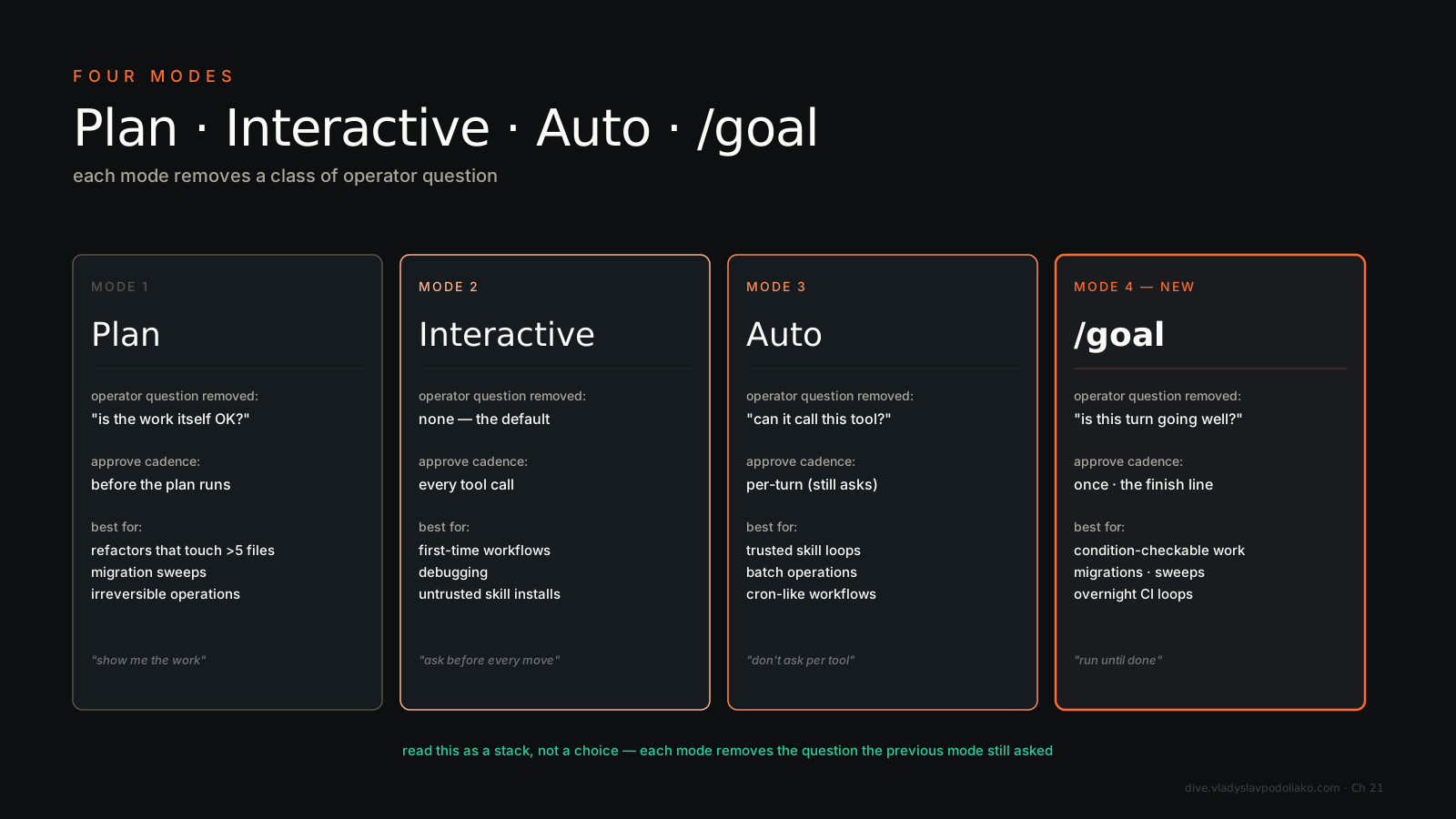
The fourth mode shipped May 11, 2026 in Claude Code v2.1.139, and it’s a different category of move than the first three. Plan removes the surprise — you see what’s coming. Auto removes the per-tool approval — you don’t gate every Edit. /goal removes the per-turn approval — you don’t end the turn. Anthropic’s own framing in the docs is the clean version: “auto mode removes per-tool prompts, and /goal removes per-turn prompts.” That’s a stack, not a choice. Plan → approve the plan → Auto → don’t approve each tool → /goal → don’t approve each turn.
How it actually works. You type /goal <condition up to 4,000 chars>. Claude takes a turn. After the turn, a small fast model (Haiku 4.5 by default) reads the transcript and judges whether the condition holds. If not, Claude starts another turn instead of returning control. The goal clears automatically once the condition is met. A live overlay labeled ◎ /goal active shows elapsed time, turns evaluated, tokens spent. One goal per session. Setting a new one replaces the old. /goal clear (aliases stop, off, reset, cancel) kills it.
The killer scene: /goal deploy until tests pass. The evaluator’s signal is the test runner’s exit code Claude already had to print. Roughly 12 turns on a real refactor, fire-and-forget. Same shape for “all P0 issues labeled auth are closed” or “the auth migration in src/auth/* compiles under strict tsc, and no file outside src/auth/ has been modified.”
The new failure mode is the one you have to name out loud. Open-ended /goal conditions create vibe-eval loops — “make the code better” never converges, “the docs are good” is interpretation, and Haiku will happily decide “not yet” forever while burning your budget. The eval has to be one Claude’s own output can demonstrate in the transcript. If the test runs in a subprocess whose stdout doesn’t bubble back, the evaluator never sees pass/fail and you loop forever. Put a stop clause in the condition itself — or stop after 20 turns — and watch the first run before you trust it overnight. See Chapter 38 for the autonomous-loop deep dive: /goal, /loop, and Stop hooks as the three primitives.