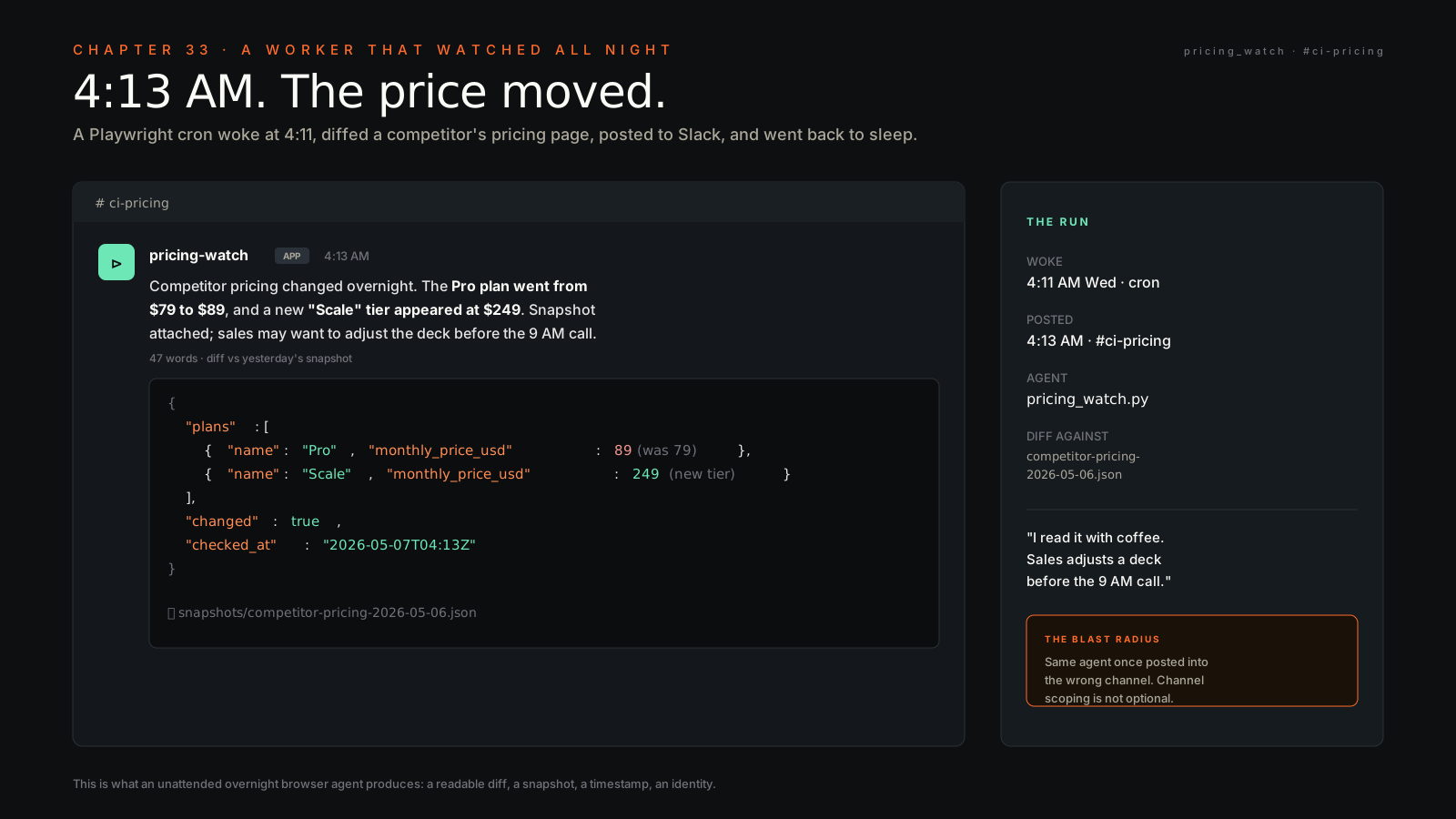
It’s 4:11 AM Wednesday. I’m asleep. A Playwright script wakes up on a Vercel cron, opens a Chromium window in a Hetzner box, loads a saved cookie jar, navigates to a competitor’s public pricing page, waits for the DOM to settle, snapshots the visible offer table, hands the HTML to Claude with a prompt that says “diff this against yesterday’s snapshot at /var/snapshots/competitor-pricing-2026-05-06.json, return JSON,” and at 4:13 AM a 47-word summary lands in the #ci-pricing Slack channel saying the Pro plan went from $79 to $89 and a new “Scale” tier appeared at $249. I read it with coffee. Sales adjusts a deck before the 9 AM call.
That same agent, two days later, posted the same kind of summary into #partner-folderly because I’d typo’d a channel ID in a config file. A customer in that channel saw a screenshot of a competitor’s pricing page with our logo on the deck around it. They asked, politely, whether we make a habit of this. I spent an hour writing the apology and another two days writing the kill switch I should’ve shipped on day one.
Both halves are the chapter. Browser agents unlock the workflow that has no API. They also drive a forklift through your laptop while you sleep. You want both — the unlock and the rails.
The Playwright + Claude pattern#
The whole loop is four steps and they don’t change.
Read the DOM. Reason about what you see. Click or type or scroll. Verify the page changed the way you expected. Repeat until the goal is met or a budget runs out.
The “read DOM” step is page.content() or page.locator(...).inner_text() — Playwright gives you the rendered HTML after JavaScript has run, which is the version that matches what a human sees. The “reason” step is a Claude call with the relevant slice of HTML and a prompt like “the user wants to extract the pricing table; return CSS selectors that point at the columns.” The “click” step is page.click(selector) or page.fill(selector, value). The “verify” step is a re-read of the DOM and a check that the thing you expected to happen happened — usually a text match, sometimes a URL change, occasionally a screenshot diff for visual workflows.
The mistake most people make on day one is asking Claude to drive every click. You don’t need Claude for page.goto(url) or page.click("#login-button") — those are deterministic, write them as code. You need Claude for the steps where the page is unfamiliar, the layout is hostile, or the structure changed since yesterday. Use Claude for the reasoning gaps; use Playwright for the muscle.
Login flows — save state once, reuse forever#
The single biggest unlock in browser automation, the thing that turns “this is fragile” into “this runs for six months untouched,” is saving session state.
Playwright has a method called context.storage_state(path="state.json") that dumps every cookie, every localStorage entry, every sessionStorage entry from a logged-in browser context to a JSON file. You log in once, by hand, in a Playwright-launched browser. You save the state. From then on, every script run loads that state file and starts already-authenticated. No password handling. No 2FA dance. No “are you a robot” challenge for a session that already exists.
# one-time bootstrap, run interactively
from playwright.sync_api import sync_playwright

with sync_playwright() as p:
    browser = p.chromium.launch(headless=False)
    context = browser.new_context()
    page = context.new_page()
    page.goto("https://app.example.com/login")
    input("log in by hand, then press enter...")
    context.storage_state(path="state.json")
    browser.close()
State files expire. Most stay valid 30 to 90 days; some sites rotate session tokens weekly. When a run fails on a redirect to /login, that’s the signal — re-run the bootstrap, refresh the state, you’re back. Treat state.json like a credential — same drawer as your .env file, same encryption at rest, same “do not commit” rule. Don’t put it in git. Don’t put it in a Slack DM to yourself. Put it somewhere a teammate can rotate it without asking you.
The action loop, with code#
Here’s the working shape. Pseudocode first, then actual code that runs.
The pseudocode: launch browser with saved state → navigate to target page → wait for DOM ready → extract relevant HTML → ask Claude to return structured JSON → validate JSON shape → write to durable storage → close browser. Every step has a timeout. Every step has a fallback. The whole thing runs in under 30 seconds on a healthy page.
# pricing_watch.py — runs on a cron, ~50 lines
import json
import os
from datetime import datetime
from pathlib import Path
from playwright.sync_api import sync_playwright
from anthropic import Anthropic

TARGET_URL = "https://competitor.example.com/pricing"
STATE_FILE = "state.json"
SNAPSHOT_DIR = Path("snapshots")
SNAPSHOT_DIR.mkdir(exist_ok=True)

client = Anthropic(api_key=os.environ["ANTHROPIC_API_KEY"])

def fetch_pricing_html() -> str:
    with sync_playwright() as p:
        browser = p.chromium.launch(headless=True)
        context = browser.new_context(storage_state=STATE_FILE)
        page = context.new_page()
        page.goto(TARGET_URL, wait_until="networkidle", timeout=20_000)
        page.wait_for_selector("[data-testid='pricing-table']", timeout=10_000)
        html = page.locator("[data-testid='pricing-table']").inner_html()
        browser.close()
        return html

def extract_offers(html: str) -> dict:
    msg = client.messages.create(
        model="claude-opus-4-7",
        max_tokens=1024,
        messages=[{
            "role": "user",
            "content": (
                "Extract every plan from this pricing HTML. "
                "Return JSON: {plans: [{name, monthly_price_usd, features: [..]}]}. "
                "If a plan has no listed price, use null. No prose.\n\n" + html
            ),
        }],
    )
    return json.loads(msg.content[0].text)

def main():
    html = fetch_pricing_html()
    offers = extract_offers(html)
    stamp = datetime.utcnow().strftime("%Y-%m-%d")
    out = SNAPSHOT_DIR / f"competitor-pricing-{stamp}.json"
    out.write_text(json.dumps(offers, indent=2))
    print(f"wrote {len(offers.get('plans', []))} plans to {out}")

if __name__ == "__main__":
    main()
That’s the whole thing. Paste it into a file, set ANTHROPIC_API_KEY, run python pricing_watch.py. The diff-against-yesterday + Slack post is another 20 lines on top — read both files, ask Claude what changed, post to a webhook. Cron it. Walk away.
CAPTCHA reality#
You will hit a CAPTCHA. Probably on the third site you try.
There are three honest answers. One: the site detected automation and you should leave. CAPTCHAs aren’t a puzzle to solve, they’re a “go away” sign. If your use case is a public pricing page, switch to a different signal — RSS feed, sitemap, a cached version on a third-party comparison site. Two: pay a CAPTCHA-solving service like 2Captcha or CapSolver, $1 to $3 per thousand solves, plug it into Playwright via a small adapter, and accept that you’ve moved up a tier in the cat-and-mouse. Three: the CAPTCHA is on a workflow you legitimately have an account for, in which case use authenticated session state (see above) and you’ll usually never see one.
The line I draw: if the site shows a CAPTCHA to logged-out humans, that’s a “go away” sign and I respect it. If the site shows a CAPTCHA only to behavior that looks bot-like and I am, in fact, a bot doing human-shaped work for myself, that’s a UX problem I can solve with slower clicks, real mouse movement libraries, and rate limiting. If the site shows a CAPTCHA to me-the-logged-in-human acting through a script, the session-state pattern fixes 90% of those.
ToS lines you don’t cross#
Browser automation is legal. How you use it gets you sued.
LinkedIn scraping at scale is the canonical example. The hiQ vs LinkedIn case made public-data scraping technically defensible in the US, but LinkedIn still bans accounts that automate, and your state.json will be dead in 48 hours, and they will block your IP block, and you’ll have spent two weeks building a thing that worked for three days. Don’t ship products on top of that. Don’t promise customers a feature that depends on it.
The four hard NEVER lines I keep:
- Never automate account creation. That’s where the law gets unforgiving and the platforms get vindictive.
- Never scrape PII at scale, even if it’s “public.” The GDPR/CCPA bill arrives later. The LinkedIn class actions exist.
- Never automate DMs, follow-spamming, or any behavior that simulates a human at scale on a social platform. Account dies, you waste the work.
- Never run a browser agent against a system you don’t own where the failure mode is someone else’s data getting touched. Use the API, get permission, or walk away.
The soft rule: if I’d be embarrassed to explain the script to the company that owns the site, I don’t run the script. That filter catches 90% of the bad ideas before I write the first line of code.
Chapter 9 goes deeper on the security side. Chapter 12 covers the connectors-first reflex — always check whether an MCP exists before you reach for Playwright.
Operator is dead, computer-use is production#
The browser-agent landscape consolidated harder than I expected. OpenAI’s Operator — the flagship “watch the agent click around your browser” product they launched in 2024 — got shut down on 2025-08-31. It couldn’t reliably finish checkout flows once JavaScript, CAPTCHAs, and session state stacked up. Anthropic’s computer-use went the other direction: graduated from research preview in 2024 to a production-tier feature on Pro and Max in March 2026, available through Cowork and Claude Code on the user’s own machine. The OSWorld benchmark, which measures full-desktop control, sits at 72.5% for Sonnet 4.6 — roughly the human baseline. Anthropic also disclosed an internal model (Mythos) at 81% OSWorld and explicitly stated it would NOT ship — Project Glasswing shipped instead. The number that matters for actual operator stacks is the 72.5% you can deploy today, not the ceiling the lab refused to release.
What that means at the script level: a Playwright cron I built on Operator in 2024 to pull invoice screenshots out of a vendor portal got ported to Anthropic computer-use earlier this year. Latency held within ten percent. Token cost dropped because the model is cheaper per turn. Reliability went up because the model now actually parses login modals and dialog boxes instead of guessing at coordinates. Same workflow, different runtime, better economics. The landscape now is essentially Anthropic computer-use plus Playwright plus a handful of open-source browser-use libraries — the consolidation makes the stack simpler to defend in front of a security review and easier to debug at 4 AM. One pattern note from the production deployments I’ve seen: nobody runs a single agent with full browser control. The shape is a dispatcher orchestrator routing to specialist subagents — hub-and-spoke — because debugging “what was the agent thinking when it clicked the wrong button” needs a single control flow to trace, not a free-form swarm.
The kill switch#
Every browser agent needs a way to stop everything, fast, no matter what.
Mine is three lines of defense. The first is a config-driven “is this allowed to run today” check at the top of every script — reads a file at ~/.config/browser-agents/enabled.json, exits 0 if the agent’s name isn’t in the allowed list. Flipping one bit in one file kills the entire fleet without redeploying. The second is a per-run timeout — every script wraps its work in a 5-minute hard ceiling, after which Playwright force-closes the browser and the script dies with a non-zero exit code that the cron runner reports. The third is destination-allowlisting — every Slack post goes through a wrapper that checks the channel ID against a hardcoded set of approved IDs. The day I posted the competitor’s pricing into the wrong channel was the day I shipped that wrapper. Should’ve been day one.
# kill_switch.py — import at the top of every browser agent
import json, sys
from pathlib import Path

ALLOWLIST = Path.home() / ".config/browser-agents/enabled.json"

def check_enabled(agent_name: str) -> None:
    if not ALLOWLIST.exists():
        sys.exit(f"kill switch: {ALLOWLIST} missing — refusing to run")
    enabled = json.loads(ALLOWLIST.read_text()).get("enabled", [])
    if agent_name not in enabled:
        sys.exit(f"kill switch: {agent_name} disabled — exiting cleanly")
The kill switch is the thing that lets you run browser agents at all. Without it you’re one bad config away from a Slack apology to a paying customer. With it, the worst day is “the script noticed it wasn’t allowed and went home.”
Browser agents are the bridge between the world that has APIs and the world that doesn’t. The pricing page nobody publishes a feed for. The vendor portal where invoices live behind a login. The internal tool a vendor sold you with no MCP. You don’t get to wait for those companies to ship integrations. You get to script the page.
The thing browser agents are not is a substitute for thinking. A connector with a contract is always better than a script that interprets a webpage. APIs change with notice; pages change overnight. So my reflex order is: MCP connector first (Chapter 12), official API second, scraped feed third, browser agent fourth, and only when the prior three don’t exist or aren’t enough.
I’m not going to wrap this with five lessons. The lesson is the channel I posted into, the apology I wrote, the kill switch I shipped two days late. If you build browser agents, you will repeat one of those three at least once. Get the kill switch in before the apology, and you’ll only repeat the first two.