A subscription renews on the billing clock, and nobody does anything to make it happen. No tap, no engineer awake — a card gets charged, Apple’s servers auto-renew the subscription, a receipt gets signed, and a row lands in RevenueCat. Store: App Store. Product: LinguaLive — Monthly Pro, $7.99. Event: RENEWAL. The customer is an anonymous id, 392e…ff42, that had shown up once before as an INITIAL_PURCHASE.
That’s the whole chapter in one row. Not a download count, not a TestFlight link, not a screenshot of an app icon on a home screen — a renewal. Money that recurred because a real StoreKit purchase ran on a real phone, the one thing no simulator, no .storekit config file, and no agent can fake. And here’s the part that should sit wrong with you in the right way: I have never written a line of Swift. Claude Code one-shot the native app — every line of it — and it still couldn’t ship it. The agent wrote a language I can’t read; it could not walk through the gate that made that row possible. I did.
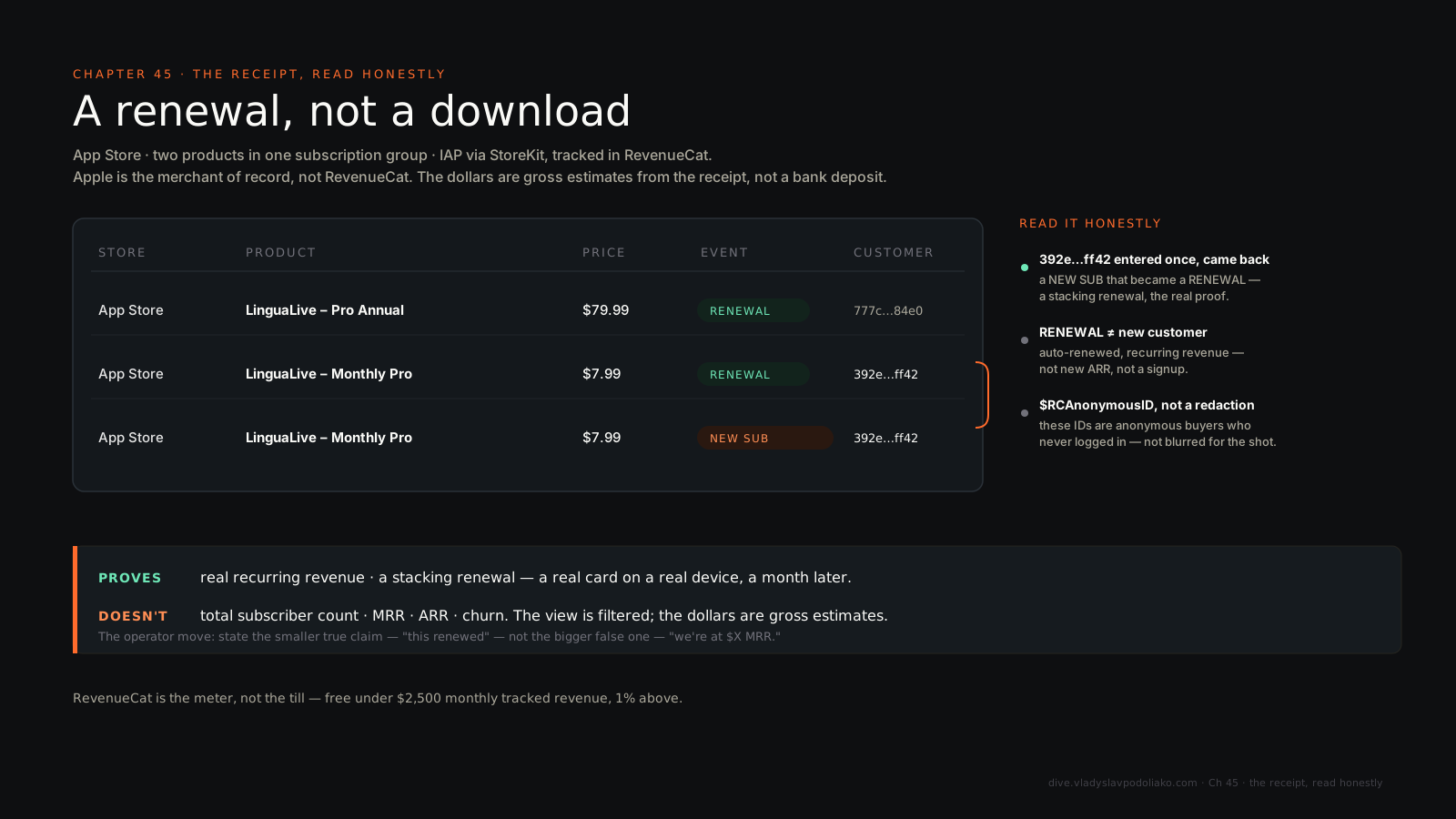
So state the honest claim and the honest non-claim in the same breath, because a dashboard is the easiest thing in this book to lie with. That row proves real recurring revenue and a stacking renewal — a subscriber who entered once and stayed. It does not prove a subscriber count, MRR, ARR, or churn. The view is filtered. I’ll come back to how to read it without inflating it, because the restraint is the point.
Now the reframe, and it’s the load-bearing one. The lesson is not “you can build an iOS app with no Swift.” Of course you can — the code is the easy part now. The lesson is that shipping native means the operator owns a platform-and-policy surface the agent is structurally locked out of. The App Store is just another deploy target — with the strictest gates in the book, and the operator, not the agent, walks through every one.
One boundary before I start, because this is a book with receipts. What follows rests on two things: the public reality of the Apple platform, sourced to Apple’s own docs, and the real facts of LinguaLive — the web build, the product, the revenue rows above, and the agent that wrote the native code, which was Claude Code, in one shot. What I won’t do is dress it up with a build timeline I didn’t log or a rejection I didn’t get. The gates below are the platform’s, stated as the platform’s — not a reconstructed diary.
The same app, validated as a web app first#
The native ship wasn’t a cold start. LinguaLive existed first as a web app — Next.js, the Gemini Live API streamed over WebSockets for the lowest-latency audio, Claude Opus for the edge-case conversation logic, Supabase underneath — built over one weekend. The voice-agent rebuilds live in their own chapter; this one picks up after the web app already worked.
The web version had already passed the only test that matters before you pay a single platform-tax dollar: 50 real users in 48 hours. Demand was real before native was attempted — the Saturday-ship cadence of build something and see if it works, not validate it with Google searches. The product is honest and small on purpose: real-time spoken practice with instant correction, six languages, free for 30 minutes a day, Pro at $7.99 a month. Three minutes of talking beats an hour of tapping.
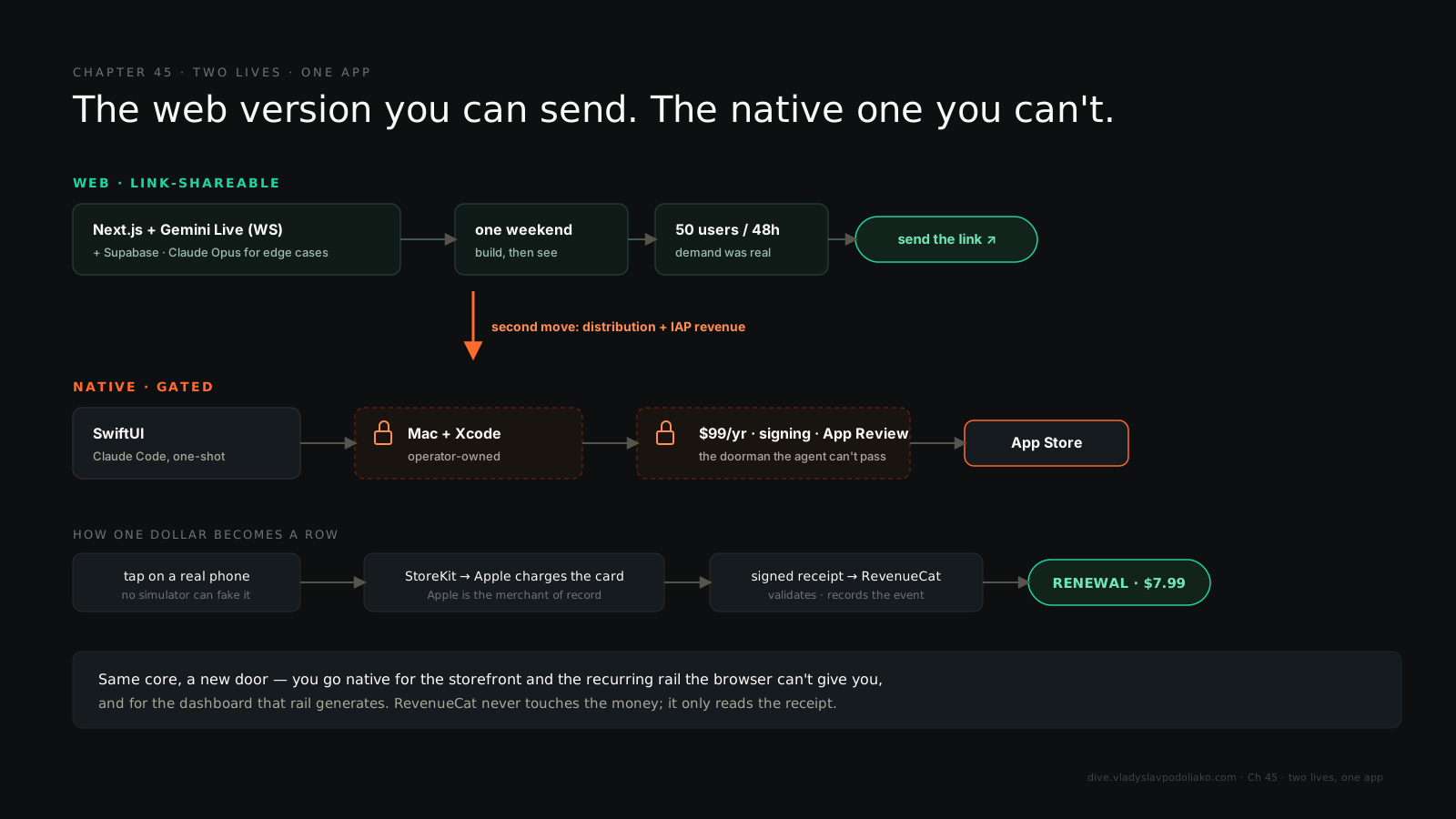
So why go native at all, if the web app worked? Because native isn’t an upgrade of the web app — it’s a different distribution surface with a different revenue rail. You go native for two things a browser can’t hand you: a spot in the App Store, where people already go looking for apps, and a payment rail that turns “tried it” into “renews monthly.” The web app could be link-shared — that’s the send-the-link move, the whole book’s argument about live artifacts. Going native trades that link away on purpose, for the storefront and the tollbooth.
What the agent actually owned#
The reframe only lands if I’m honest about the code-side win, so let me be specific: the part everyone fears, writing Swift, is the part that’s now cheap. SwiftUI is declarative — Apple’s own framing is “write the results, not the instructions” — so it maps almost one-to-one to plain-English intent, which is exactly the altitude an agent is good at. Claude Code one-shot the native app, and the reason that’s even possible is that this whole layer is an agent’s home turf: the SwiftUI views, a StoreKit 2 paywall, the URLSession-and-Codable plumbing, the unit tests, and the underrated one — explaining a cryptic Xcode error in plain English instead of sending me on a Stack Overflow archaeology dig. (That SwiftUI has matured enough since iOS 18 to skip UIKit for most apps is the community’s read, not Apple’s — but it matches what I saw.)
The surface got better at exactly the right moment. Xcode 26.3 added agentic coding: an in-IDE agent can create files, build the project, run tests, take UI snapshots, read the build logs, and iterate until the errors clear — on your own model account, with Apple not sitting in the middle. That closes a loop the agent used to be locked out of, where a human had to shuttle build output back to the model by hand.
But notice the distinction, because it’s the one operators get wrong. An in-IDE Xcode agent can build, run, and snapshot. A standalone terminal agent — xcodebuild on the command line (-allowProvisioningUpdates, DEVELOPMENT_TEAM, an exportOptions.plist) or fastlane — and wiring that bridge is itself operator work, not something the model does for you.
Which points straight at what the AI is bad at, and it’s not “writing code.” It’s resolving a real code-signing failure, where the model offers a plausible-and-wrong fix that makes the maze worse. It’s the .pbxproj merge conflict Xcode regenerates on every change. It’s how the app behaves on a real device. It’s citing the current fee or SDK minimum from memory, when both drift. The boundary was never “can it code.” It’s “can it stand at the gate.”
The gates the agent cannot cross#
This is the spine made literal. The gates are a sequence the operator alone crosses — each one a place the agent is locked out by design, not by capability: a portal it has no account on, a policy it can’t satisfy by writing code, an identity it can’t hold.
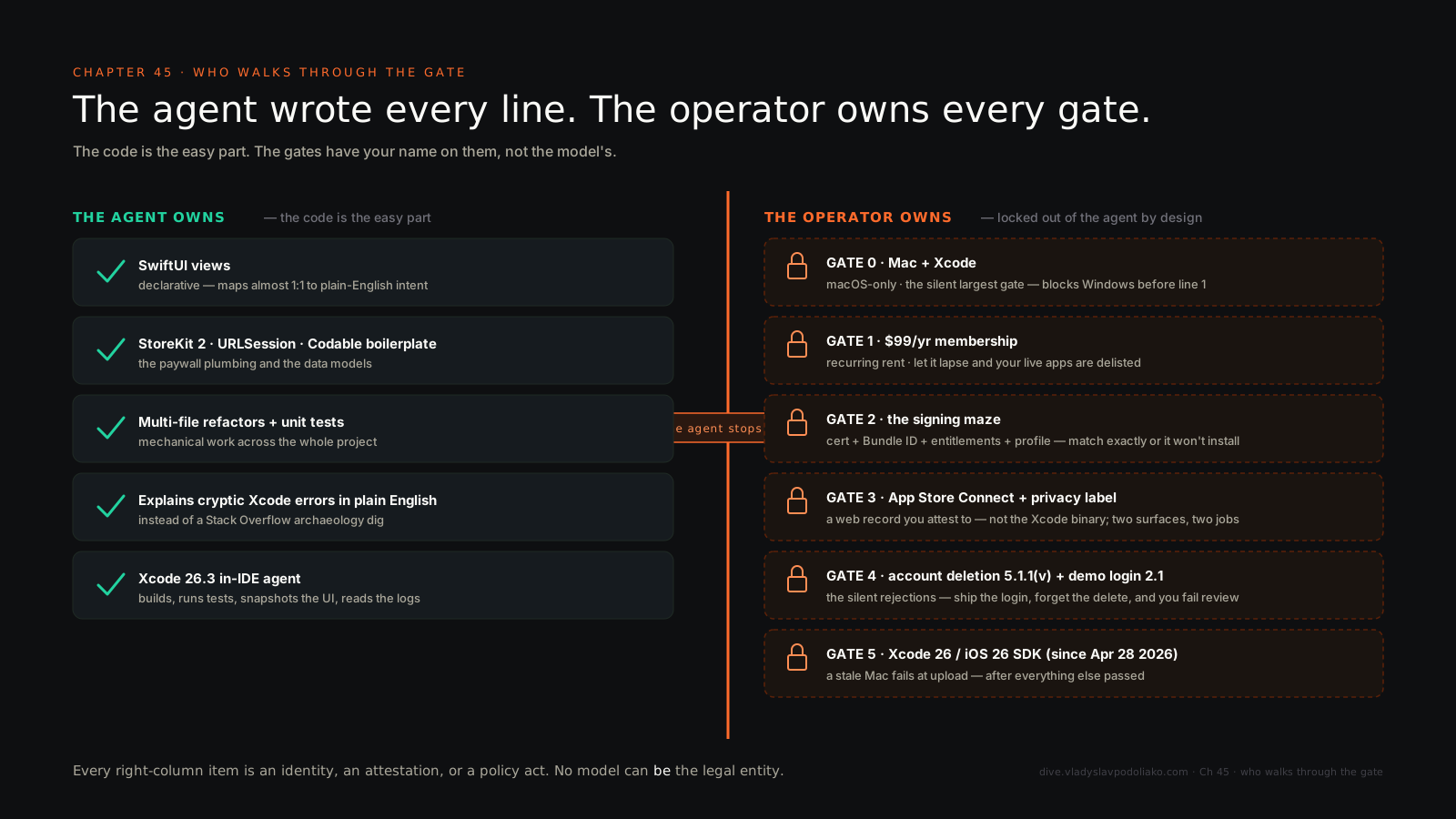
Gate 0 — a Mac running Xcode. The silent largest one. Xcode is macOS-only, and Xcode is what compiles, signs, archives, and uploads the binary. No Mac, no native iOS app — cloud-Mac and CI services still just drive Xcode under the hood. This blocks every builder on Windows or a Chromebook before line one of code, and nobody warns them.
Gate 1 — $99 a year. The Apple Developer Program is annual and recurring, and your live apps get delisted if it lapses. It’s a subscription you pay for the right to charge subscriptions. Rent, not a setup fee.
Gate 2 — the signing maze. The number-one non-code blocker: a signing certificate (your identity) plus a Bundle ID, plus entitlements (the in-app-purchase capability is one), plus a provisioning profile that binds all of it — matching exactly, or the build won’t even install. This is precisely where the agent’s plausible-but-wrong fixes burn you. Xcode’s “Automatically manage signing” is the right default for a beginner, and these certificates are blast-radius keys — treat them with the same hygiene as any other credential.
Gate 3 — two portals, not one. App Store Connect — the web record where metadata, screenshots, the privacy label, pricing, and the submit button live — is not Xcode, which produces the binary. Beginners conflate them. The terminal agent touches neither cleanly.
Gate 4 — the silent rejections. This is the one AI-built apps fail most quietly. Account deletion has been mandatory since June 30, 2022 under Guideline 5.1.1(v): any app with sign-up must let a user delete the account from inside the app, deactivate is not delete, it has to be easy to find, and if you use Sign in with Apple you must also revoke tokens through its REST API. Agents ship the login and forget the delete. Next to it: the App Privacy nutrition label, required for every app and including what your third-party SDKs collect, where a false or incomplete answer is a rejection — and a working demo account for the reviewer under Guideline 2.1, because the reviewer is a real person who will try to sign in, and a login wall with no credentials or a dead backend is an instant reject.
Gate 5 — the last-gate toolchain trap. Since April 28, 2026, uploads must be built with Xcode 26 and the iOS 26 SDK. A stale Mac silently produces a build that App Store Connect rejects at upload — after everything else passed.
Pull the thread and every one of these is the same kind of thing: an identity, an attestation, or a policy act. The agent can draft the privacy answers and write the delete-account screen. It cannot be the legal entity that attests to them, hold the signing identity, or sit across the table from App Review.
The rung you cannot skip#
This is the mobile version of the browser-QA rung from the Folderly refactor — verify with real behavior, which is the whole game, pointed at a phone. Three rungs, and the agent rides the first two while the third needs a real device in a human hand.
Rung one: build in Xcode — it compiles. Rung two: the simulator — fast for laying out views, and a trap if you stop there. It runs x86, not the ARM code that ships; it has no camera, no GPS, no Secure Enclave, no push, and — the load-bearing omission — no live StoreKit. You can make a purchase screen look flawless in the simulator and prove nothing.
Rung three is the one you cannot skip: a real device with a sandbox Apple ID for anything monetized, sensor-bound, or performance-sensitive. The trap the vibe-coder falls into is the .storekit configuration file — it lets you exercise the purchase flow locally, and it feels like proof. It is not. A live in-app purchase only validates on a physical device, which is also exactly what App Review checks under 3.1.1.
Tie it back to the row I opened on. That renewal could only exist because a real purchase cleared this ladder to the top rung — the dashboard row and the top rung are the same event, seen twice. That’s why the row is the receipt and a TestFlight link isn’t. And it’s why real-device behavior sits on the AI-is-bad-at list: the agent can’t feel the purchase sheet stall on a real phone the way a user does. A number you can’t defend with real behavior is hope.
Why IAP, the tollbooth, and the price of admission#
Going native forced one architecture decision, and it’s worth understanding instead of resenting. Guideline 3.1.1: to unlock any in-app digital feature or subscription, you must use Apple’s in-app purchase — apps “may not use their own mechanisms,” no in-app Stripe sheet, no license keys. That single rule is the entire reason a subscription app wires StoreKit, or RevenueCat over it.
There’s a 2025 nuance worth stating so this chapter ages well. After Epic v. Apple in April 2025, US apps may link out to an external browser checkout, and Apple can’t reject you solely for the link — but an in-app Stripe or web-view sheet for a digital subscription is still a 3.1.1 rejection. It’s US-specific; the EU runs on a separate DMA track. And here’s the operator’s move, which is the spine compressed into one decision: I chose in-app purchase anyway. The link-out saves a few points of margin; it does not produce the receipt. Route the money around Apple and you route around the dashboard this whole chapter rests on.
Now the cut, stated correctly, because the most-cited error in this whole topic is “Apple takes 30%.” It doesn’t, flatly. Apple takes 30% in a subscriber’s first year, then 15% after one year of paid service in the same subscription group — or a flat 15% from day one if you’re in the App Store Small Business Program, which covers developers with up to $1M in proceeds the prior year, and new developers qualify. Stripe, for contrast, is roughly 2.9% plus 30 cents. Apple’s cut is real, and it’s the ongoing tollbooth, not a start-line cost.
The start-line cost is its own short tally, assembled once so nobody under- or over-counts it: a Mac (the silent, largest hidden gate), $99 a year for the membership, RevenueCat at $0 until you cross $2,500 in monthly tracked revenue (1% above that), and the model metered per token, since Xcode 26.3 bills against your own account — the AI is a usage cost, not a seat. The web version of LinguaLive cost a weekend and tokens, the ~$81 shape of a Saturday build. The native version cost a Mac, a membership, and a walk through gates the agent can’t take for you. The code got free. The platform didn’t.
How to read this dashboard without inflating it#
A dashboard is the easiest thing in this book to lie with, so the integrity section is load-bearing, not a footnote. Start with the stack, so the row stops being magic. StoreKit on the device, then Apple’s servers charge the card and auto-renew, then a signed receipt, then RevenueCat validates it, resolves the entitlement, and records the event — then the rows you see. The money never touches RevenueCat. Apple is the merchant of record. RevenueCat is the meter, not the till.
Read each field honestly. RENEWAL means an existing subscription auto-renewed with no user action — recurring revenue, not a new customer, not new ARR. INITIAL_PURCHASE, the “NEW SUB” badge, is a first-time or lapsed-and-resubscribed buyer. A healthy ledger is mostly renewals with a trickle of new subs — which is exactly the shape of the proof: an INITIAL_PURCHASE that became a RENEWAL.
Read the customer IDs correctly too. Those $RCAnonymousID strings — 392e…ff42, 777c…84e0 — are RevenueCat’s default anonymous identifiers, generated when a buyer didn’t log in before purchasing. They are not redactions someone smeared on for a screenshot. Reading them as “hidden for privacy” is the wrong read; they’re just anonymous buyers. And the two products are one subscription group: Monthly Pro at $7.99 on a one-month term, Pro Annual at $79.99 on a one-year term, a user holding exactly one at a time — which is why you don’t double-count someone who switches.
Last, the dollars. They’re gross price estimates pulled from the receipt, not a bank deposit — real proceeds net out tax, currency, and the 30-or-15 split above. So say the smaller true thing out loud: this view proves real recurring revenue and a stacking renewal — two visible subscribers, $7.99 a month and $79.99 a year, mostly renewals. It does not prove total subscriber scale, MRR, ARR, or churn. The operator move is to state the smaller true claim, “this renewed,” instead of the bigger false one, “we’re at $X MRR.” On the web you prove it by sending the link. On iOS you can’t send the binary, so the live artifact becomes the dashboard — read honestly.
The deploy target had a doorman#
The App Store turned out to be just another deploy target. The Swift was the easy part — Claude Code wrote a language I can’t read, in one shot, and it compiled. What made it hard was the doorman: a membership, a signing maze, a privacy label, a delete screen, a reviewer who wanted to log in. None of which an agent can clear. All of which an operator can. The edge was never knowing the platform. It was knowing how to drive an agent through an unfamiliar platform’s gates, and knowing which gates have your name on them and not the model’s.
The renewal didn’t care which language the app was written in, or who wrote it. A card got charged a second time, on a phone I’ve never held, for an app whose source I can’t read. That’s the receipt. That’s the chapter.