Why this chapter exists#
Every /compact actually does. This chapter is the ten-minute version of that search history — a reference you scan, not a chapter you read. Bookmark it. You’ll come back.
Note on sources: command names and flags below are verified against the official Claude Code docs at docs.claude.com/en/docs/claude-code. Anything inferred from my own daily usage (rather than docs) is flagged as such inline.
1. CLI flags — what you actually launch with#
These are the invocations you’ll type a hundred times. Memorize the top five.
claude                              # interactive in current dir
claude --print "your prompt"        # headless / scriptable, prints answer and exits
claude --model opus                 # pin a model for this session (sonnet | opus | haiku)
claude --resume                     # pick from a list of past sessions and resume one
claude --continue                   # resume the most-recent conversation, no prompt
claude --no-update                  # skip the auto-update check on launch
claude --version                    # which CC am I running?
claude --help                       # the official menu (incomplete — not every flag is listed)
A few field notes:
--printis what you wire into shell pipelines and cron jobs. Pair with--output-format jsonif you want to parse the response.--resumeshows a session picker;--continuejumps straight back into the last one. Different muscle memory, different use cases.--modelaccepts model aliases (sonnet,opus,haiku) or full model IDs. Aliases are safer — they auto-track the current generation.--no-updatematters in CI containers and locked-down sandboxes where the updater wastes seconds or fails outright.--dangerously-skip-permissionsexists. It bypasses every approval prompt. We cover when (and when not) to use it in Chapter 15.
2. Built-in slash commands — the daily set#
Inside an interactive session, type / and you get a fuzzy-search picker. These are the ones you’ll actually use.
/help — Lists everything available right now, including custom commands and plugin-provided ones. When you forget a command name, this is your first stop.
/init — Walks the current repo and generates a starter
/clear — Resets the context window without ending the session. Use this between unrelated tasks. Saves tokens and stops the model from “remembering” something it shouldn’t be reasoning over.
/compact — Summarizes the running history into a compact form, frees context space, and keeps continuity. Use this when you want to keep going on the same thread but you’re hitting context limits. /clear is amnesia; /compact is shorthand notes.
/cost — Running spend in this session. Token count and dollar estimate. Glance at it before you fire off a 30-tool-call swarm.
/model — Switch models mid-session. Sonnet is the workhorse. Flip to Opus for hard reasoning, refactors, architectural calls. Haiku for cheap bulk passes. The session keeps its context across the switch.
/agents — Manage
/mcp — List configured
/hooks — See and edit configured
/plugins — Browse the plugin marketplace, install
/install-ide — Wire CC into your editor. VS Code, JetBrains family, Neovim. We expand on this in Section 7.
/login and /logout — Auth controls. Use /logout when you’re handing your laptop to someone else or switching between work and personal Anthropic accounts.
/exit or Ctrl-D — Leave the session. The session is auto-saved and resumable via claude --resume.
2b. May 2026 surface — what shipped since Edition 1#
The command surface moved roughly ten entries in 90 days. The ones below are the additions and material updates between February and May 2026 — verified against the official changelog where noted, flagged otherwise.
/goal <condition>— autonomous loop. Sets a finish-line condition, runs turn after turn, and a small fast model (Haiku 4.5) inspects the transcript after every turn to check whether the condition holds. Shipped 2026-05-11, Claude Code v2.1.139. Stops itself when satisfied; aliases for clear includestop,off,reset,cancel. See Chapter 21 for the mode story./loop [interval] [prompt]— run a prompt on a recurring interval. Existed pre-/goal; pairs with it for time-based polling vs goal-directed loops./loop 5m check if the deploy finished./agents— Agent View dashboard. Single CLI surface showing every background session (running, blocked, done), dispatch new sessions inline. Shipped 2026-05-11, v2.1.139. Replaces the tmux-grid hack./powerup— interactive tutorials inside Claude Code. Shipped 2026-04-01, v2.1.90. Onboarding without writing docs./team-onboarding— generates a teammate ramp-up guide from your last 30 days of CC usage; ships with named sub-agent support. Shipped 2026-04-10, v2.1.101./resume— enhanced May 2026 with PR-URL search across GitHub, GitLab, and Bitbucket. Find a prior session by the PR you were working on instead of scrolling the picker./model— March 2026 update added theOption+P(Mac) /Alt+P(Linux/Windows) shortcut and theopusplanargument for combined Opus + plan mode./scroll-speed— Cowork UI velocity control. Shipped 2026-05-11. Cosmetic but real if you live in Cowork./batch <instruction>,/teleport(alias/tp),/rewind(alias/checkpoint),/ultraplan,/ultrareview,/recap,/insights— all surfaced in the April–May changelog cycle. Some are bundled skills, some built-ins; verify in your version. Highlights:/batchdecomposes a large change into worktree-isolated subagent jobs (the multi-agent fan-out command),/ultrareviewruns a cloud-sandbox multi-agent review with 3 free runs/month on Pro and Max,/rewindrolls both chat and files back to a previous point.
The command surface moved 10 entries in 90 days. Check your version (claude --version) before relying on any specific one — the names sometimes outlive the implementations and vice versa.
3. Custom slash commands — write your own in 60 seconds#
This is the highest-leverage feature in CC and almost nobody uses it. Drop a markdown file in ~/.claude/commands/<name>.md (personal, all repos) or <repo>/.claude/commands/<name>.md (repo-scoped, shared with your team via git). The filename is the command name.
---
name: morning-brief
description: Pull last 24h of Slack + HubSpot motion + post a canvas
---

Read the Slack MCP for #sales-pipeline and #ops messages overnight.
Pull HubSpot deal stage changes since yesterday 5pm.
Write a single Slack canvas to #morning-brief titled "Morning Brief — {{date}}".
Save that file. Restart CC (or it’ll pick it up live, depending on version). Now /morning-brief is available in any session — Claude reads the body of the file as the prompt.
What’s worth knowing:
- The frontmatter
descriptionis what shows up in the/picker. Make it scannable. - The body is just a prompt. You can use
{{date}},$ARGUMENTS(anything the user types after the command name), and reference files with@path/to/file. - Repo-scoped commands ship with the repo. Commit
.claude/commands/and your whole team gets/release-notesor/code-reviewfor free. - I run a personal
/newsletter-draftcommand for the Newsletter that pulls the week’s reading list and seeds a draft. Took ten minutes to write, saves an hour every Friday.
4. Settings — the four files that matter#
There are exactly four files you need to know about. Everything else is cosmetics.
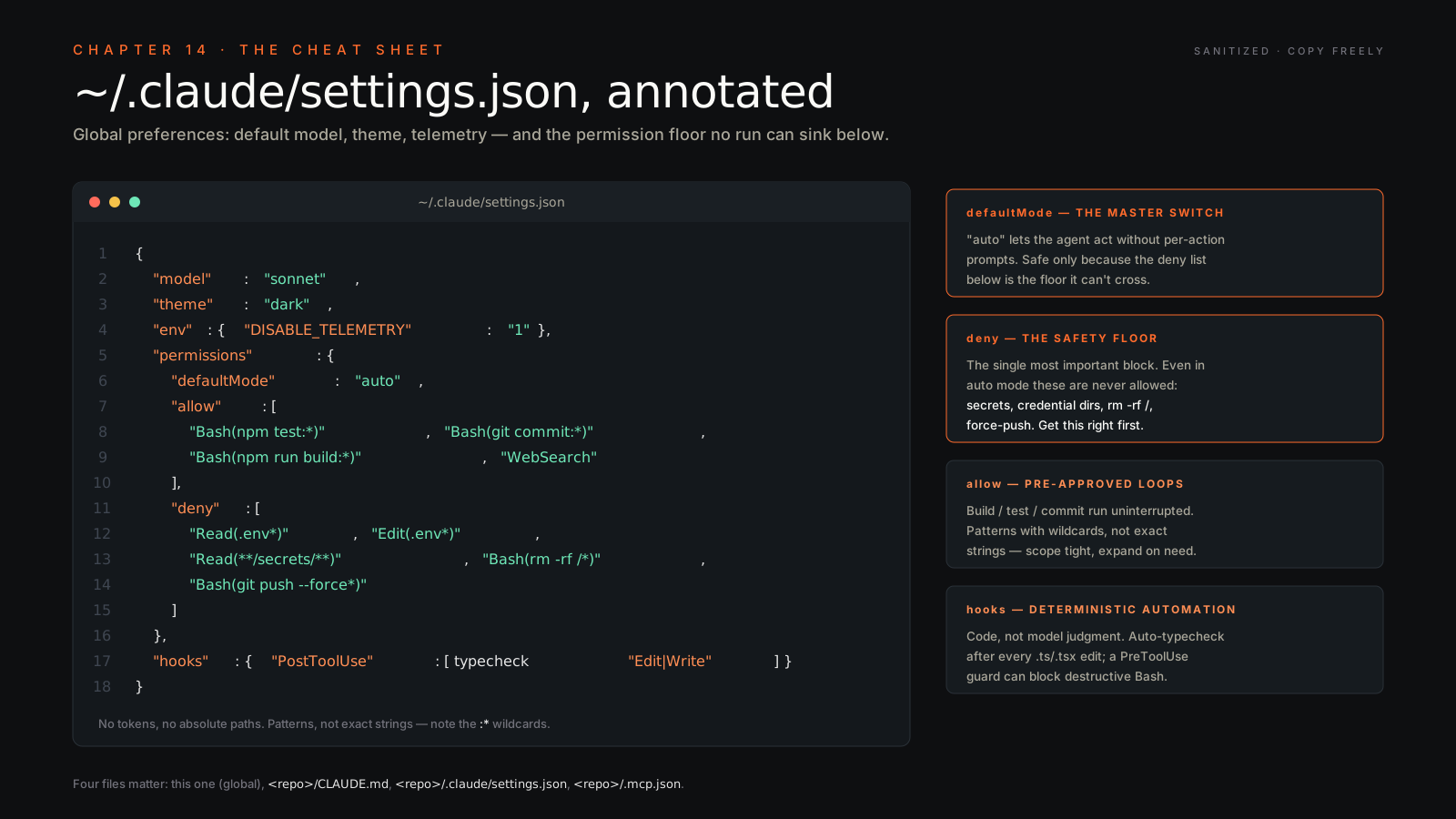
~/.claude/settings.json— Your global preferences. Default model, theme, telemetry, permission rules that apply everywhere.<repo>/CLAUDE.md— Project memory, loaded on every turn in this repo. Coding conventions, where the API lives, how to run tests, who not to ping. This is the most undervalued file in the system.<repo>/.claude/settings.json— Repo overrides of global settings. Scoped to this checkout. Permissions live here for sensitive repos.<repo>/.mcp.json— MCP servers for this project. Commit it. It’s the difference between “works on my machine” and “every teammate gets the same tools.”
5. Settings — common keys you’ll set#
Open ~/.claude/settings.json. Most setups end up looking like this:
{
  "model": "sonnet",
  "theme": "dark",
  "telemetry": false,
  "autoUpdater": "weekly",
  "permissions": {
    "allow": ["Bash(npm test*)", "Edit(src/**/*)"],
    "deny":  ["Bash(rm -rf*)", "WebFetch"]
  }
}
What each one does:
model— Default model when you launch with no--modelflag.sonnetis the right default. Override per-session when needed.theme—dark,light, orauto. Cosmetic. Ignore unless you stare at it eight hours a day.telemetry—falseopts out of usage telemetry. I run with it off on personal machines, on for shared dev environments where the team uses anonymized usage data for capacity planning.autoUpdater—weeklyis the sane default.disabledfor locked-down build agents.dailyif you actually want the cutting edge.permissions.allow/permissions.deny— Pre-approved and pre-denied tool calls. The patterns are glob-ish.Bash(npm test*)letsnpm testrun without prompting.Bash(rm -rf*)blocks any recursive delete outright.WebFetchdenial is a privacy choice — flip it on for repos that contain customer data.
The repo-level .claude/settings.json overrides any of these per project. That’s where I lock down permissions tightly for the Belkins customer-data repos and leave them looser on Folderly’s marketing site.
6. The IDE plugins — /install-ide#
Run /install-ide from inside a session. It detects your editor and walks the install. Currently supported: VS Code, JetBrains (IntelliJ, PyCharm, WebStorm, the whole family), and Neovim.
What changes inside the editor once it’s wired:
- Inline diff preview. When CC proposes an edit, you see the diff in your editor with the same syntax highlighting as your code, not as an opaque block in the terminal.
- @-mention to reference files. Inside the CC panel, type
@src/api/auth.tsand the file is loaded into the conversation as context. No more pasting paths. - Cmd-Esc (Mac) / Ctrl-Esc (Linux/Windows) to summon CC. Anywhere in your editor. Selection is auto-included.
- Inline suggestions while you type — closer to Copilot’s UX but using whatever model your CC session is on.
JetBrains and VS Code are first-class. Neovim works but expect a slightly more bring-your-own-keymap experience.
7. Keyboard shortcuts you should learn#
Five keys cover 95% of session navigation. Ctrl-C interrupts the current generation without ending the session — useful when CC starts going down the wrong path and you want to redirect mid-stream. Ctrl-D (or typing /exit) leaves the session entirely. The ↑ arrow recalls your last prompt for editing — same muscle memory as your shell. Esc Esc (double-tap) undoes the last input you just sent. Shift-Enter inserts a newline without sending — essential for multi-line prompts and pasted code blocks.
Bonus muscle memory: Tab autocompletes file paths, / opens the slash-command picker, @ opens the file-reference picker.
8. Environment variables you’ll touch#
ANTHROPIC_API_KEY=sk-ant-...        # required when scripting headless / CI
CLAUDE_CONFIG_DIR=/opt/claude       # relocate ~/.claude (sandboxes, CI runners)
CLAUDE_MODEL=sonnet                 # per-shell default, overrides settings.json
MCP_SERVER_<NAME>_<KEY>=value       # per-server env passthrough into MCP processes
ANTHROPIC_API_KEY is what CI uses when there’s no interactive login. CLAUDE_CONFIG_DIR is how you sandbox CC inside a Docker container or move config to an encrypted volume. CLAUDE_MODEL lets you alias claude in different shells to different defaults (one terminal pinned to Opus for thinking work, another on Sonnet for everything else). MCP_SERVER_* vars get forwarded into the corresponding MCP server process — that’s how you pass secrets into HubSpot, Stripe, or whatever connector without putting them in .mcp.json.
9. Files & folders glance#
~/.claude/
├── settings.json          # global prefs
├── commands/              # custom slash commands (markdown)
├── agents/                # custom subagent definitions
├── skills/                # personal skills
└── plugins/               # installed plugin bundles

<repo>/
├── CLAUDE.md              # project memory
├── .mcp.json              # MCP servers (commit to git)
└── .claude/
    ├── settings.json      # repo overrides
    ├── agents/            # repo-shared subagents
    └── skills/            # repo-shared skills
Two rules: personal stuff lives under ~/.claude/, shared stuff lives under <repo>/.claude/ and gets committed. If you find yourself copying a custom command between machines manually, you put it in the wrong place — move it to a repo and commit.
The mental model: ~/.claude/ is your dotfiles. <repo>/.claude/ is a project README for Claude.
Closing line#
Print this chapter. Tape it next to your monitor. Stop re-googling.