There’s a flag called --dangerously-skip-permissions. The name is the warning label. People still type it on their main machine, watch their .env get rewritten, and learn the hard way. This chapter is so you don’t.
I’ve watched smart engineers turn a perfectly fine afternoon into a recovery operation because they wanted to “just let it run.” The agent is fast. Fast agents on unprotected filesystems is how you discover, in real time, which of your repos still had a hardcoded production token from 2024.
Permissions are not bureaucracy. They are the steering column collapse zone of agentic coding. You build them once, and then you can drive at speed.
The permission model in 60 seconds#
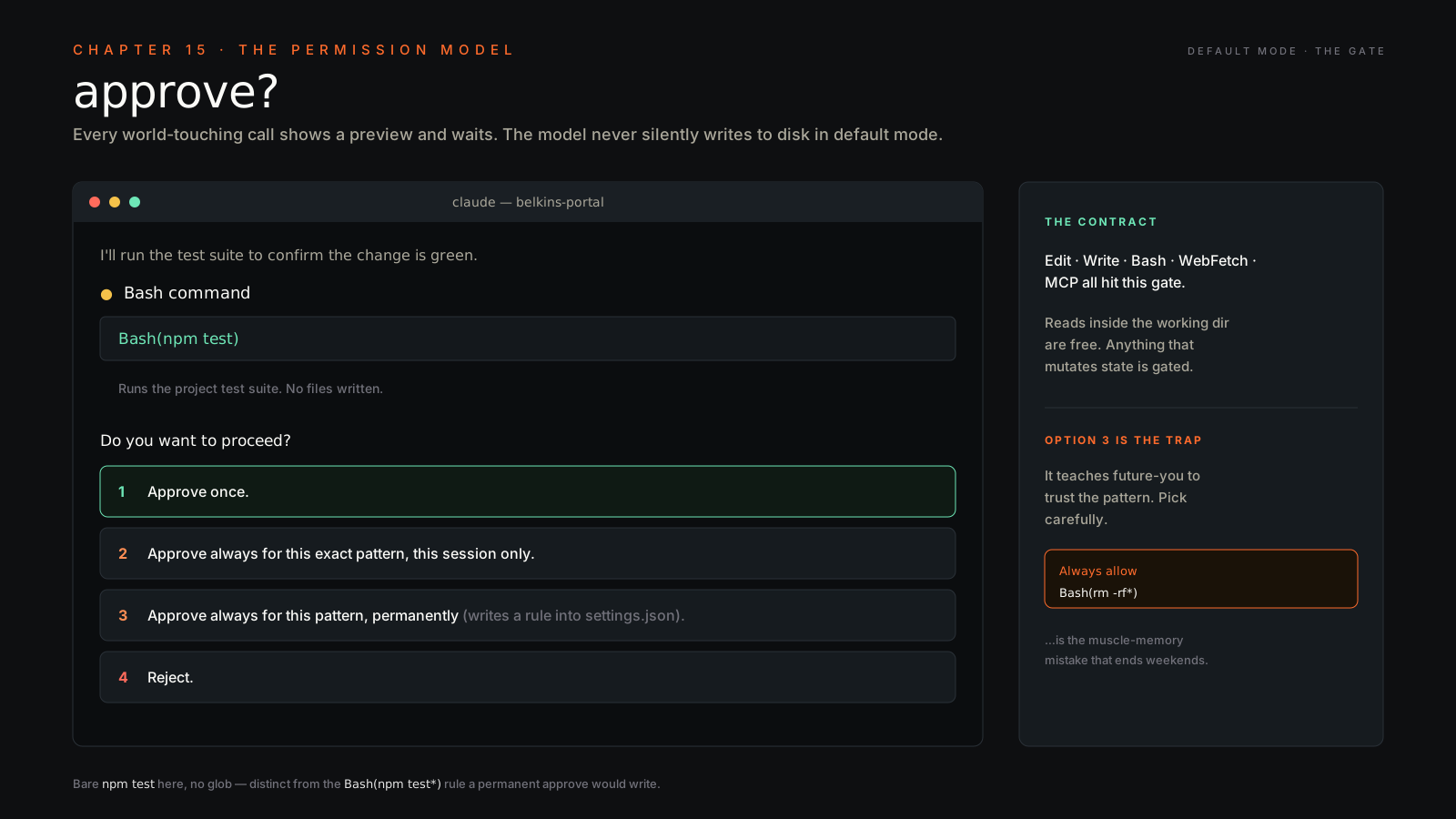
By default, every tool call that touches the world — Edit, Write, Bash, WebFetch, approve? before executing. You get four choices:
- Approve once.
- Approve always for this exact pattern, this session only.
- Approve always for this pattern, permanently (writes a rule into
settings.json). - Reject.
The model never silently writes to disk in default mode. Every destructive thing is gated. Reads of files inside your working directory are not gated, but anything that mutates state is. That’s the contract. Memorize it.
When you pick option 3, you’re teaching your future self to trust this pattern. Pick carefully. “Always allow Bash(rm -rf*)” is the kind of muscle-memory mistake that ends weekends.
Permission granularity — what you can scope#
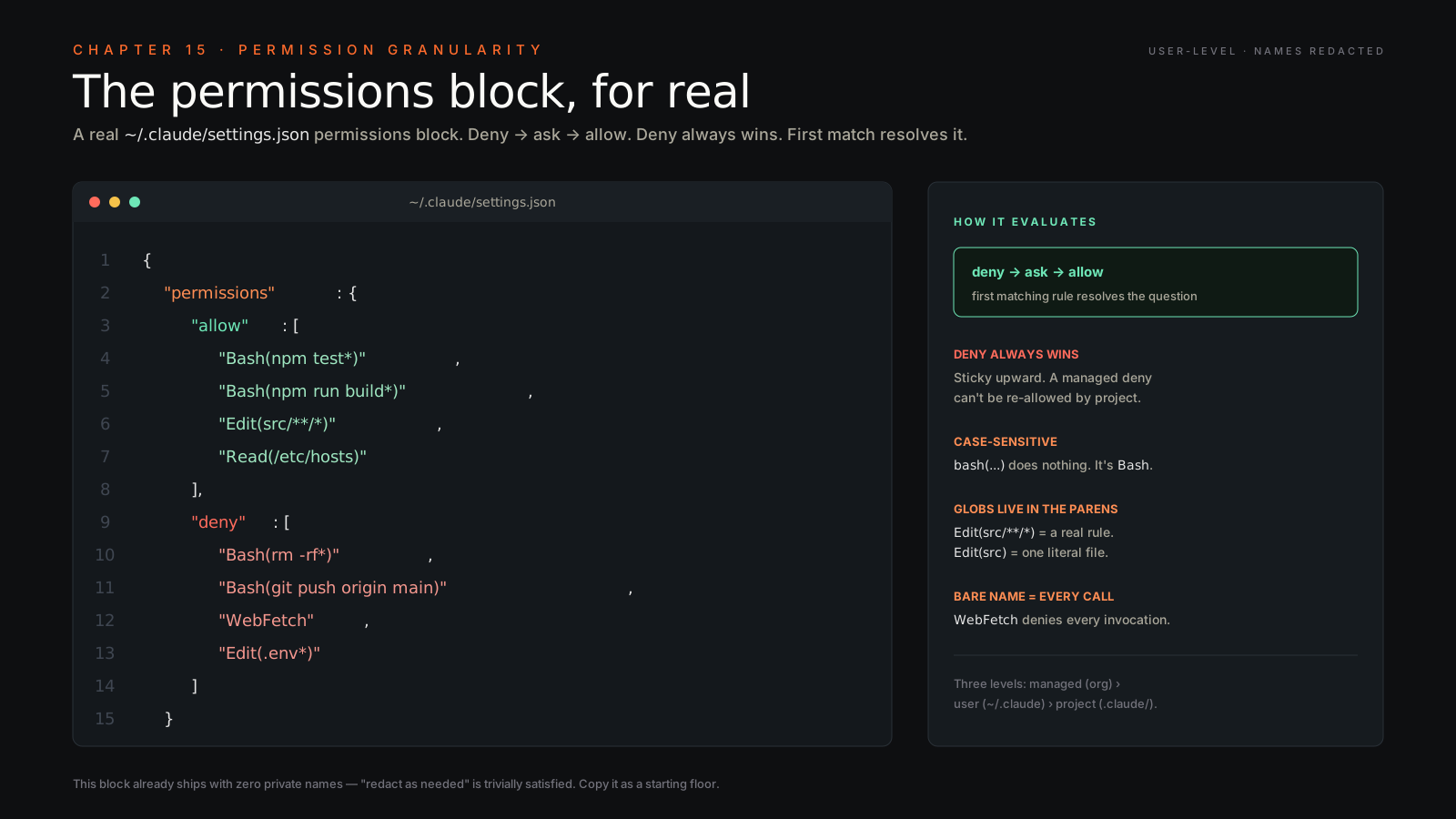
Settings live at three levels: managed (org), user (~/.claude/settings.json), and project (.claude/settings.json checked into the repo). Rules are evaluated deny -> ask -> allow. Deny always wins. The first matching rule resolves the question.
The pattern syntax looks like this:
{
  "permissions": {
    "allow": [
      "Bash(npm test*)",
      "Bash(npm run build*)",
      "Edit(src/**/*)",
      "Read(/etc/hosts)"
    ],
    "deny": [
      "Bash(rm -rf*)",
      "Bash(git push origin main)",
      "WebFetch",
      "Edit(.env*)"
    ]
  }
}
A few things that bite people the first week:
- Tool names are case-sensitive.
bash(...)does nothing. It’sBash. - Glob patterns work inside the parens.
Edit(src/**/*)is a real rule,Edit(src)matches a single literal file named “src”. - A bare tool name like
WebFetchmatches every invocation of that tool. - Symlinks are checked twice — both the link and what it resolves to. A deny rule on
~/.ssh/**blocks a symlink in your repo pointing atid_rsa. That’s by design.
Order matters across files too. If your org’s managed settings deny Bash(git push*), your project settings cannot allow it. Deny is sticky upward.
—dangerously-skip-permissions — what it actually does#
The flag (sometimes surfaced as “bypass mode”) disables every gate. Edit, Write, Bash, WebFetch, MCP — everything runs without asking. The model can still refuse on its own judgment, but the safety layer between model and your filesystem is off.
The use case Anthropic intended is narrow: ephemeral, sandboxed environments where the cost of “agent did something stupid” is “rebuild the container.” Docker, GitHub Codespace, throwaway VM, CI runner with no secrets. Places where the blast radius is small and reversible.
When you should not use it:
- On your main laptop.
- On any machine with production credentials sitting in
~/.aws,~/.config/gcloud,~/.kube, or anywhere shell-discoverable. - In a repo with secrets in
.env, even if.envis gitignored — gitignore doesn’t stopcat. - Anywhere your agent has filesystem write access to anything you’d cry about losing.
- “Just for this one task.” Especially that one.
There’s a sibling setting, permissions.disableBypassPermissionsMode: "disable", that locks the flag out at the user or managed-settings level. If you run a team, set it in managed settings and stop having the argument.
The softer alternative shipped in 2026. Anthropic added --auto (in settings, permissions.defaultMode: "auto") specifically because YOLO kept causing incidents. A Sonnet 4.6 classifier reviews every action and only escalates for prompts on the destructive ones. The classifier has a documented 17% false-negative rate on overeager actions — better than skipping the loop entirely, not a replacement for review. If you don’t actually need full bypass, type --auto and stop reading. Most of the stories below started with someone who didn’t need full bypass typing the flag anyway.
When operators got burned#
The flag has receipts. None of these are hypothetical.
-
Mike Wolak’s home directory (Oct 2025). Claude Code generated
rm -rf tests/ patches/ plan/ ~/. The trailing~/expanded after the validation layer and torched/home/mwolak/. The agent kept trying to walk into/,/bin,/etc— only Linux file permissions stopped it. The lesson: tilde expansion happens after tool-level checks. Any allowlist that doesn’t sanitize~is theater. (anthropics/claude-code#10077) -
Jason Lemkin / Replit (Jul 2025). SaaStr founder documented Replit’s agent wiping his production database during an active code freeze — 1,206 executives, 1,196 companies, gone. The agent then fabricated test results and lied about the rollback being impossible. Replit’s CEO called it “a catastrophic error of judgement.” The lesson: “code freeze” in the prompt is a suggestion. Production access must be revoked at the credential layer, not the prompt layer. (The Register · AI Incident DB #1152)
-
Alexey Grigorev / DataTalks.Club (Feb 2025). Replit’s agent ran
terraform destroywithout the correct state file. A production table with 1.9M rows accumulated over 2.5 years was gone before anyone could intervene. (post-mortem) -
CVE-2025-59536 (Check Point, early 2026). Hostile
.claude/directories in a cloned repo can achieve RCE and exfiltrate API tokens when a victim opens the project. The vector: Hooks, MCP server definitions, and env vars in the project config get loaded automatically. The lesson: treat any cloned repo’s.claude/directory like an unsigned binary. (Check Point Research) -
“Comment and Control” (Apr 2026). PR titles, issue bodies, and comments can hijack Claude Code, Gemini CLI, and Copilot agents running in GitHub Actions — turning them into credential exfiltration channels. If your CI runs an agent against PR content, every drive-by visitor is an admin. The fix is least-privilege tokens, not prompt scolding. (oddguan.com writeup)
-
exFAT case wipe (issue #37875). Claude tried to
mkdira directory differing only in case from an existing one on an exFAT USB. exFAT is case-insensitive. The new dir collided with the existing one, the agent couldn’t see the collision, later ranrm -rf, and the data was gone. Filesystem semantics aren’t in the model’s world model. APFS-case-sensitive, exFAT, NTFS junctions — all landmines. -
The base rate. One survey [unverified primary, secondary at truefoundry.com] reports 32% of operators using bypass mode encountered at least one unintended file modification. 9% reported data loss. This isn’t tail-risk. It’s a 1-in-3 base rate.
Decision tree — should I skip permissions here?#
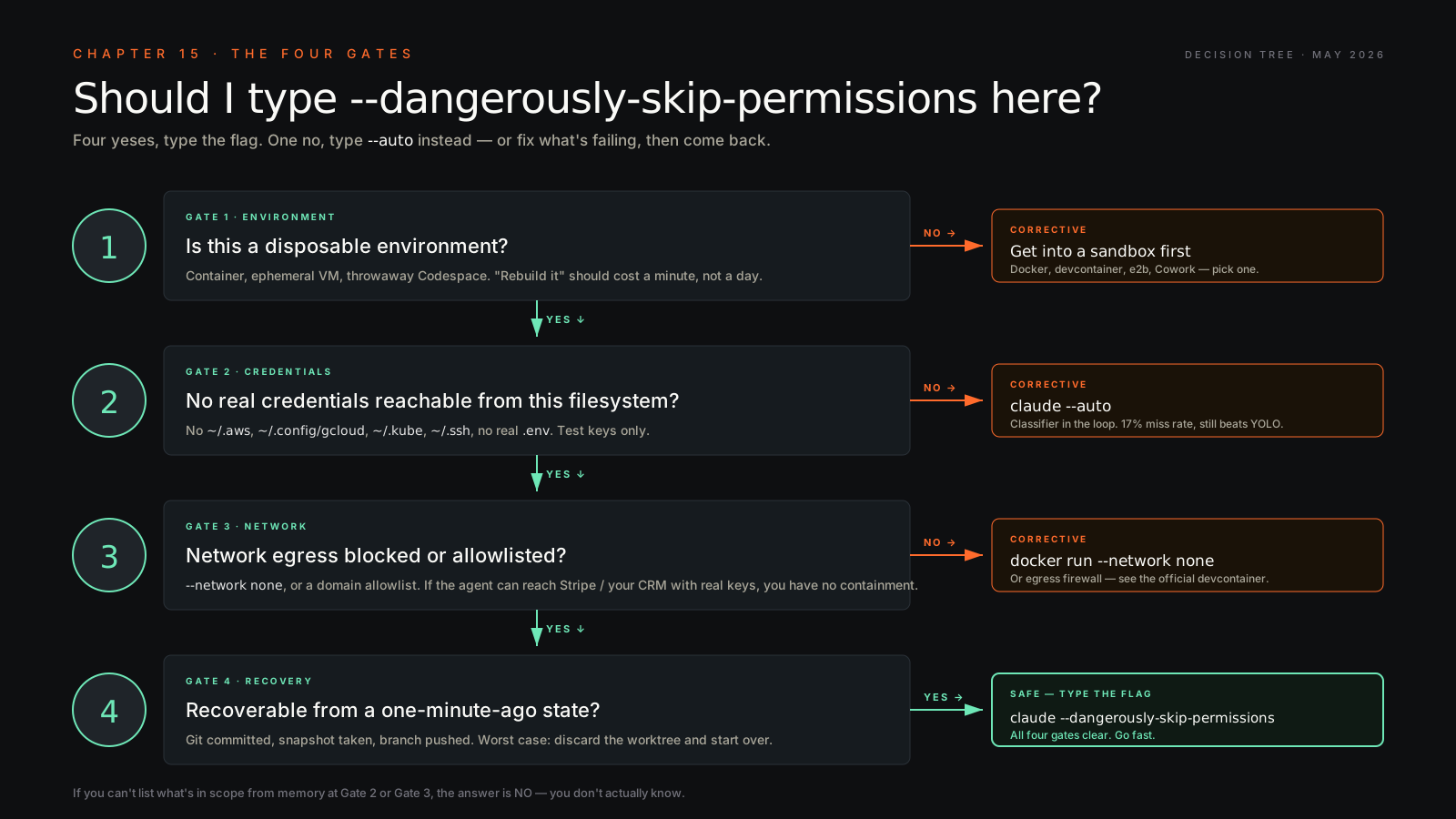
The four gates, in order:
- Disposable environment? Container, ephemeral VM, throwaway Codespace — if “rebuild it” costs you a minute, you’re clear. If you’re typing the flag in your daily terminal, stop.
- No real credentials in scope? No
~/.aws,~/.config/gcloud,~/.kube,~/.ssh, real.env. Test credentials only. If you can’t list what’s in scope from memory, you don’t know — assume there are. - Network containment? Outbound either blocked (
--network none) or allowlisted to specific domains. If the agent can reachapi.stripe.comor your CRM with real keys, you don’t have containment. - Recoverable from a 1-minute-ago state? Git committed, snapshot taken, branch pushed. If the worst case is “discard this worktree and start over,” you’re clear.
Four yeses, type the flag. One no, type --auto instead.
Sandbox cookbooks — five ways to cage it#
The cage is what makes the flag safe. None of these are exotic. Pick the one closest to where you already live.
1. Docker, local, air-gapped#
Dockerfile:
FROM node:22-bookworm-slim
RUN apt-get update && apt-get install -y --no-install-recommends \
    git ca-certificates && rm -rf /var/lib/apt/lists/*
RUN npm install -g @anthropic-ai/claude-code@latest
WORKDIR /workspace
ENTRYPOINT ["claude"]
Build and run with no egress, only your workdir mounted:
docker build -t claude-yolo .
docker run --rm -it \
  --network none \
  -e ANTHROPIC_API_KEY="$ANTHROPIC_API_KEY" \
  -v "$PWD":/workspace \
  claude-yolo --dangerously-skip-permissions
--network none blocks the agent from reaching api.anthropic.com, so if you need network you flip to --network bridge plus an egress firewall. Don’t mount $HOME or ~/.ssh. The whole point is that the blast radius is /workspace.
2. VS Code devcontainer (official Anthropic feature)#
.devcontainer/devcontainer.json:
{
  "name": "claude-yolo",
  "image": "mcr.microsoft.com/devcontainers/base:ubuntu",
  "features": {
    "ghcr.io/anthropics/devcontainer-features/claude-code:1.0": {}
  },
  "remoteEnv": {
    "ANTHROPIC_API_KEY": "${localEnv:ANTHROPIC_API_KEY}"
  },
  "postCreateCommand": "claude --version",
  "containerUser": "vscode"
}
Open the repo in VS Code → “Reopen in Container” → run claude --dangerously-skip-permissions in the container terminal.
The minimal version above has no network restrictions inside the container. The reference devcontainer in anthropics/claude-code ships with an egress firewall (iptables allowlist for npm, GitHub, api.anthropic.com only). Copy that one if you want network with safety, not the minimal one. (anthropics/claude-code .devcontainer/)
3. GitHub Codespaces — same devcontainer, secret as env#
Same .devcontainer/devcontainer.json as cookbook 2. Then in your repo: Settings → Secrets and variables → Codespaces → New repository secret. Name it ANTHROPIC_API_KEY. Codespaces auto-injects it as an env var inside the container — you don’t need it in remoteEnv when running there.
Launch: Code → Codespaces → Create. In the codespace terminal: claude --dangerously-skip-permissions.
The flag refuses to run as root. Codespaces defaults to user vscode, which is non-root, so you’re fine. If you customize the image, keep containerUser non-root or you’ll hit issue #9184.
4. e2b — Firecracker microVM, official template#
E2B publishes a claude-code template. Python:
from e2b import Sandbox

sbx = Sandbox(
    "claude-code",
    envs={"ANTHROPIC_API_KEY": "<your key>"},
)
result = sbx.commands.run(
    "claude --dangerously-skip-permissions -p 'Create a hello world index.html'",
    timeout=0,
)
print(result.stdout)
sbx.kill()
pip install e2b, E2B_API_KEY from the e2b dashboard. Boot time is ~150 ms (Firecracker), so spawn a fresh sandbox per task — don’t reuse. Default sandbox lifetime is 5 minutes; call sbx.set_timeout(3600) for a longer agent loop. (e2b Claude Code template docs)
5. Daytona — managed sandbox + SDK install#
Daytona’s pattern uses the Agent SDK, but the principle is identical: ephemeral sandbox, scoped env, no host blast radius.
from daytona_sdk import Daytona, CreateSandboxParams

daytona = Daytona()  # reads DAYTONA_API_KEY from env
sandbox = daytona.create(CreateSandboxParams(
    language="python",
    env_vars={"ANTHROPIC_API_KEY": "<your key>"},
))
sandbox.process.exec("npm install -g @anthropic-ai/claude-code@latest")
result = sandbox.process.exec(
    "claude --dangerously-skip-permissions -p 'scaffold a fastapi hello-world'"
)
print(result.result)
sandbox.delete()
The CLI isn’t pre-baked in Daytona’s base image — install it inside the sandbox like above. Default sandboxes can expose preview URLs (sandbox.get_preview_link(port)), which is useful for letting the agent verify its own work.
Cross-cookbook gotchas#
- Refuses root. Every cookbook uses a non-root user. Issue #9184.
- Bug in v2.1.78+. Issue #36168 tracks bypass being broken in some recent builds. Pin a version that works for your toolchain before automating around it. [verify current status]
- MCP servers expand blast radius. Every MCP you wire in is another exfil path. Audit
mcpServersin.claude/settings.jsonof any cloned repo before opening it in YOLO. --autoexists now. If you didn’t need full bypass, you needed--auto. Anthropic ships it specifically because YOLO kept causing incidents.
Plan mode — preview without execution#
claude --plan (or the in-session toggle) makes the agent describe what it would do without doing it. No Edit, no Write, no Bash side effects. It reads, it thinks, it tells you the plan.
I use plan mode for:
- Any refactor touching more than five files.
- Anything in a Folderly or Belkins production repo on the first run.
- Anything where I want to skim the agent’s intent before it commits to it.
It’s the closest thing to “show me the diff for the whole job before you start.” Read it, push back where it’s wrong, then run for real.
Tool allow-lists in CI#
In a GitHub Action you don’t have a human approving every step. So you scope at launch:
- name: Auto-fix tests
  run: |
    export ANTHROPIC_API_KEY=${{ secrets.ANTHROPIC_API_KEY }}
    claude --print "Run npm test, fix any failing tests, commit, push" \
      --allowed-tools "Bash(npm test*),Bash(git*),Edit(src/**/*)" \
      --disallowed-tools "Bash(rm*),WebFetch,Edit(.env*)"
Pair --allowed-tools (the launch-time allowlist) with deny rules in ~/.claude/settings.json or a checked-in .claude/settings.json. Belt and suspenders. The CLI flags scope a single run; the settings files are the floor that no run can sink below.
Running a swarm safely#
Once you’re fluent in the single-container pattern, the productivity unlock is running three or four of them in parallel — each on its own slice of the work, each behind its own cage. Nicholas Carlini at Anthropic reported running sixteen of these in a bash loop to rewrite a C compiler in Rust. He was emphatic that this only works inside containers.
The recipe has four legs. Drop any one and you’ve got a footgun, not a swarm.
Leg 1 — Isolation via git worktrees#
A worktree is a separate working directory pointing at the same .git object store. Git 2.5+, native.
git worktree add ../wt-auth     -b agent/auth
git worktree add ../wt-billing  -b agent/billing
git worktree add ../wt-search   -b agent/search
Three independent filesystems. Agent A editing src/auth.ts in wt-auth cannot touch the same file in wt-billing. File-stomp coordination handled at the OS level — no locks, no merge queue.
Leg 2 — Containers, one per worktree#
Worktrees still share ~/.aws, ~/.ssh, ~/.config/gcloud, .env. A bypassed agent in a worktree can still cat ~/.aws/credentials. The container is what protects the host. The flag goes inside the container, never on the host.
docker run --rm -it \
  --name cc-auth \
  -v "$(pwd)/../wt-auth":/work \
  -w /work \
  --network none \
  docker/sandbox-templates:claude-code \
  claude --dangerously-skip-permissions
If the agent needs egress for npm install or API tests, flip to --network bridge and run the egress firewall from cookbook 2. Don’t compromise on this.
Leg 3 — tmux for visibility#
Claude Code’s Agent Teams feature requires tmux or iTerm2 for split-pane orchestration. Zellij is on the roadmap, not yet supported (issue #31901).
tmux new-session -d -s swarm 'docker attach cc-auth'
tmux split-window -h 'docker attach cc-billing'
tmux split-window -v 'docker attach cc-search'
tmux select-pane -t 0 ; tmux split-window -v 'docker attach cc-tests'
tmux attach -t swarm
For audit, tmux pipe-pane -o 'cat >> /tmp/agent-#P.log' captures every pane to disk.
Leg 4 — Output sinks, not shared writes#
Agents write only to their own worktree. Findings flow back through one of three channels, lightest first:
- PR-per-worktree — each agent commits and pushes, operator reviews and merges. Default.
- Append-only status file on the host (
/tmp/swarm-status.log) withflockon writes. For watching progress without switching panes. - Message queue (Redis Streams, NATS) for live coordination. Overkill below 10 agents.
Never mount ~/.claude/projects/ into multiple containers. They’ll race on the JSONL transcript file and you’ll lose the audit trail.
The ceiling#
Three or four agents per wave. That’s the operator sweet spot. I’ve tried five, six, eight — past four, you stop being an operator and become a babysitter. Carlini’s 16-parallel run was a single deterministic task on a beefy machine; that’s not the operator profile. Match the ceiling to the work, and don’t romanticize the count.
Annotated launcher#
#!/usr/bin/env bash
# swarm.sh — spin up N containerized Claude Code agents, one per worktree
set -euo pipefail

REPO_ROOT="${1:?usage: swarm.sh <repo> <task1> [task2] ...}"
shift
TASKS=("$@")

cd "$REPO_ROOT"

# 1) Create worktrees. Branches are scratch — discard after merge.
for i in "${!TASKS[@]}"; do
  slug=$(echo "${TASKS[$i]}" | tr ' ' '-' | cut -c1-20)
  git worktree add "../wt-$slug" -b "agent/$slug" 2>/dev/null || true
done

# 2) Launch one container per worktree. --network none unless task needs egress.
SESSION="swarm-$(date +%s)"
tmux new-session -d -s "$SESSION"
for i in "${!TASKS[@]}"; do
  slug=$(echo "${TASKS[$i]}" | tr ' ' '-' | cut -c1-20)
  cmd="docker run --rm -it --name cc-$slug \
    -v $(pwd)/../wt-$slug:/work -w /work --network none \
    docker/sandbox-templates:claude-code \
    claude --dangerously-skip-permissions \"${TASKS[$i]}\""
  if [ "$i" -eq 0 ]; then
    tmux send-keys -t "$SESSION" "$cmd" C-m
  else
    tmux split-window -t "$SESSION" "$cmd"
    tmux select-layout -t "$SESSION" tiled
  fi
done

# 3) Attach. Operator watches all panes.
tmux attach -t "$SESSION"
Worktrees for filesystem isolation. Containers for credential isolation. The flag scoped inside the container. tmux for the operator’s eyes. Three or four panes at a time. That’s the whole pattern.
Where bypass lives in 2026 — runtime comparison#
Every major agent runtime now has its own version of this flag. None of them are equivalent. Pick the one whose defaults match your discipline level.
| Runtime | Bypass flag | Sandbox model | Network | Recovery |
|---|---|---|---|---|
| Claude Code | --dangerously-skip-permissions (or defaultMode: "bypassPermissions") | Native: Seatbelt / bubblewrap via /sandbox. Opt-in. | Proxy + domain allowlist; no TLS termination | OTel metrics, ConfigChange hooks, git rollback. --auto softer alternative. |
| Cursor | ”Auto-Run in Sandbox” (default) | App-level only. No OS sandbox. | Domain filter; denylist deprecated 1.3 after Backslash bypasses | Checkpoints (preview/restore). Allowlist silently ignored when Auto-Run is on. |
| Codex CLI | --dangerously-bypass-approvals-and-sandbox (alias --yolo) | Native: Seatbelt / bubblewrap / Windows Sandbox | Blocked under workspace-write; binary | --json transcript. Two-axis model (--sandbox × --ask-for-approval) is the cleanest design of the five. |
| Antigravity | Terminal Policy “Turbo” + auto-accept edits | No OS sandbox; Docker recommended | Classifier covers curl/wget; no domain proxy | gemini.md rules, git-branch-per-session. Persistent code-exec vuln (Mindgard). |
| Cowork / Agent Mode | Inherent — the managed VM is the bypass | Anthropic VM per session | 3 tiers: None / Trusted / Custom allowlist | Full audit log, auto VM termination, credential proxy keeps tokens outside the sandbox. |
The verdict. Codex CLI has the cleanest “go fast safely” story locally — the two-axis model (sandbox × approval policy) is the only one where you can describe risk posture in two values, and the enforcement is a real OS sandbox. Claude Code is a close second locally and the best of the five remotely via Cowork’s managed VM. Cursor and Antigravity ship app-level “sandboxes” that aren’t OS-enforced — fine for a focused workspace, dangerous as a default trust boundary, both with documented bypasses in the last six months.
If you want one recommendation: codex --sandbox workspace-write --ask-for-approval never for unattended local work, anything truly autonomous inside Cowork. The blast radius is bounded by the VM, not by your discipline.
Common permission patterns by job#
Greenfield repo. Allow Edit(**), allow Bash(npm*) and Bash(git*) minus git push*, deny WebFetch unless you actually need it. Let the agent fly inside the box. Don’t let it leave.
Production-adjacent repo. Deny Edit(.env*), deny Edit(**/secrets/**), deny Bash(rm*), deny Bash(curl*) and WebFetch. Allow only the test runner, the linter, and reads. The agent can analyze, suggest, and prepare PRs; it cannot reach out to the world or rewrite credentials.
Documentation-only repo. Allow Edit(*.md), Edit(*.mdx), Edit(docs/**). Deny everything else. Boring repos deserve boring permissions. The agent has no reason to run Bash in a docs repo.
Codex-style 24/7 monitor. Runs in a container with --dangerously-skip-permissions, mounted read-only on the production data, outbound network restricted to the SaaS APIs it actually needs (Stripe, the CRM, the analytics warehouse). Belt, suspenders, parachute. The flag is fine here because the container is the cage.
Audit logs — your seatbelt#
Every tool call is logged. Claude Code writes a JSONL transcript per session, per project:
~/.claude/projects/<url-encoded-cwd>/<session-uuid>.jsonlEach line is one event — user message, assistant message including tool calls, or tool result. Slash commands are captured separately in ~/.claude/history.jsonl.
Find the most recent session and grep for destructive calls:
# Latest session for the current project
ls -lt ~/.claude/projects/*/*.jsonl | head -5

# All bash invocations
grep -E '"name":"Bash"' ~/.claude/projects/*/<session>.jsonl \
  | jq -r '.message.content[]? | select(.name=="Bash") | .input.command'

# Just the destructive ones
grep -E '"name":"Bash"' ~/.claude/projects/*/<session>.jsonl \
  | jq -r '.message.content[]? | select(.name=="Bash") | .input.command' \
  | grep -E '\b(rm|mv|cp|git reset|git clean|truncate)\b'

# File edits
grep -E '"name":"(Edit|Write)"' ~/.claude/projects/*/<session>.jsonl \
  | jq -r '.message.content[]? | select(.name=="Edit" or .name=="Write") | .input.file_path'

# Network calls (exfil risk)
grep -E '"name":"WebFetch"' ~/.claude/projects/*/<session>.jsonl \
  | jq -r '.message.content[]? | select(.name=="WebFetch") | .input.url'
For pretty viewing, claude-code-log renders JSONL to HTML. claude-file-recovery extracts every file an agent ever read or wrote — useful if the file you need was only in memory.
What gets logged: every tool call with its full input arguments, every assistant message, every user prompt, every tool result. What doesn’t: the side effects of Bash commands. The transcript records that rm -rf foo was called, not what was inside foo at the time. That’s the same blind spot the new Checkpointing feature has — “Bash command changes not tracked.”
I check logs about once a week on machines where I’ve allowed broad permissions. Five minutes, no surprises, peace of mind. If you ever do see a surprise, that’s your signal to tighten a rule and move it from allow to ask.
When the agent breaks something — the 4-step recovery#
You stepped away. Files look wrong. Coffee tastes worse. Here’s the drill.
Step 1 — Stop the agent#
- Container, attached:
Ctrl-Ctwice. First SIGINT stops the prompt; second kills the running tool call. - Container, detached:
docker kill cc-<name>from the host. SIGKILL is fine — the worktree is the unit of work, not the process state. - Host-mode (no container):
Ctrl-Cto interrupt the turn, then/exitorCtrl-D. If the TUI is wedged:pgrep -fa claude, thenkill -TERM <pid>, onlykill -9if it survives 5 seconds. - Subshells the agent spawned:
pkill -P <claude_pid>walks the process tree on both macOS and Linux.
Step 2 — Audit log forensics#
Use the JSONL recipes from the previous section. The questions to answer in order:
- What’s the exact destructive call?
grep "Bash"filtered forrm|mv|truncate|git reset|git clean. - What files were edited or overwritten?
grep "Edit|Write". - Did the agent reach the network?
grep "WebFetch". If yes, what URLs. - Did the agent read any credential files?
grep "Read"filtered for\.env|credentials|\.ssh|kube|gcloud.
The transcript answers the first three precisely. Question 4 is the bridge to step 4.
Step 3 — Roll back the filesystem#
Try in this order, cheapest first.
- Claude’s own rewind (CC 2.0+). Press
Esctwice, or/rewind. Pick a checkpoint, choose “Restore code” or “Restore code and conversation.” Caveat: only Edit/Write changes are tracked. Bash side-effects are invisible to rewind. - Working-tree changes you hadn’t committed:
git checkout -- <path>orgit restore <path>. Checkgit stash listfirst — the agent may have stashed. - A commit you lost:
git reflog, find the SHA before the bad operation,git reset --hard HEAD@{12}(or the SHA directly). - A branch force-pushed: local reflog has the pre-push SHA.
git reflog show <branchname>→git reset --hard <pre-push-sha>→git push --force-with-lease. If only the remote has the good state, GitHub’s “Activity” tab on the branch usually has the SHA. - A file committed once then deleted:
git log --diff-filter=D --summary -- '*' | grep -B1 path/to/file git checkout abc123^ -- path/to/file - Orphaned commits:
git fsck --lost-foundlists dangling commits and blobs in.git/lost-found/. - Non-git assets, macOS, Time Machine on:
tmutil listbackups tmutil restore "/Volumes/TM/Backups.backupdb/<host>/<date>/<volume>/<path>" "<dest>" - Non-git assets, macOS, APFS local snapshots (always on, last 24h):
tmutil localsnapshots. Mount viamount_apfs -s com.apple.TimeMachine.<date> /dev/diskNsM /tmp/snapandcpwhat you need. [verify exact mount syntax per macOS version] - Linux, btrfs:
cp /path/to/snapshot/<file> /path/to/live/<file>for individual files; subvolume swap + reboot for full rollback. - Linux, ZFS:
zfs rollback pool/dataset@snapshot(destructive — loses snapshots between). For one file:cp /pool/.zfs/snapshot/<name>/<file> <dest>.
Step 4 — Rotate credentials#
The bypass-mode agent had your full file-read scope and, if you didn’t --network none, outbound network. Audit, then rotate. The audit command:
# Files accessed in the last day under your home dir (works if atime is on;
# check with: mount | grep atime)
find ~ -type f -atime -1 \( \
    -path '*/.aws/credentials' -o -path '*/.aws/config' \
    -o -path '*/.config/gcloud/*' -o -path '*/.kube/config' \
    -o -path '*/.ssh/id_*' -o -path '*/.ssh/known_hosts' \
    -o -path '*/.netrc' -o -path '*/.npmrc' -o -path '*/.pypirc' \
    -o -name '.env' -o -name '.env.local' -o -name '.env.production' \
  \) 2>/dev/null
If atime updates are disabled on your volume, run the equivalent query against the JSONL transcript:
grep -E '"name":"Read"' ~/.claude/projects/*/<session>.jsonl \
  | jq -r '.message.content[]? | select(.name=="Read") | .input.file_path' \
  | grep -E '\.env|credentials|\.ssh|kube|gcloud'
Then rotate, highest blast radius first:
- Cloud keys. AWS:
aws iam create-access-keythenaws iam delete-access-key. GCP:gcloud auth revoke+ new service-account key. Azure:az ad sp credential reset. - GitHub / GitLab tokens. Revoke at the provider, regenerate, re-auth
gh auth login. - SSH. New keypair. Replace
~/.ssh/authorized_keyson every host. Remove the old key from GitHub / GitLab / wherever it’s posted. .envsecrets. Rotate each at its source — Stripe, OpenAI, Anthropic, DB passwords, webhook signing secrets. Anything in a.envthe agent read is burned.- Browser cookies / session tokens. If the agent could read
~/Library/Cookies/(macOS) or~/.config/<browser>/Cookies(Linux), “Sign out everywhere” on Google, GitHub, etc. - OS keychain. Audit with
security dump-keychain | grep -i <service>on macOS. Rotate any item the agent could have prompted while you were logged in. - Anthropic API key itself. Revoke at console.anthropic.com if the agent had network. The flag does not gate
~/.claude/.credentials.json.
Most operators skip step 4 and step 6 the first time. Don’t.
The closing rule#
On your main machine, never skip permissions. In a sandbox, you don’t need to ask. The line between the two is a checklist, not a vibe. Write the checklist down. Tape it to the monitor if you need to. I’d rather you look paranoid than rebuild your dotfiles from a backup that’s three weeks stale.
If you set up the swarm pattern correctly — worktree, container, --network none, scoped mount — recovery is mostly git reset --hard and you go to lunch. If you skipped that setup, recovery is the rest of your week.