I once typed “please run prettier on this file” 47 times in one week. Then I learned about hooks. I haven’t typed it since.
That sentence is the entire pitch for this chapter. If you’ve ever found yourself nagging
Hooks turn ad-hoc prompting into policy. Subagents turn one model into a team. Together, they’re how you stop talking to Claude and start operating it.
What hooks actually are#
A
There are a lot of events, but in practice you’ll spend 90% of your time on three:
PreToolUse— fires before any tool call. Use it to validate, block, or audit-log.PostToolUse— fires after a tool call succeeds. Use it to format, lint, test, or notify.Stop— fires when the agent’s turn finishes. Use it to commit, ship, or DM you.
The full list also includes SessionStart, UserPromptSubmit, PostToolUseFailure, PermissionRequest, TaskCompleted, WorktreeCreate, and a handful of others. Don’t enumerate them in your head — look them up when you need them. The three above pay for themselves in week one.
Where hooks live#
Two locations:
~/.claude/settings.json— global, applies to every session on your machine.<repo>/.claude/settings.json— repo-scoped, commit it, so your whole team gets the same guardrails.
Here’s the shape of a real PostToolUse hook that runs Prettier after every edit:
{
  "hooks": {
    "PostToolUse": [
      {
        "matcher": "Edit|Write",
        "hooks": [
          { "type": "command", "command": "prettier --write \"$CLAUDE_FILE_PATH\"" }
        ]
      }
    ]
  }
}
The matcher field is a regex against the tool name — here, “Edit or Write.” $CLAUDE_FILE_PATH is one of several environment variables Claude Code injects when the hook runs. There are others: $CLAUDE_PROJECT_DIR, the tool name, the full JSON payload on stdin if you want it.
That’s the whole concept. Now we make it useful.
Five hooks every team should run#
1. format-on-save#
{
  "matcher": "Edit|Write",
  "hooks": [
    { "type": "command", "command": "prettier --write \"$CLAUDE_FILE_PATH\" 2>/dev/null || ruff format \"$CLAUDE_FILE_PATH\"" }
  ]
}
Stops “please format this” forever. Picks Prettier first, falls back to Ruff. Failure is silent so non-JS/Python files don’t blow up the chain.
2. test-on-write#
{
  "matcher": "Edit|Write",
  "hooks": [
    { "type": "command", "command": "if [[ \"$CLAUDE_FILE_PATH\" == *.test.* ]]; then npx vitest run \"$CLAUDE_FILE_PATH\"; fi" }
  ]
}
Wrote to a test file? Run that one test. Tight feedback loop, no orchestration logic in the chat.
3. block-push-to-main#
{
  "PreToolUse": [
    {
      "matcher": "Bash",
      "hooks": [
        { "type": "command", "command": "if echo \"$CLAUDE_TOOL_INPUT\" | grep -q 'git push origin main'; then echo 'Blocked: push to main requires a human.' >&2; exit 1; fi" }
      ]
    }
  ]
}
Non-zero exit blocks the tool call. The stderr message goes back into the model’s context, so the agent reads “Blocked: push to main requires a human.” and adapts. This single hook has saved me from three “oh no” moments at Belkins this year.
4. commit-message-template#
{
  "Stop": [
    {
      "hooks": [
        { "type": "command", "command": ".claude/hooks/draft-commit.sh" }
      ]
    }
  ]
}
Where draft-commit.sh runs git diff --cached, summarizes it (with a tiny local model or a templated heuristic), and writes the message to .git/COMMIT_EDITMSG. The agent ends its turn, you get a pre-filled commit message, you tweak and ship.
5. slack-notify-on-long-task#
{
  "Stop": [
    {
      "hooks": [
        { "type": "command", "command": "[ \"$CLAUDE_TURN_DURATION_MS\" -gt 120000 ] && curl -X POST -d \"text=CC turn finished: $CLAUDE_SESSION_ID\" $SLACK_WEBHOOK" }
      ]
    }
  ]
}
Two-minute threshold, Slack DM, done. Now I can launch a long refactor, walk away, and trust the buzz on my watch instead of polling the terminal like a madman.
Hooks return values matter#
This is the part most people miss. Hooks aren’t fire-and-forget. They have a contract:
- Exit 0 — tool call proceeds.
- Non-zero exit — tool call is blocked.
- stdout — surfaces to the agent as additional context.
- stderr — surfaces to the agent as a warning/error message.
Which means a hook is also a way to talk back to Claude. Two patterns I lean on:
- Reject with a why. A
PreToolUsehook can exit 1 with a stderr message that explains the rejection — “this branch is frozen, switch to a feature branch first” — and the agent will pick up the redirection on its next move. - Inject context. A
SessionStarthook cancata file to stdout, and that text gets prepended to the model’s context for the session. Great for “current sprint priorities” or “things this codebase has been burned by.”
Hooks aren’t just guardrails. They’re a side-channel for policy.
Subagents — the 90-second mental model#
A
- Its own context window (so the orchestrator’s context stays clean).
- Its own tool allow-list (so you can restrict blast radius).
- Its own system prompt (so it has one job and does it well).
- A single summary it returns to the parent when it’s done.
Claude Code ships with built-ins. The names you’ll see:
general-purpose— open-ended, has all tools. The default fallback.Explore— read-only repo search. Fastest. Use it when you need to find things, not change things.Plan— software-architect mode, no edits, returns a plan only. Pair withgeneral-purposefor execution.
Custom subagents — writing your own#
Subagents are Markdown files with YAML frontmatter. Two locations, same rules as hooks:
~/.claude/agents/<name>.md— user-level, every project.<repo>/.claude/agents/<name>.md— repo-level, commit it.
Here’s a code-reviewer subagent I use across Belkins and Folderly:
---
name: code-reviewer
description: Reviews diffs for security, performance, style. Use when user says
  "review this PR", "check this diff", or "is this code safe?". Read-only.
tools: Read, Grep, Glob
---

You are a senior code reviewer. Given a diff, return:
1. Three highest-impact issues, ranked by severity.
2. Two style nits, with line numbers.
3. One suggestion the original author would not have considered.

Do not edit. Do not run shell. Read-only review only.
Three things to notice. The description is what the orchestrator reads to decide when to delegate — write it like an instruction, not like a tagline. The tools line is a tool allow-list — by stripping Edit, Write, and Bash, I’ve made it physically impossible for this subagent to mutate the repo. And the body is just the system prompt: short, opinionated, formatted output enforced.
Spawning subagents — the practical move#
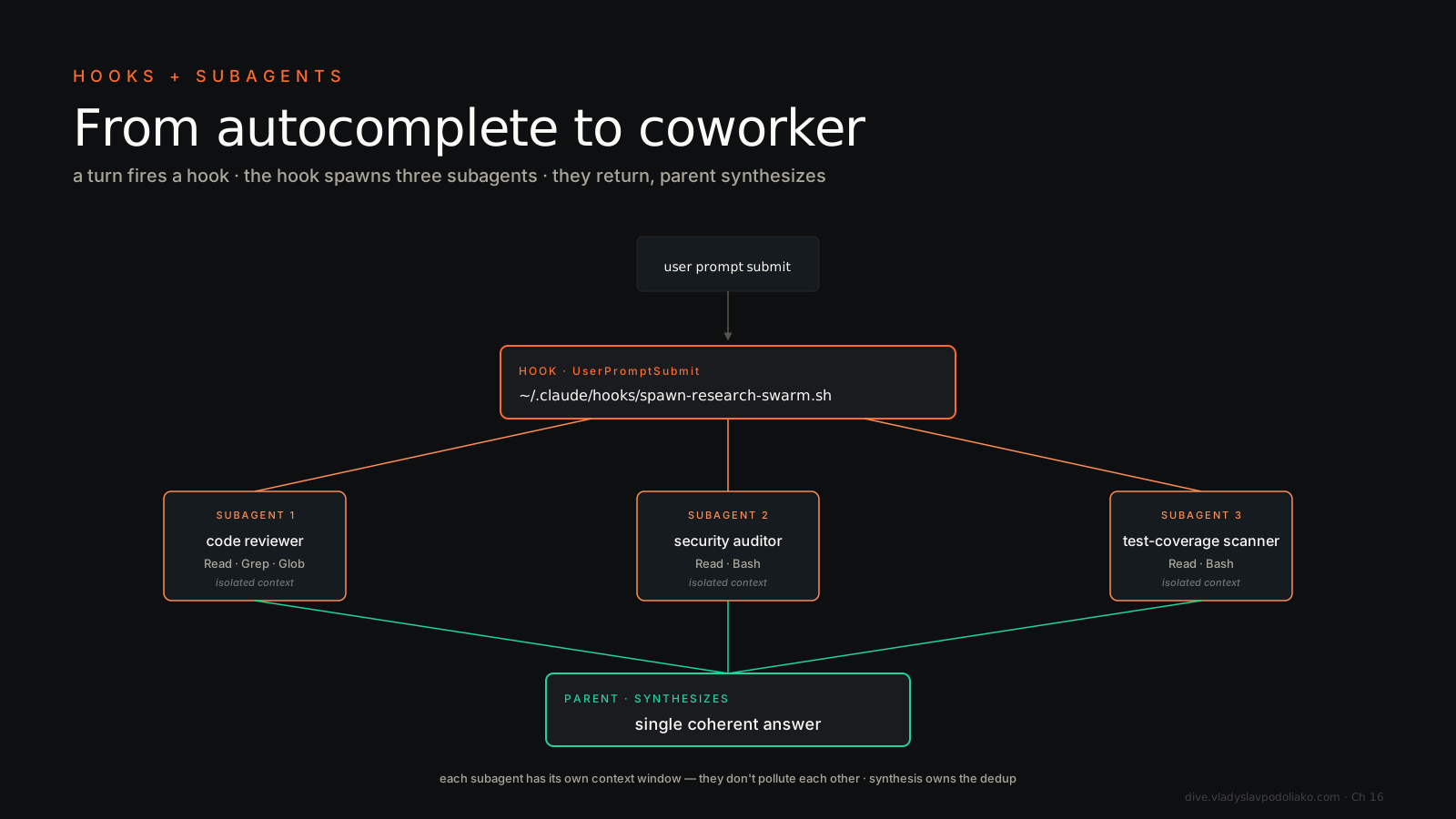
In your main session, you say (or the model decides on its own):
Spawn 3 code-reviewer subagents in parallel: one on
src/auth, one onsrc/billing, one onsrc/api. Then merge their findings into a single ranked list.
The orchestrator dispatches all three in one tool batch. Each runs in its own context, reads its slice, and returns a summary. The orchestrator merges them. You get the union of three focused reviews in roughly the time of one — and your main context isn’t polluted with three full diffs.
This is the move. Three reviewers in parallel beats one reviewer reading 9,000 lines, every time.
The exploration/editing split#
There’s a second subagent move that matters more in a large codebase than the parallel-review one, and Anthropic calls it out explicitly as a recommended pattern: don’t explore and edit in the same session.
The shape:
- Spin up a read-only subagent with its own context window. Its only job: map the subsystem. How does auth flow through this service? Where does the retry logic live? What calls what?
- The subagent writes its findings to a file —
.claude/scratch/auth-map.md— not back into the orchestrator’s context. - The main agent reads that file and does the edit with the full picture, on a context window that never got burned by the 40 files the explorer had to open to produce the map.
Why this beats “just let the one agent figure it out”: exploration is expensive and messy. It opens dead ends, reads files it won’t touch, follows imports that don’t matter. If that all happens in your editing session, the editing context is polluted with exploration noise by the time the model starts writing code. The split keeps the cost where it belongs. The explorer pays it; the editor inherits a clean summary.
The explorer-writes-to-disk, editor-reads-from-disk handoff is the same disk-handoff discipline from the anti-patterns section below, applied to the highest-value case. Treat .claude/scratch/ like a message queue and the pattern composes with everything else in this chapter.
The four parallel-dispatch patterns#
Chapter 6 covered the why of parallel dispatch — context isolation, throughput, blast radius. This chapter is the how to wire them. Quick re-cap of the four shapes:
- Fan-out — one task, N subagents on N inputs (the code-reviewer example).
- Pipeline — subagent A’s output is subagent B’s input (Plan → general-purpose execute).
- Map-reduce — N subagents produce, one orchestrator reduces (the parallel review merger).
- Adversarial — two subagents argue, a third judges (great for spec reviews, RFC critique, naming debates).
If you can name the shape before you dispatch, you’ll write better orchestrator prompts.
Subagent anti-patterns#
Spawning a subagent for a task that fits in one tool call. Subagent dispatch has overhead — context setup, prompt parsing, summary generation. If the task is “read this one file and tell me the export,” just read the file. Subagents pay off when the work is non-trivial or when isolation matters.
Forgetting to specify the output format. If you don’t tell each subagent exactly what shape to return — three bullets, JSON, ranked list — you’ll get N different shapes and your merge step becomes a parsing nightmare. Pin the format in the subagent body or in the dispatch prompt. Both is fine.
Letting subagents share state via the orchestrator’s context. If subagent A produces something subagent B needs, write it to disk and pass the path. Don’t try to thread it through orchestrator memory. Disk handoffs are debuggable, replayable, and don’t melt your context window. Use /tmp or a .claude/scratch/ directory and treat it like a message queue.
Hooks + subagents = real systems#
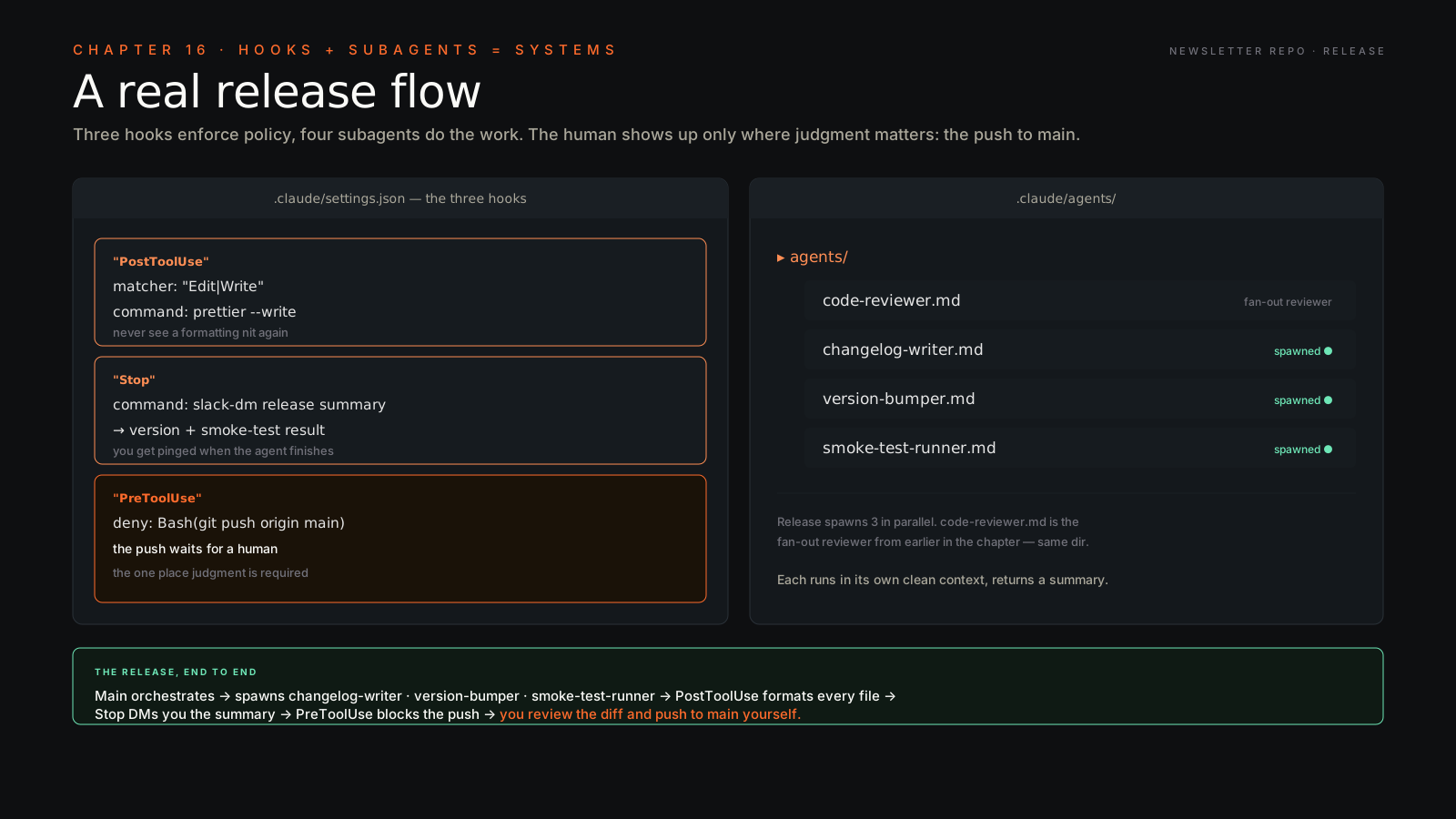
Now wire them together. Concrete example, from my own setup, for a release flow on the Newsletter publishing repo:
- Main session orchestrates the release.
- It spawns three subagents in parallel:
changelog-writer(reads commits, drafts release notes),version-bumper(updatespackage.json+ tags),smoke-test-runner(hits the staging URL, checks 200s). - A
PostToolUsehook onEdit|Writerunsprettier --writeon every file touched, so I never see a formatting nit again. - A
Stophook posts a Slack DM to me with the release summary, the new version number, and the smoke-test result. - A
PreToolUsehook denies Bash calls matchinggit push origin main— so the actual push waits for a human (me) to review the diff and run it.
That’s a real system. The agent does the boring work. The hooks enforce the rules. The subagents keep the context clean. And the human (me) only shows up at the one moment where judgment matters: the push to main.