This is the chapter I wish someone had handed me at hour ten. None of this is in the docs because none of this is teachable until you’ve shipped a few hundred hours of real work through the agent. I learned each of these the dumb way. You don’t have to.
Twenty-five tips. Five buckets. Read it once, then come back next week — half of it won’t click until you’ve felt the pain it solves.
Context discipline#
tip-1#
Keep CLAUDE.md under 100 lines. Every line in that file gets re-read on every turn of every session. If yours is 300 lines, congratulations, you’ve built a wiki and you’re paying tokens to load it on every prompt. The model gets dumber when it has to triage a doc to find the relevant rule. Move the long-form context into docs/ and link out.
Action: open your
tip-2#
Use /clear more than you think. When you switch tasks mid-session — finished the auth refactor, now you’re poking at the build pipeline — the auth context bleeds into the build context and you get weird hybrid suggestions. /clear is free. Treat it like closing a browser tab. I clear between every meaningful task switch and my hit rate jumped maybe 20%.
Action: bind /clear to muscle memory the same way you do Cmd+T for a new tab.
tip-3#
/compact before any long task. Compact summarizes the conversation so far and frees the window for the actual work coming up. I run it before any task I expect to take more than ten turns. Your accuracy goes up because the model isn’t competing for tokens with the last hour of debugging chitchat. Your cost goes down because compact is cheaper than the bloat.
Action: when you finish a discovery phase and you’re about to start executing, type /compact first, then go.
tip-4#
Drop file paths into prompts, not contents. “Read src/auth/index.ts and tell me what the session refresh does” beats pasting 400 lines of TypeScript into the prompt window. The model fetches with the Read tool, you keep your token budget for actual reasoning. Pasting code into the prompt is a beginner move that feels productive and isn’t.
Action: get used to typing paths. The agent can find anything you can find.
tip-5#
Treat the cwd like a sentence. Where you start claude defines the universe of cheap attention. Start it at the repo root and the model has to swim through ten subprojects to find your file. Start it inside packages/api and everything narrows. The cwd is the first sentence of your prompt — make it specific.
Action: cd into the smallest scope that still contains everything the task needs, then start the session there.
Speed and cost#
tip-6#
Default to Sonnet. Reach for Opus on hard reasoning. Haiku for high-volume classification subagents that just need to label things. Sonnet handles 90% of normal work — refactors, doc writing, code review, glue code. Opus is for the gnarly stuff: architectural decisions, multi-file reasoning across unfamiliar codebases, anything where wrong-but-confident is expensive. Don’t pay senior rates for junior work. Action: write down which model you reach for by default and audit yourself for a week — most people overuse Opus and it shows on the bill.
tip-7#
Run swarms in Sonnet, orchestrate in Opus. When you’re spawning ten
tip-8#
/cost after every meaningful task. Most people overestimate cost by 10x and underuse the tool because of it. They imagine a $50 session and don’t run it. They run it and it cost $1.40. /cost calibrates your intuition fast. After a week of checking, you start estimating jobs accurately and stop flinching at things that are actually cheap.
Action: type /cost at the end of the next ten tasks and write down the number. You’ll be surprised.
tip-9#
Cache prompt prefixes. If you’re hitting the same skill or system prompt thousands of times — a daily digest, a CI lint pass, a repeated workflow — the long stable prefix can be cached at the API level. Prompt caching is roughly free money for anyone running repeated work. Action: identify your three most-run prompts. Confirm they have a stable opening section. Move that section to the top, mark it cacheable.
tip-10#
claude --print) is unpriced leverage. Most people never run it. They live inside the interactive REPL. The moment you pipe claude --print into a shell script, a cron job, or a CI step, your infrastructure gets 10x smarter for cents per run. CI lint comments. Auto-generated changelogs. Slack digests. Newsletter draft passes.
Action: pick one cron job you already run that produces text, and pipe its output through claude --print with a one-line instruction. Watch the quality jump.
Permissions and blast radius#
tip-11#
Never skip permissions on your main laptop. The flag is --dangerously-skip-permissions for a reason. The name is the warning label. Anything destructive the agent can do on your machine, it will eventually try, in the wrong directory, on the wrong day. Skipping permissions on your daily driver is how rm -rf happens.
Action: if you’ve ever typed that flag on your main machine, stop. Move that workload into a sandbox today. See Chapter 15.
tip-12#
Allow narrow, deny broad. Write your permission config like a paranoid sysadmin. allow: Bash(npm test*), allow: Bash(git status), deny: Bash(*). Specific allows trump generic denies, and the broad deny catches every foot-gun you didn’t think of. The first time you see the agent get blocked from running git push --force, you’ll thank yourself.
Action: open .claude/settings.json, audit your permissions, add a generic deny line at the bottom of the Bash list.
tip-13#
Use plan mode before any 5+ file refactor. --plan runs the agent in describe-only mode. It tells you the steps it would take, the files it would touch, the order, the risks. You read it like a PR description. You catch step four where it was about to delete the wrong adapter. Then you run it for real. Plan mode pays for itself the first time it saves you a re-run.
Action: any refactor that touches more than five files, plan mode first. Always.
tip-14#
Sandbox before —dangerously-skip-permissions. If you genuinely need yolo mode — and there are good reasons, parallel swarms among them — do it inside a container. Docker, devcontainer, GitHub Codespace, e2b, Daytona. Pick the one you’ll actually use, get fluent in it, live there. The blast radius collapses to a disposable filesystem. That’s the only safe place to let the leash off.
Action: spin up one
tip-15#
Audit logs are your seatbelt. When something goes off the rails — a file got rewritten, a commit landed you didn’t expect, a curl hit the wrong endpoint — the log answers what happened. Know where they live before you need them, not after. Most people learn the path during the panic. Don’t be most people. Action: today, find your session log directory, open one, read it. Now you know the format when it matters.
Skills, hooks, swarms#
tip-16#
A skill that’s slightly wrong is worse than no skill. A wrong
tip-17#
Test a skill description by reading it cold. Open the skill in a fresh tab and read just the description, the way a model sees it for the first time on every turn. If a smart colleague who’s never met you couldn’t decide when to fire it from those words alone, the model can’t either. Vague descriptions kill skills. Action: read each of your skill descriptions out loud. If it doesn’t sound like a clear “fire when X” trigger, rewrite it.
tip-18#
PostToolUse hook running prettier --write saves you from explaining formatting in 50 future prompts. A PreToolUse hook that blocks edits to .env files saves you from one disaster. Set them once. Never repeat the correction.
Action: list the three corrections you’ve typed at the agent more than five times this month — those are your next three hooks.
tip-19#
Subagent briefs are contracts, not requests. “Write section X” is a bad prompt. “Write section X with these subsections, this tone, this length, this output path, return a one-line status” is a good prompt. The brief is the contract. If you can’t write the contract, the subagent will deliver what it thinks you meant, which is rarely what you wanted. Action: for the next subagent you spawn, write the brief like you’re writing a PRD. Three minutes of brief saves an hour of rework.
tip-20#
Spawn subagents in one message to run them in parallel. Sequentially-dispatched agents run sequentially — you wait for each one. One tool batch with multiple Agent calls runs concurrently. The difference is wall-clock time multiplied by N. Ten subagents, ten minutes of work each, sequential is 100 minutes; parallel is 10. Same cost either way. Action: every time you’re about to spawn three agents in a row, stop, batch them into one message.
Workflow and habits#
tip-21#
# to add a memory. Inside a session, lines that start with # get added to your CLAUDE.md without leaving the session. Every time you correct the agent on something durable — “always use pnpm here”, “the staging URL is X” — drop it in with #. That correction becomes permanent. Skip this and you’ll re-explain the same rule next Tuesday.
Action: next time you correct the agent on a fact, type the correction prefixed with # and let it harden into memory.
tip-22#
@ to reference a file. @src/auth/index.ts adds that file to context without you typing “read src/auth/index.ts.” Faster, cleaner, and the agent treats it as a stronger signal of “this matters” than a Read tool call buried in the conversation. Pair @ with a precise instruction and the model locks on.
Action: practice typing @ until it’s automatic. It’s the fastest way to point at code.
tip-23#
Resume vs continue — know the difference. --resume shows you a list of past sessions and lets you pick one to revive; it’s archaeology. --continue jumps straight back into the most recent session; it’s resumption. Use the wrong one in a hurry and you’ll either pick the wrong dig site or stomp on a session you wanted to leave alone.
Action: write both flags on a sticky note. Look at it next time you reopen a terminal.
tip-24#
Esc Esc undoes your last input. Most people don’t know this. They retype the whole prompt from scratch when they catch a typo. Stop retyping. Two taps of escape rewinds your last message and you can edit cleanly. Action: try it right now in your next session. Once it’s in your fingers, you’ll never type a long prompt over again.
tip-25#
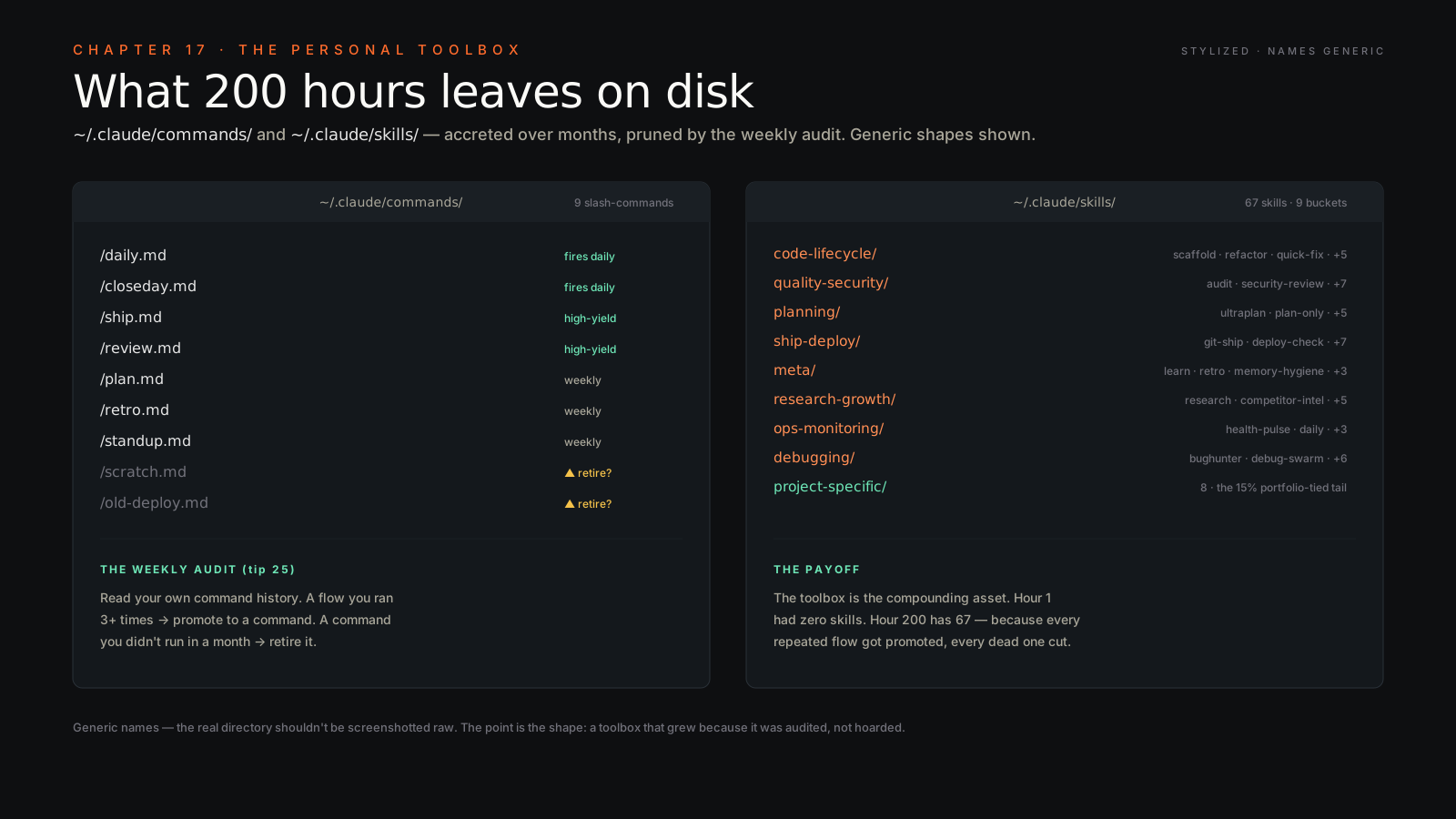
Read your own commit history weekly. Sit down Friday afternoon and skim what the swarm actually shipped for you that week. You’ll see two things: patterns that should become skills (you ran the same flow four times — turn it into a slash command) and patterns that should be retired (a skill fired six times and produced two useful results — kill it). The audit is how you keep your toolbox sharp instead of bloated. Action: book a 20-minute calendar block every Friday called “Toolbox Audit.” Don’t skip it.
What to do tomorrow morning#
Pick three of these you don’t already do. Just three. Wire them in before you start your real work. The candidates I’d push hardest: cut your CLAUDE.md, set up one PostToolUse hook to stop a correction you’ve typed too many times, and book the Friday toolbox audit. Three small moves that pay back inside a week.
Then send me what breaks. The fastest way to write the next chapter of this book is to hear which of these tips collapsed on contact with your real workflow. Operator wisdom is collective — I learned every one of these from somebody else who learned it the dumb way first. Pay it forward.