Claude writes the plan, runs the swarm, and checks its own work.
The headline of Opus 4.8 isn't the weights — it's a new way of working. You hand Claude a task too big for one conversation. It writes a script that breaks the work into subtasks, fans out up to 16 agents at a time, has other agents try to break what the first ones built, fixes what they find, and comes back with one answer. The proof point already on the table: Jarred Sumner ported Bun from Zig to Rust — 750,000 lines, 11 days, 99.8% of the test suite still green.
The Playbook already has the swarm you run by hand. This is the swarm that runs itself — the plan moves into code, the orchestration happens outside your context, and work that used to be scoped in quarters lands in days. This page is what it is, how the generator→validator loop actually works, how you turn it on, where I point it across the portfolio, and the part nobody writes down — when not to.
Jump to section tap to open
What it is
A dynamic workflow is a JavaScript script Claude writes to orchestrate subagents at scale. You describe the task; Claude writes the script; a runtime executes it in the background while your session stays responsive. That last part is the whole trick — the plan moves into code. The script holds the loop, the branches, and the intermediate results, so your context window only ever sees the final answer instead of every agent's scratch pad.
That's the line between this and what came before. With subagents and skills, Claude is the orchestrator — it decides turn by turn what to spawn, and every result lands back in its context, eating the window. A workflow is a script the runtime executes: dozens to hundreds of agents per run, resumable mid-session, with the coordination happening outside the conversation so the plan stays on track no matter how big the task gets. Opus 4.8 shipped it as a research preview — needs Claude Code v2.1.154+, runs on every paid plan (on Pro you flip it on in /config).
Agent teams vs dynamic workflows
Anthropic shipped two shapes of parallelism, and the difference is who writes the org chart. Agent teams are a roster you define up front — one session as lead, then named roles: Frontend Specialist, Backend Engineer, Quality Engineer, each with a brief. That's the right tool when the work decomposes cleanly into domains you can name before you start.
Dynamic workflows are for when you can't name the decomposition yet. Claude writes the org chart itself: how many agents to spawn, how to split the work, when to run an adversarial verification pass, and when the results have converged enough to stop. Per task it's an implementer, then verifiers, then a fixer — fanned out across as many tasks as the job needs.
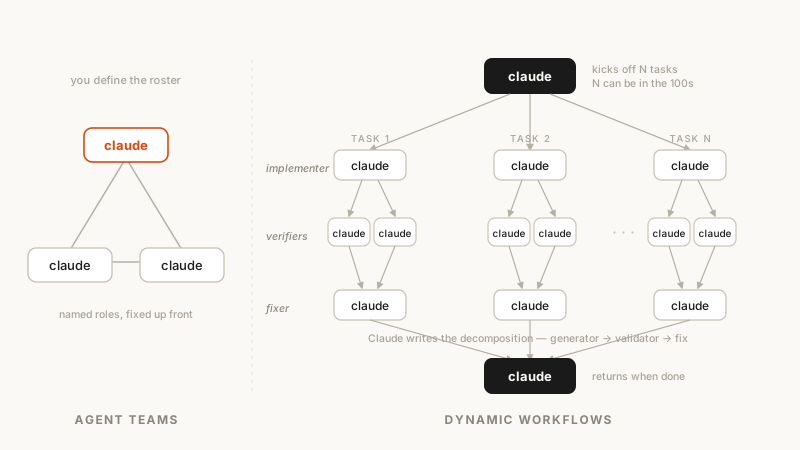
The validator loop — the part that matters
Here's the part that took me a beat to feel: the value isn't that a pile of parallel agents burns more tokens. It's the loop. One set of agents makes the change — code, refactor, tests. Another set tries to break it — reads the diff, hunts for errors, thinks through the edge cases. Generate, then validate, then fix what validation caught. It's a little like a GAN, only pointed at an engineering workflow instead of pixels.
Because the plan lives in the script, a workflow can apply a repeatable quality pattern instead of just running more agents: have independent agents adversarially review each other's findings before anything is reported, or draft a plan from several angles and weigh them against each other. One request can become several workflows in a row — one to understand the code, one to make the change, one to verify it. The model stops being a single answer and becomes an orchestration that has already argued with itself before it reaches you.
The mechanics of orchestrating parallel agents by hand — the wave pattern, the between-wave audit, the skill shelf — live in The Swarm. Dynamic workflows is that, automated: you get the chain of command without writing the dispatch prompts yourself.
Turning it on — the /effort dial
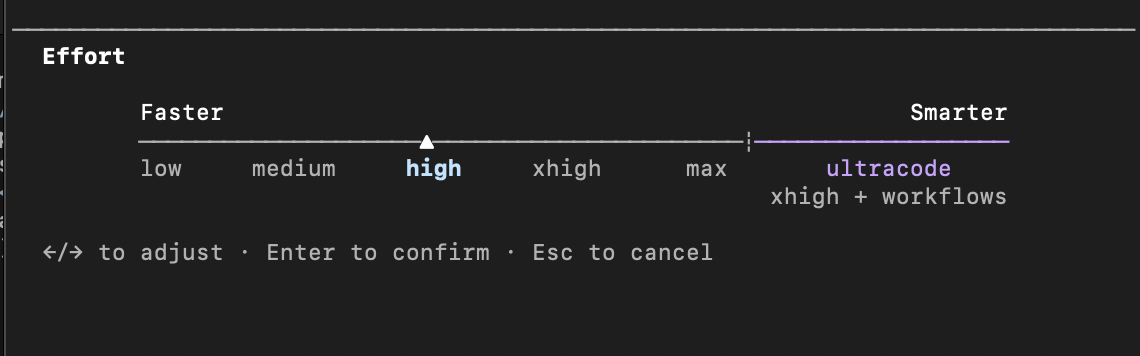
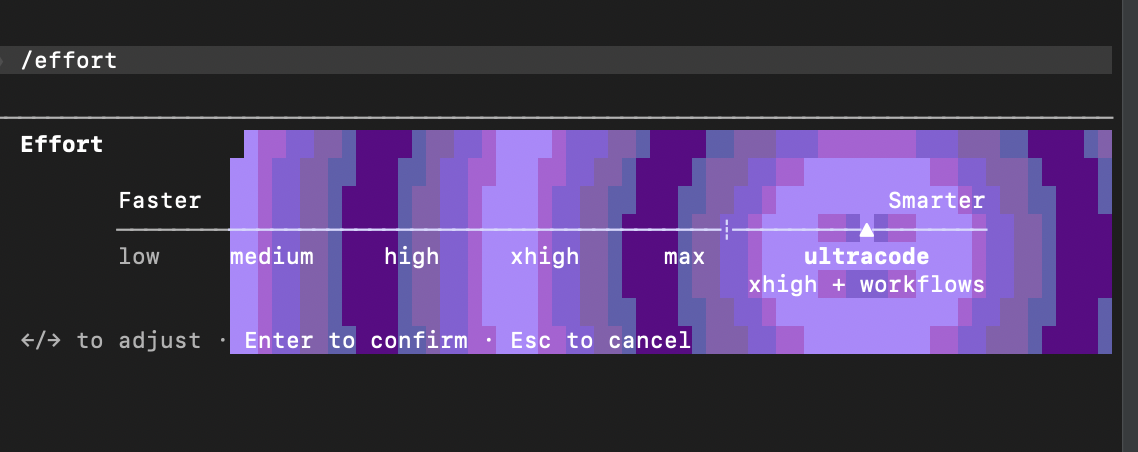
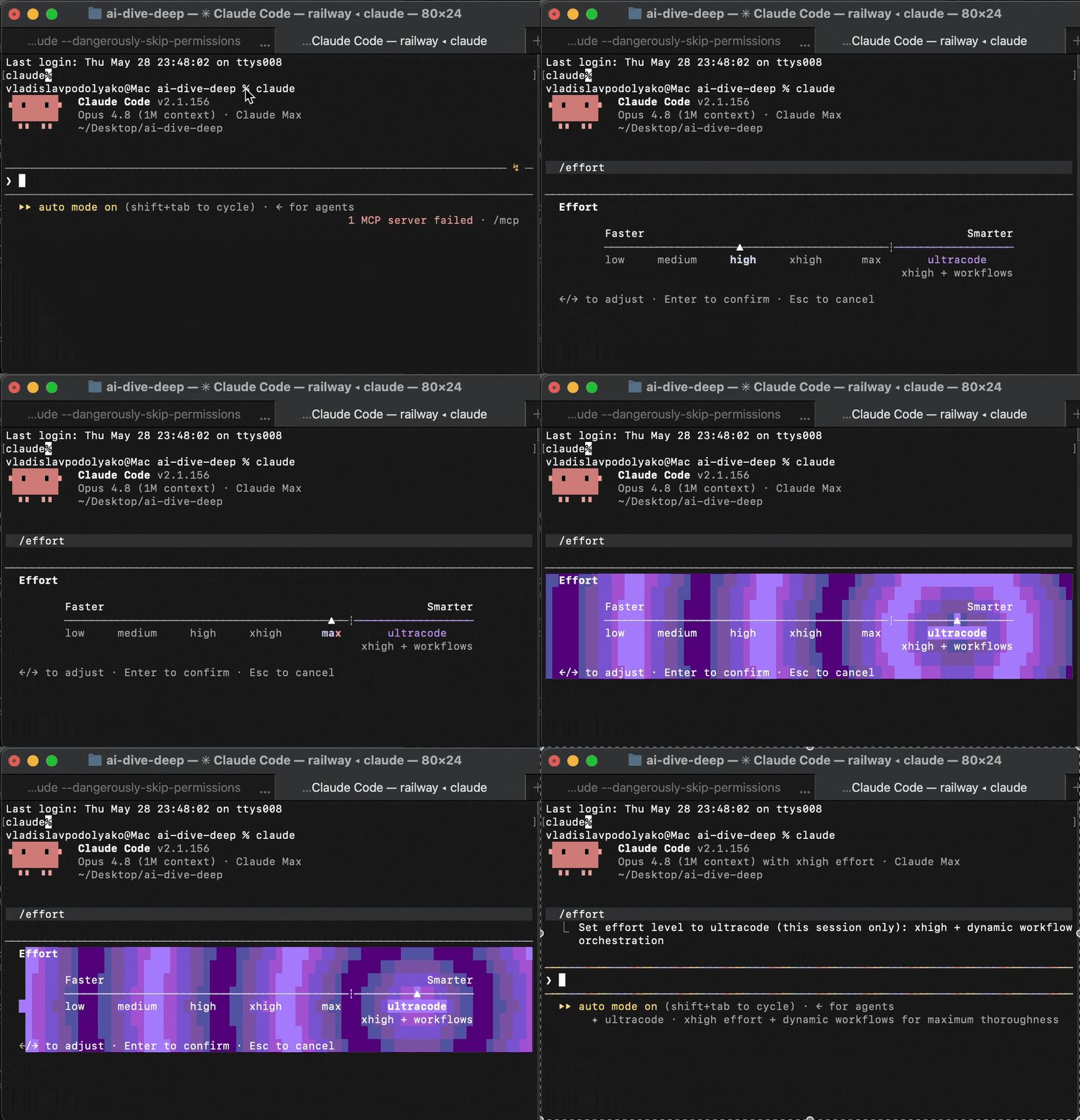
Three ways in. Drop the word workflow anywhere in a prompt and Claude writes one for that single task. Run the bundled /deep-research to watch one work end to end. Or set the dial: /effort runs low → medium → high (the 4.8 default) → xhigh → max, and then a separate notch, ultracode — xhigh reasoning plus standing permission to orchestrate workflows. With ultracode on, Claude plans a workflow for every substantive task in the session instead of waiting for you to ask.
So ultracode is the on-ramp: it's how you tell Claude "you decide when this job is big enough to fan out." It's session-only — it resets when you start fresh, and you drop back with /effort high when you return to routine work. (The full notch-by-notch table is in the reference below.)
My read, after actually running it
I gave it a real task and it went away for forty minutes — wrote code, fixed its own errors, checked itself, kept going. It's one of the first "agent swarm" features that reads like a working tool instead of a demo. You stop typing prompts and start handing off jobs.
The cherry, for me, isn't the parallelism — it's the generator→validator cycle I described above. One half builds, the other half tries to prove it wrong. The tests it writes aren't always ones I'd trust yet, but it already catches its own mistakes at a rate that changes how much I have to babysit. That's the unlock.
My one complaint going in was the planning stage — it felt like "here's the task, go," when what I wanted was: Claude proposes a plan, I edit it, I add constraints and success criteria and the files that matter, then it runs. Turns out that's mostly already there. Before a run, Claude Code shows the planned phases and lets you View raw script, hit Tab to adjust the prompt, or Ctrl+G to open the script in your editor before you approve it. The gap between "go do it" and "let me shape the plan first" is narrower than it felt on day one — you just have to know the approval screen is the seam.
Verdict: the direction is very strong. This is the first version of "let the swarm run itself" I'd actually put on a real codebase.
Where I point it
A workflow earns its cost on a specific shape of job: one with a plan worth writing and branches worth running in parallel. Here's where it goes across the portfolio.
The multi-file refactor that used to eat a sprint — the kind where the risk isn't writing the code, it's holding twelve files in your head at once. A workflow plans it, fans out across the files, runs the verifier pass, and comes back with a diff I can read top to bottom. I still read every line. It does the holding-in-its-head part I'm bad at after the third coffee.
Point a workflow at a batch of sending-domain findings and it organizes the collection, runs the analysis in parallel, cross-checks the results, and synthesizes a client-ready report — a fan-out over many items with a reconcile at the end, exactly what the script form is built for. A day of copy-paste-and-format becomes a review pass over something already assembled.
A workflow for the research-and-structure pass — pull the sources, cross-check them against each other, argue the angles, lay out the skeleton. Then I take the voice pass myself, because the one thing the swarm can't do is sound like me. It does the work that parallelizes; I do the work that doesn't.
The pattern under all three: a workflow pays off when the job has a plan worth writing and branches worth running in parallel. A one-file fix doesn't. A twelve-file decision — or a 750,000-line port — does.
What Anthropic says
I run it the way an operator runs it. Anthropic ships it with their own framing — worth reading next to mine.
The short version: they built it for hard, multi-step, verify-as-you-go work at a scale one conversation can't hold. That's the same place I land — I just have the receipts and a "when not to" section they'd never write.
When not to run a workflow
The fastest way to look like you don't understand the feature is to fire a workflow at everything. It spawns many agents, so a single run uses meaningfully more tokens than working the same task in conversation — and most of the day doesn't need it.
Don't run it on simple tasks. A rename, a one-line fix, "what's the syntax for X" — a workflow will plan, fan out, and reconcile a job that wanted a single edit. You pay for a swarm to convene on an answer a single turn would have streamed back before you finished reading the question.
Mind the seams. A run takes no mid-flight input — only agent permission prompts can pause it, so if you need sign-off between stages, run each stage as its own workflow. And add the shell commands and MCP tools the agents need to your allowlist before you start, or a long run stalls on a prompt mid-flight.
The operator move: default to high effort, reach for a workflow when you can name the plan and the branches. If you can't name them, you don't need one yet.
Reference
The lookup tail — who holds the plan, the /effort notches, and the limits — so you can come back and skip the prose.
Subagents vs skills vs workflows
| Subagents | Skills | Workflows | |
|---|---|---|---|
| What it is | a worker Claude spawns | instructions Claude follows | a script the runtime executes |
| Who decides next | Claude, turn by turn | Claude, per the prompt | the script |
| Intermediate results | Claude's context | Claude's context | script variables |
| Scale | a few per turn | a few per turn | dozens to hundreds per run |
| Interruption | restarts the turn | restarts the turn | resumable in-session |
The /effort dial
| Notch | What it's for | Persists? |
|---|---|---|
low | throwaway one-liners, syntax lookups, subagents | saved |
medium | light edits, quick questions, cost-sensitive work | saved |
high (default) | the daily driver — edits, reviews, focused features | saved |
xhigh | traps — multi-file refactors, risky migrations, >30-min agentic work | saved |
max | one model thinking as hard as it can; prone to overthinking | session only |
ultracode | xhigh + workflows — Claude plans a workflow per substantive task | session only |
Limits: up to 16 concurrent agents, 1,000 per run, no mid-run input, resumable in-session. Research preview — requires Claude Code v2.1.154+, on all paid plans (Pro: enable in /config). Opus 4.8 itself: $5/$25 per M tokens, 1M context auto on Max/Team/Enterprise, agentic coding 64.3% → 69.2%, and 4× less likely than 4.7 to let code flaws pass. A workflow run uses substantially more tokens than the same task in conversation.
Do this Monday
Don't take my use cases. Take the feature. Tomorrow, pick the gnarliest thing on your list — the migration, the codebase-wide audit, the spec you've been avoiding — and start the prompt with the word workflow. When the approval screen comes up, don't just hit yes. Read the planned phases. Open the script. Adjust the prompt. Then let it run, and go do something else for forty minutes.
You're not learning a command. You're learning where the seam is between "go do it" and "let me shape the plan first" — and once you've felt the validator loop catch its own mistake, you won't want to refactor a big thing by hand again.
Related: The Swarm — orchestrating parallel agents by hand · Ch 6 — the swarm · The Sovereign Stack — the model under it · Ch 40 — the prompting knob