It’s late morning on a Wednesday in February. An engineer on my team pings me on Slack with the same frustration I’d hit myself the week before:
“Claude stopped formatting commits as conventional commits — can we just spell it out in claude.md so it sticks?”
Read that again. The agent had been doing the right thing for weeks. Then it stopped. Not because the rule changed. Because the rule was never written down in the layer the model actually reads. It was floating in a Slack thread, in a PR review comment, in someone’s head. The convention existed in the team. It just didn’t exist in the place an instance reboots into every morning.
That’s the entire problem this chapter solves. Prompt engineering is the visible part — the prose you write into the box. Context-file architecture is the load-bearing part underneath. Where your conventions live, in what order they get loaded, which layer wins when they disagree. Most operators have never thought about it as architecture at all. They have one file called
The four layers#
Context-file architecture is four layers. They each have a job. They each have a budget. They are not interchangeable.
Layer 1 — CLAUDE.md (project rules, always loaded)#
CLAUDE.md is the file the agent reads on every turn of every session inside a project. Working memory. The kitchen rules.
What goes in:
- Project identity in one paragraph — what this codebase is, who it serves, the stack.
- Naming conventions, file ownership boundaries, the never-do list.
- Voice and tone if the project produces writing.
- The exact lint, test, typecheck, build commands.
- Three to five “we tried that, don’t do it again” rules. Real ones, with real receipts.
What does NOT go in:
- Long-form documentation. That belongs in
docs/and you link to it. - Inventories of every file in the repo. The agent has Read; it can look.
- Marketing copy about what makes the product great. The model doesn’t care.
- Anything that changes weekly. Stable rules only; living state belongs in memory.
Length budget: under 100 lines. Hard ceiling around 150. Past that, three things go wrong. The model has to triage a wall of text on every turn to find the relevant rule and the relevant rule gets buried. The
Layer 2 — memory/ (auto-memory, the agent writes here)#
Memory is the layer the agent writes to. Lives at ~/.claude/projects/<project-slug>/memory/ for Claude Code, or whatever the surface’s equivalent is. The agent reads it on session start. Updates it when something worth remembering happens.
What goes in:
- User facts the agent learned: “Vlad prefers em-dashes over semicolons.”
- Project decisions made in conversation: “We chose Prisma over Drizzle on 2026-03-14, here’s why.”
- Failure receipts: “The
pnpm dlx prisma migrate devworkflow stalls on macOS 14 — usepnpm prisma migrate devinstead.” - Reference URLs the agent has verified work.
- Behavioral patterns that took multiple sessions to surface.
What does NOT go in:
- Ephemeral state like “current PR being reviewed.” That dies at session end and shouldn’t haunt next week.
- Anything secret. Memory files persist on disk and ride along with backups.
- Conventions that should live in CLAUDE.md. Memory is for things the agent discovers; CLAUDE.md is for things you decide.
Practical shape: one MEMORY.md index file at the root, individual .md files for each lesson. The index points to the lessons. The agent reads the index on wake-up, decides which lessons apply, loads only those. That’s how you keep the memory layer from becoming the next CLAUDE.md bloat problem.
That index is also where the next problem hides. “Updates it when something worth remembering happens” is doing a lot of quiet work in one sentence — across hundreds of sessions you’ll never re-read, how does this layer stay deduplicated, verified, and under that ceiling? That’s a discipline of its own, and it’s Chapter 44: the propose-only loop I run to surface candidate memories and re-check every one against the raw transcript, without ever letting an agent write to this layer on its own.
Layer 3 — skills/ (procedural memory, loaded on demand)#
The relevant point for context-file architecture: skills are how you avoid stuffing every workflow into CLAUDE.md. A workflow with steps and edge cases belongs in a skill. A rule that applies everywhere belongs in CLAUDE.md. The line is workflow versus convention — runbook versus law.
If you find yourself adding a fifty-line “how I review PRs” section to CLAUDE.md, that’s a skill trying to be born. Extract it. Your CLAUDE.md gets shorter. Your PR review workflow gets reusable across projects.
Layer 4 — session-scoped (this conversation only)#
The fourth layer is the volatile one. The current chat. Files you’ve mentioned. Tool outputs sitting in the window. Things you typed into the box ten minutes ago.
This layer exists by default — you don’t configure it, it accumulates. Your job is to know it exists and to flush it when it gets polluted. /clear between unrelated tasks. /compact before a long stretch of execution. Don’t trust the model to remember a decision from three hours ago in the same conversation without re-grounding it.
Hierarchy of authority — who wins when layers disagree#
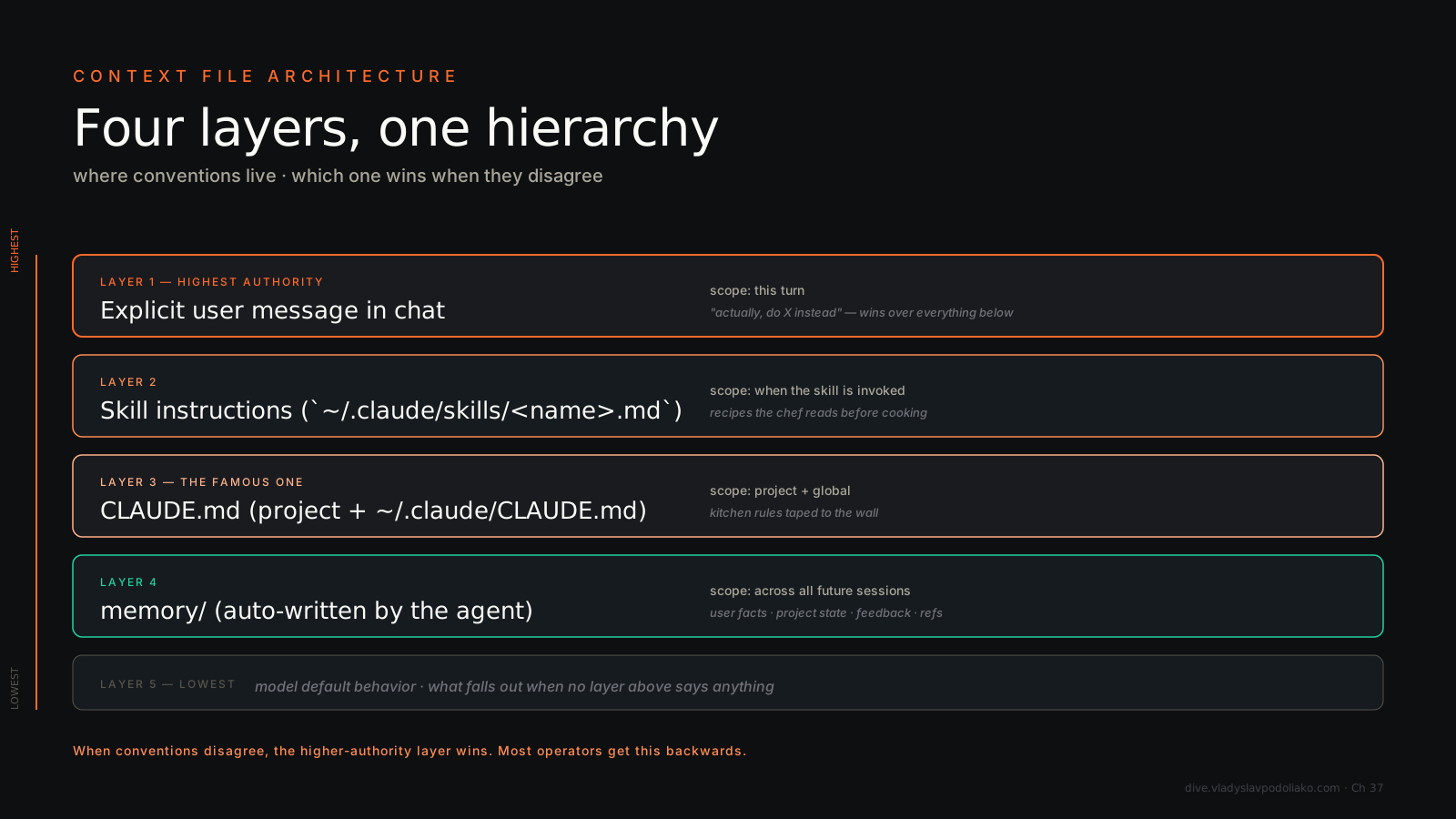
When two layers say different things, which wins? Most operators get this wrong because they’ve never sat down and tested it. Here’s the order, top wins:
- Explicit user message in the current turn. What you typed thirty seconds ago beats everything. If you say “actually, ignore the convention, do it this way for this one file,” the model does it.
- Skill instructions, when a skill has fired. A skill body is more specific than CLAUDE.md and the model treats it that way. If your
friday-wrapupskill says “format the output as a Slack canvas,” and CLAUDE.md says “default to markdown,” the skill wins for that invocation. - CLAUDE.md. Project-level conventions. Override the model’s defaults but lose to skills and to explicit instructions in the chat.
- memory/. The agent’s accumulated notes. Influence the model’s behavior but get overridden by anything more specific.
- Model defaults. Whatever the model would have done with no context at all.
The mistake people make is putting too much in CLAUDE.md and expecting it to act like layer 1. It doesn’t. CLAUDE.md is layer 3. If you put a critical rule in CLAUDE.md and a contradicting instruction sneaks into the chat or a skill, CLAUDE.md loses. Putting a rule in CLAUDE.md doesn’t make it sacred — it makes it default.
For genuinely non-negotiable rules — “never commit to main,” “never call this destructive API without confirmation” — don’t rely on CLAUDE.md at all. Use a
Decision tree — what goes where#
Three questions. Run any rule through them.
- Is it personal to you, or project-specific? Personal →
~/.claude/CLAUDE.md(global). Project-specific → repo-localCLAUDE.md. Don’t mix; the global one bleeds into every project and pollutes contexts where it doesn’t apply. - Does it change across sessions, or is it stable? Stable → CLAUDE.md or skill. Changes session-to-session → memory or session-scoped. A weekly metric goal is not a CLAUDE.md entry.
- Is it a rule (apply everywhere) or a workflow (multi-step, conditional)? Rule → CLAUDE.md. Workflow → skill. If your “rule” has the words “first,” “then,” “if X do Y” — it’s a workflow. Make it a skill.
A worked example. “Format git commits as conventional commits” is project-specific, stable, and a rule. CLAUDE.md, one line, done. “Pull HubSpot deal data, cross-reference with Slack mentions, draft a Friday memo” is personal, stable, and a workflow. Skill. “Mentee A’s weekly session is rescheduled this week” is personal, volatile, and project-specific. Memory.
The five context-file mistakes (with receipts)#
1. The 1,000-line CLAUDE.md#
What it looks like: somebody dumps the entire onboarding wiki into CLAUDE.md because “the agent should know.” The file balloons to 1,200 lines. Every turn of every session loads all of it.
What goes wrong: the model’s accuracy on convention-following actually drops because the relevant rule is buried in noise. Prompt cache invalidates every time you edit. Token bill on the project doubles within a week.
Fix: cut to under 100 lines. Move the long-form content to docs/ with descriptive filenames. The agent has Read — it can pull what it needs.
2. Conventions buried under hype copy#
What it looks like: CLAUDE.md starts with three paragraphs about what makes the project special and the vision and the stack we love. The actual rule about how to name files is on line 47.
What goes wrong: the model triages the file and the early lines get the most weight. If your first 200 tokens are marketing prose, the model has been told “this project is exciting” instead of “files in src/server/ are owned by the backend teammate.”
Fix: put rules at the top. Identity in one sentence. Lead with the conventions. No preamble.
3. “Always do X” rules the model can’t verify#
What it looks like: “Always run the test suite before suggesting a change.” “Never propose code that would break production.”
What goes wrong: the model can’t actually check these. It doesn’t know if its proposed change will break production. So it either ignores the rule (and you get burned) or hallucinates compliance (“I’ve verified this won’t break anything” — it hasn’t).
Fix: rewrite as something the model can actually do. “Before proposing a schema migration, run pnpm prisma migrate diff and include the output.” That’s actionable. Or move the check to a
4. Conflicting rules in CLAUDE.md vs. a skill#
What it looks like: CLAUDE.md says “default to markdown for output.” A friday-wrapup skill says “format as Slack canvas.” They disagree. You assume CLAUDE.md wins because it’s the “global rule.”
What goes wrong: the skill wins, because skills are more specific. You get the Slack canvas output and don’t understand why your “global rule” didn’t apply.
Fix: know the hierarchy. CLAUDE.md is default, skills override. If you want CLAUDE.md to actually be sacred for a particular thing, don’t write a skill that contradicts it. Or move the rule into the skill explicitly.
5. Mid-session CLAUDE.md edits with no audit trail#
What it looks like: you’re three hours into a session, the agent does the wrong thing, you alt-tab into CLAUDE.md and add a line. You go back to the chat and ask it to retry.
What goes wrong: the running session was started with the old CLAUDE.md. The new line you just added isn’t loaded into this instance. The agent does the wrong thing again. You add another line. You’re now editing live with no idea which version is loaded where.
Fix: restart the session after CLAUDE.md edits. Type /clear and re-prompt. The new file gets read on the next session boot, not in the middle of a running one. And keep the file in git so you can see what changed and when.
A working CLAUDE.md template#
Sixty-ish lines. Comments inline. Copy, paste, edit. This is structurally what mine looks like across most projects.
# CLAUDE.md

# Identity (one paragraph max — what this project is, who it serves)
This is LinkAgent. The LinkedIn for AI agents. Trust scores, verified
benchmarks, network graphs. Solo founder, Next.js 15 + tRPC + Prisma +
PostgreSQL on Vercel.

# Voice (only if this project produces writing)
- Lowercase tolerant. Em-dashes as breath marks.
- Real numbers per claim. No "powerful" / "best-in-class".
- Failure receipts included.

# File ownership (which folders belong to which subagent/teammate)
- prisma/, src/server/, src/lib/      → backend
- src/app/, src/components/           → frontend
- src/lib/trust-score.ts, scripts/    → trust-engine
- package.json, layout.tsx            → lead only

# Naming
- Files: kebab-case (agent-card.tsx)
- Components: PascalCase (AgentCard)
- tRPC procedures: camelCase (getBySlug)
- Zod schemas: camelCase + Schema (createAgentSchema)

# Commands (the actual ones, copy-pasteable)
- pnpm dev                # local dev server
- pnpm lint               # eslint + prettier
- pnpm test               # vitest
- pnpm typecheck          # tsc --noEmit
- pnpm prisma migrate dev # after every schema change

# Conventions
- TypeScript strict. No `any`.
- All API inputs validated with Zod.
- Server components by default. 'use client' only when needed.
- Conventional commits (feat:, fix:, chore:, docs:).
- Path alias @/ maps to src/.

# Never-do list (with receipts)
- Don't use raw SQL in routes — broke type safety twice in March.
- Don't bypass tRPC for "quick endpoints" — same reason.
- Don't add npm packages without checking bundle impact.
- Don't commit to main directly. PRs only.

# Linked deep docs (the agent has Read — it can pull these)
- docs/business/VISION.md       — product positioning
- docs/technical/ARCHITECTURE.md — system design
- docs/ROADMAP.md                — phased plan
That’s it. Sixty-three lines. Everything else lives somewhere else.
Scaling this to a large codebase#
Everything above holds for a 5-file side project and a 5-million-line monorepo. What changes at scale is that the cost of getting the layers wrong stops being “the model ignored a rule” and becomes “the model can’t find the file.” Anthropic published a field guide on exactly this — Claude Code running in production across decade-old legacy systems and architectures spanning dozens of repos. Three things in it are worth stealing.
First: it’s agentic search, not RAG. Claude doesn’t embed your repo into a vector store and retrieve chunks. It navigates the tree like an engineer would — ls, grep, open a file, follow an import. That means your directory structure is your retrieval index. A legible tree is a fast agent. A dumping-ground src/ with 400 files is a slow one, for the same reason it’s slow for a new hire.
Second: initialize Claude in the subdirectory, not the repo root. This is the highest-leverage move in the whole guide and almost nobody does it. Claude walks up the tree from where it starts and loads every CLAUDE.md it finds, additively. So a CLAUDE.md at services/payments/CLAUDE.md plus one at the repo root gives the agent local payment conventions and the big picture — but only the slices that matter, not all 2,000 lines of every service’s rules at once. The root file becomes pointers and critical gotchas only. The subdirectory files carry the local conventions. Same layering principle as the rest of this chapter, applied spatially.
The practical setup, the one I run on the bigger Belkins repos:
- Root CLAUDE.md: ≤ 80 lines. What the system is, where the landmines are, links down.
- Per-service CLAUDE.md: the test command for that service, the lint config, the one weird thing about that subsystem. Scoped, not global.
.claude/settings.jsonchecked into the repo withpermissions.denyrules for generated files, build artifacts, vendored code. Version-controlled, so the whole team inherits the exclusions and nobody’s agent wastes a turn readingdist/.- An LSP server wired up if it’s a multi-language repo — symbol-level “go to definition” beats string-grep, and it filters before the model reads anything. (Chapter 16 covers the exploration-split that pairs with this.)
Third: context files rot, and they rot faster as the model improves. Review the whole stack every 3–6 months, and always after a major model release. Half the rules you wrote in 2025 were scaffolding around limitations the current model doesn’t have. The classic: a rule that forces single-file refactors because an older model lost the plot across files. The current model does coordinated cross-file edits fine — that rule is now a cage, not a guardrail. Retiring stale instructions is maintenance, not optional. A CLAUDE.md you haven’t pruned since the last model generation is actively making the agent dumber.
If you only have eighteen minutes for the why behind all of this, watch Boris Cherny — he created Claude Code — explain why the harness around the model matters more than the model. This whole chapter is the operator’s version of that argument.
A note on ~/.claude/CLAUDE.md (the global one)#
There’s a second CLAUDE.md most operators don’t realize exists. It lives at ~/.claude/CLAUDE.md and loads into every Claude Code session you start, regardless of project. This is where personal rules go. Voice. Tone. How you like reports formatted. “Don’t ask me homework questions.”
Two warnings. First, anything in the global CLAUDE.md bleeds into every project — make sure it’s actually universal. A rule about how to format Slack canvases is not universal; it’s relevant to the projects that produce Slack canvases. Second, the same length budget applies. Mine is currently 178 lines and I know it’s slightly too long; on the list to cut.
The repo-local CLAUDE.md inherits from the global one. They stack, with project-local winning on conflicts.
The closer — the mistake I made on this exact pattern#
Last winter I put my entire
It was 340 lines. The agent read all 340 lines on every turn of every session, whether I was working on the vault or debugging a TypeScript build error in a completely unrelated repo. The token bill on the project doubled in a week. The model started ignoring half of it because the relevant rules were buried.
The fix took two hours. I extracted the workflow into three skills: daily-note, mentoring-fan-out, inbox-triage. Each one is a folder under ~/.claude/skills/ with a SKILL.md, a description that fires on the right phrases, and a fifty-line body. CLAUDE.md shrank to 84 lines. The skills fire when I need them. CLAUDE.md is back to being the kitchen rules — short, scannable, always-on.
If you take one thing from this chapter: when CLAUDE.md grows past 100 lines, the answer is almost never “trim it.” The answer is “what skill is hiding in there.” Extract the skill. Your conventions get shorter, your workflows get reusable, and your prompt cache stops getting voided every time you tweak a comma.
Conventions don’t break because the agent forgot them. They break because they were never in the layer the agent actually reads. Pick the layer first. Then write the rule.