A Claude Code mod is a plugin of function hooks: a small TypeScript or JavaScript module that Claude Code loads into the session. It can rewrite or refuse a tool call or a prompt, and draw its own interface, from a line above the prompt to a docked pane. You install one with /plugin or load a folder with --plugin-dir.
On 1 October the Claude Code team posted “You can now mod Claude Code: Change how it behaves / Customize the UI / Swap in your own features”. Two days later the post had four million views, and I pasted the thread into a session and asked what it could do for my terminals. Thirty-two minutes after that prompt, six mods were running, each one checked by the engine’s own test runner first.
What is a Claude Code mod?#
A hooks/hooks.json names one module. The module exports register(on), and every call to on(event, hook) adds a ($, e, next): $ is the engine, e is what is happening, and next(e) lets it carry on. Return without calling next and your hook answers instead. Call next with a changed e and everything after you sees the change.
The events cover tool calls, prompts, turns, sessions and drawing. That last one is what is new. A hook on ui.render can draw a band above the prompt, a pane beside the transcript or a line under the prompt, and a mod can register its own slash commands. The module runs with no Node and no DOM; everything outside it goes through $, which reads files, runs commands, asks the model, keeps state and shows toasts.
The contract is a type file the engine writes as it loads. On build 2.1.288 it is 20,140 lines long; the instructions that ship with it said “about 14,000”. Grep it for the event you need and read the declaration it lands on.
Loading is consented, not silent. The first time a session writes a mod into its own mods folder, Claude Code asks “Enable hot reloading for this session?” and only the person can answer. After a yes, every save reloads the mod when the turn that made it ends.
How do mods differ from hooks, skills and MCP?#
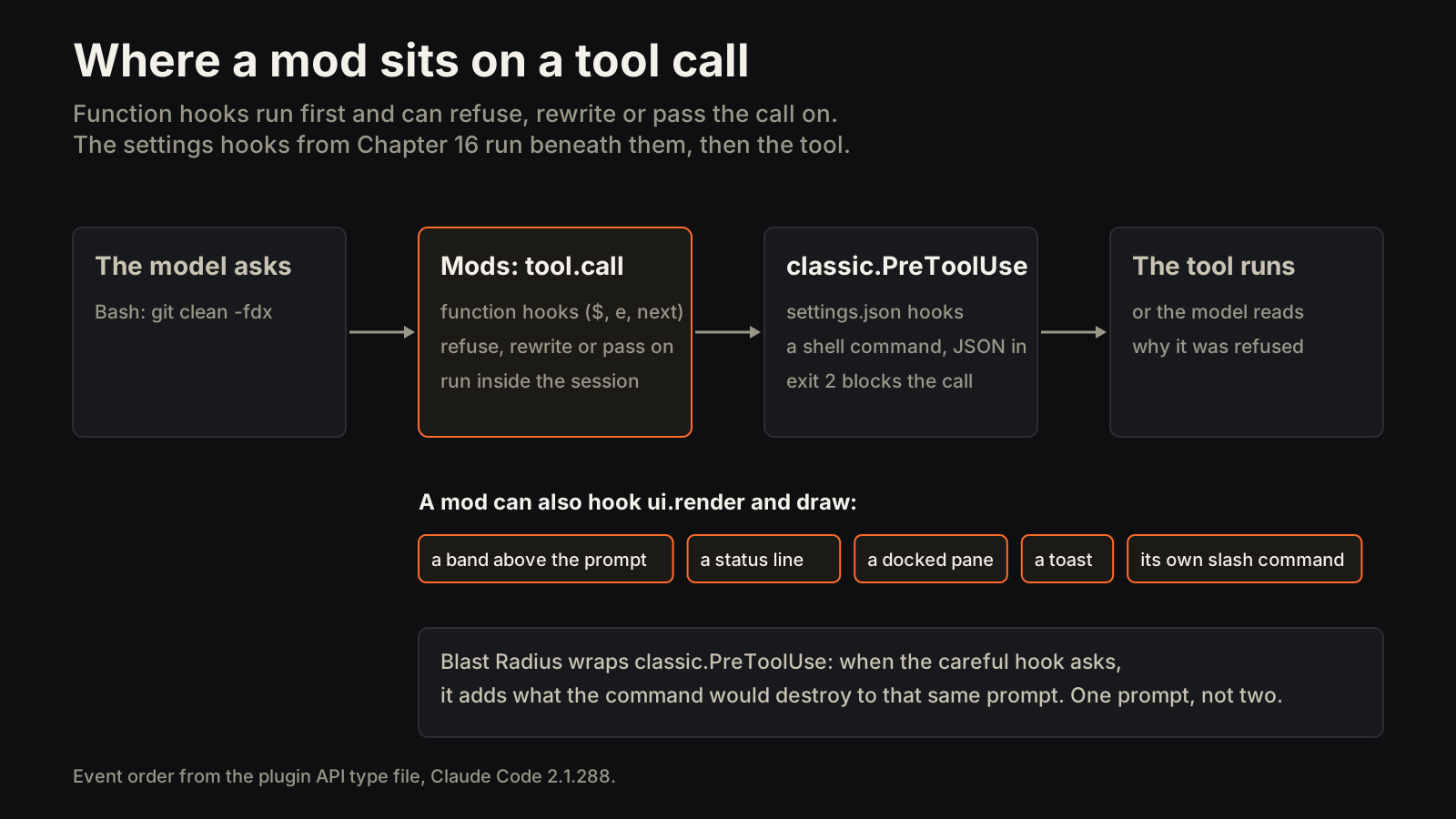
Chapter 16 made the case for settings.json. They read JSON on stdin, and exit code 2 blocks the call and hands the reason back to the model. They draw nothing. Mods are the next layer, and they do not replace the old one: a mod can wrap the settings hooks themselves, as classic.PreToolUse, which fires beneath every mod’s tool.call hook.
| What it changes | Where it lives | Draws UI | How you test it | |
|---|---|---|---|---|
| Mod | What the harness does and draws: refuse or rewrite a tool call, a band, a pane, a status line | A plugin folder, loaded by /plugin or --plugin-dir | Yes | claude plugin test, against the engine |
| Settings hook | Allows, blocks or annotates a lifecycle event | A shell command in settings.json | No | Pipe it a real payload |
| Skill | What the model knows how to do, loaded on demand (Chapter 5) | A SKILL.md folder | No | Use it and read the transcript |
| MCP server | Which outside tools the model can call (Chapter 12) | A separate process | No | Call the tool |
| Status line | One line under the prompt (terminal setup) | A shell script fed JSON | One line | Run the script on sample input |
A skill changes what the model does. A mod changes what Claude Code does around the model, including what you see.
Read your own setup before you copy a demo#
The launch thread showed three mods: Token Weather, a context forecast; Blast Radius, a preview of what a risky shell command would touch; and Replay Theater, which steps through a turn’s diffs. The obvious move was to clone all three. The first thing the session did instead was read what my terminal already had.
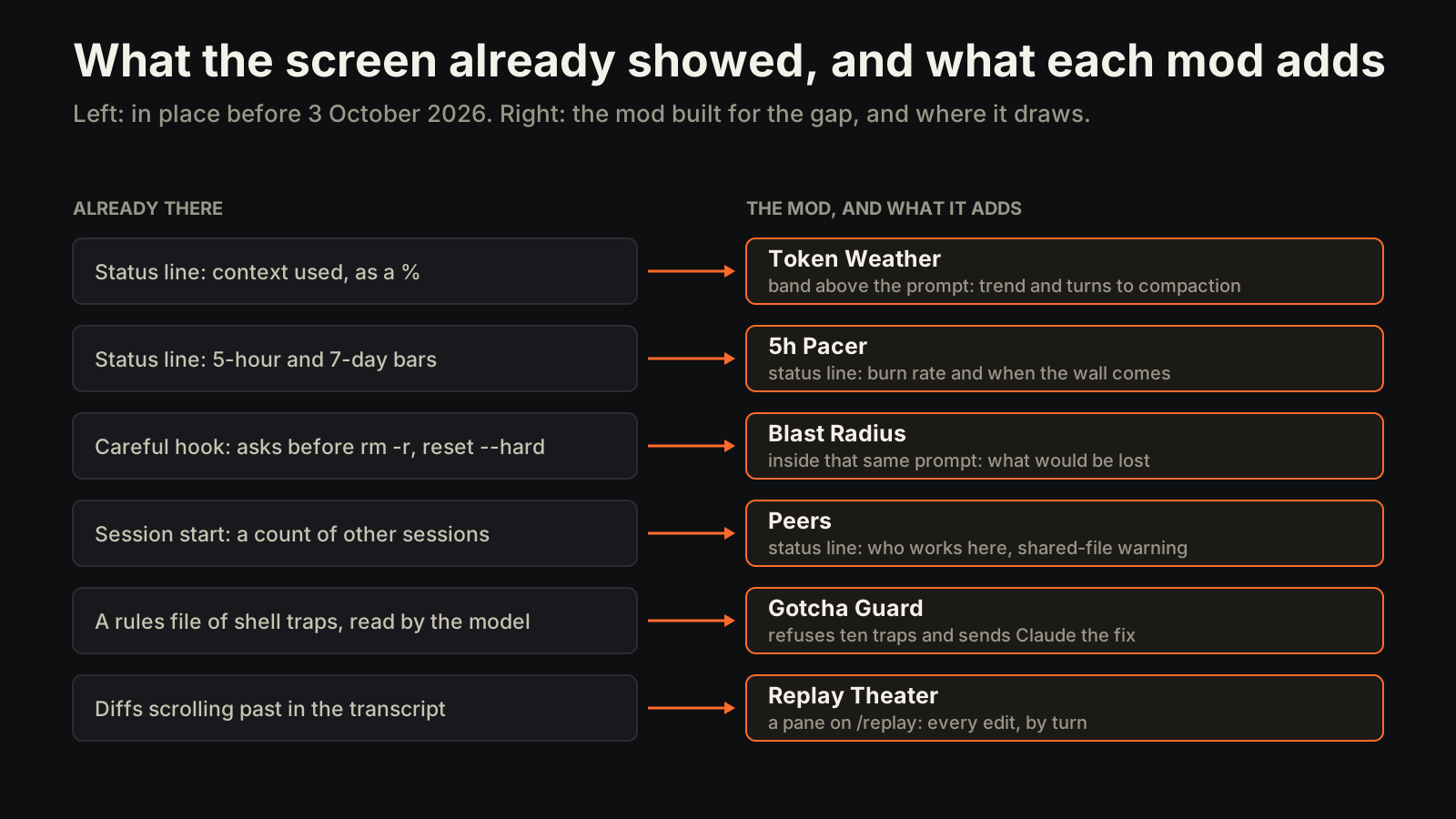
My status line already showed context used as a percentage, the session’s cost, and both plan-usage bars, the five-hour and the seven-day. A careful hook already asked before rm -r, git reset --hard, a force push, DROP and TRUNCATE. A Token Weather that only printed a percentage would have repeated the status line. A Blast Radius that raised its own prompt would have meant two prompts for one command.
So each mod had to add what the existing setup could not: a trend, a projection, or a preview of the damage.
Three from the launch thread, rebuilt for my desk#
Token Weather draws a band above the prompt after each turn: a sky from clear to storm, the fill against the auto-compact line rather than the whole window, a sparkline of the last twelve turns, and roughly how many turns remain at the current growth. A compaction resets the trend, so the forecast does not average across a drop. /weather hides it.
Blast Radius works out what a destructive command would actually destroy before it runs. For git clean -f it lists every untracked path, with anything that looks like a secret first. For git reset --hard it counts the uncommitted changes and the commits that would leave the branch. For a force push it lists the remote commits that would be overwritten and flags the main branch. It never raises a prompt of its own: it adds its findings to the prompt the careful hook already raises, and when nothing would be lost it shows a small notice and stays out of the way.
Replay Theater records every file edit by turn. /replay docks a pane with the diffs; n and p step through edits, b and f through turns, and turns without edits are skipped. The engine caps a code block at 10,000 characters, so a huge diff is trimmed with a note, and the edit counts still count every line.
Three only my setup needed#
The other three were proposals the session made after reading my setup. I said “build”.
Gotcha Guard. I keep a rules file of shell traps, each written after it cost a session: writing temp files where they should not go, cmd & inside a call that kills it on return, echo ==== (zsh reads a word starting with = as a command lookup), reading $? after a pipe, a bounded repeat in grep on a machine where grep is ugrep. The file says a trap that bites again should become a hook, because prose was not working. The guard covers ten of them. It refuses the command and hands Claude the fix, so the model rewrites and reruns without asking me. A # gotcha-ok comment lets a deliberate one through.
Peers. Chapter 20 is about running six Claudes at once. The cost it leaves is two sessions editing the same file without knowing. Every 30 seconds Peers reads the transcripts of the other live sessions in the same folder and keeps a line under the prompt: who is working, and how many files each has touched. Edit a file a peer touched in the last half hour, and you get a toast and Claude gets a note telling it to check the diff first. Run against my real transcripts, it found the two other sessions open in that folder.
5h Pacer. The status line shows how much of the five-hour window is used. The Pacer shows where it is heading: the burn rate over the last hour, when you would hit the wall at that rate, and whether that comes before the reset. When it does, it warns once per window and names the pace that would land exactly on the reset.
How do you build and test a mod?#
Every mod went through the same three gates before it ran in a session: claude plugin validate, which reads the manifest and the module the way the engine will; TypeScript in strict mode against the engine’s type file; and claude plugin test, which loads the mod into the engine and lets a test stand in for the parts beneath it, so the hook under test meets the real event chain.
The tests caught four bugs before any mod ran live:
- Blast Radius split
"$(pwd)"/buildinto two words. The test that says a path with a substitution is never expanded failed, and the parser now keeps joined pieces together. - Gotcha Guard missed
> /tmp/page.htmlbecause its pattern allowed no space after>. - The engine refused to load Peers: ”$ is passed to “guarded”, which is not a function declared at the top of this file”. The engine traces where
$travels, and a helper that receives it has to live at the top level. - Gotcha Guard’s fix text was supposed to name the right temp folder, and in the test it named none: the path was worked out only at session start, which a test never fires. It is now worked out on first use.
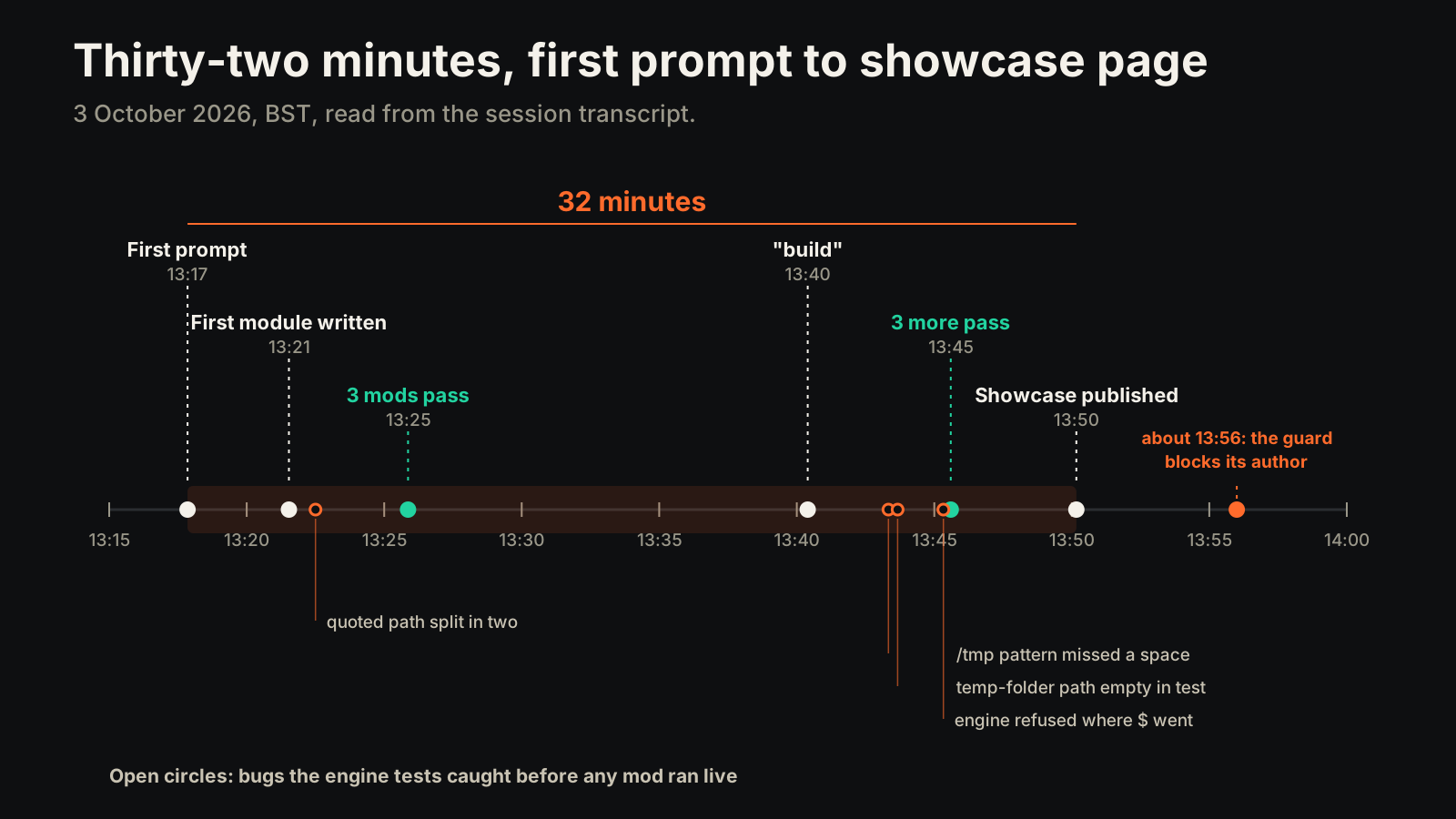
The first prompt went in at 13:17. The first module was written at 13:21, and the first three mods passed their tests at 13:25, eight minutes in. “Build” for the second three came at 13:40, and they passed at 13:45. A showcase page with live demos running the mods’ own code was published at 13:50.
The guard that blocked its author#
Two things went wrong after the tests were green, both in the shell.
While taking screenshots of the showcase page, a loop used set -- $spec to split a string into words. zsh does not split it. The trap is in my rules file, and the guard written an hour earlier does not cover it.
Then the guard fired on its author. Reading back the session’s timeline, Claude sent Python inside a heredoc, and one line compared b['name'] == 'Artifact'. The guard read that == as a shell word starting with = and refused the command. A heredoc body is data for the program it feeds, not shell. The fix strips heredoc bodies before checking, with two regression tests: Python in a heredoc passes, and a real echo ==== after the heredoc is still caught. The guard went from 13 tests to 15.
This is the same lesson as Chapter 28: the failures are the receipts. A guard that has never been shown to fire is decoration. A guard that fires on the wrong thing trains you to add # gotcha-ok to everything, and then it is decoration again.
The ledger#
| Mod | What my setup already had | What the mod adds | Tests |
|---|---|---|---|
| Token Weather | Context used, as a percentage | The trend and turns left before compaction | 6 |
| Blast Radius | A careful hook that asks first | What would be lost, inside that same prompt | 8 |
| Replay Theater | Diffs scrolling past in the transcript | Every edit by turn, stepped in a pane | 4 |
| Gotcha Guard | A rules file of shell traps, read by the model | The ten traps refused, with the fix sent back | 15 |
| Peers | A session count at start-up | Who is working here now, and a warning on a shared file | 5 |
| 5h Pacer | The five-hour and seven-day bars | The burn rate and when the wall comes | 4 |
Forty-two tests in all. Three mods came from the thread and three from my own setup, and none of the six repeats something the screen already showed.
Which mod should you build first?#
Start with the thing you already wrote down and keep ignoring. Mine was a rules file of shell traps that kept biting while it was loaded. Yours might be a check you run by hand after every deploy, or a number you keep asking the session for. That is where a mod pays first, because the cost of the miss is already known.
Then read your own setup before copying a demo. List what your status line shows, what your hooks block and what your skills cover. Build the line that is missing, not the one in the launch video.
What it cost, and what I can’t show you#
Thirty-two minutes from the first prompt to six mods and a showcase page, with 42 engine tests passing by the end of the session. One session, one machine, one afternoon.
What is missing is missing on purpose. I did not meter the session’s tokens. The mods are hours old, so there is no claim about how often each fires, what Blast Radius has saved or whether the Pacer’s projection holds over a full window. Peers reads transcripts on my own Mac; I have not tried it across machines. The six mods are described here, not published as installable code yet.
The closer#
The launch posts showed what a mod can do. The useful part was smaller: three of the six only made sense because the session read my status line and hooks first, and the one I trusted most blocked me within the hour.
Chapter 16 said hooks turn prompting into policy. Mods let that policy show its work on screen, and they are code, so they need tests like code.
The demo shows what a mod can draw. Your own setup decides which one is worth building.